

Introduction
In the era of data-driven decision-making, clickstream analytics has evolved from simple page-view counting to sophisticated behavioral prediction. For enterprises, understanding what a user did is no longer sufficient; the competitive advantage lies in predicting what they will do next. Traditional sequential analysis often fails to capture the nuance of user intent because it treats events as isolated data points rather than interconnected signals within a session.
This article explores the most predictive user behavior signals in clickstream data and demonstrates how to operationalize these insights using an enterprise-grade Multi-Agent Retrieval-Augmented Generation (RAG) system. By leveraging LangGraph, we can build a stateful, multi-agent architecture that not only retrieves historical patterns but also reasons about real-time user behavior to provide actionable predictions. This approach bridges the gap between raw telemetry and business strategy, enabling dynamic interventions like personalized offers or churn prevention.
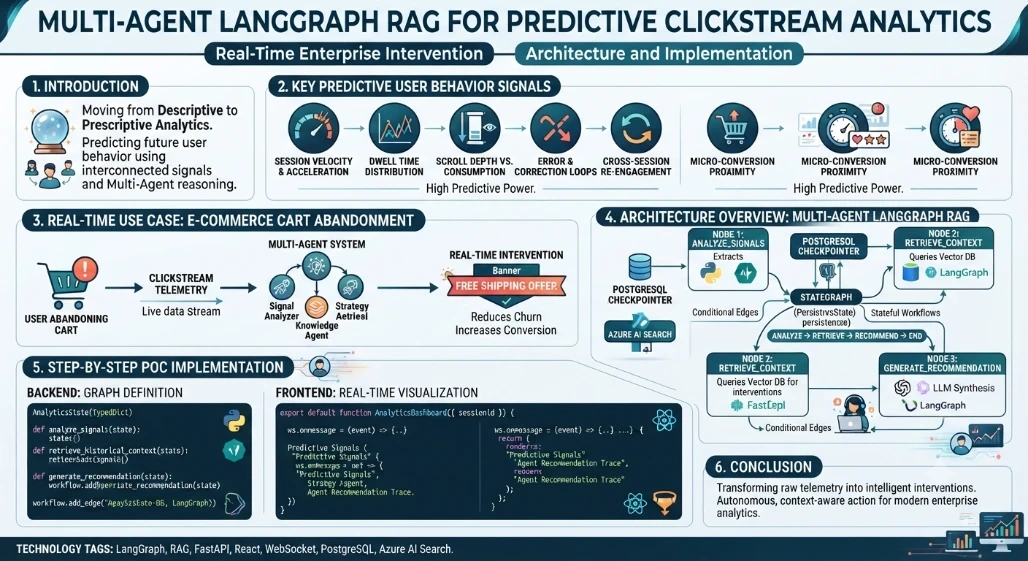
Key Predictive User Behavior Signals
Through extensive A/B testing and model training, specific clickstream features consistently demonstrate higher predictive power for conversion and retention than others:
Session Velocity and Acceleration: The rate of clicks per minute and its derivative. Sudden acceleration often indicates frustration or urgent intent, while deceleration suggests engagement or confusion.
Dwell Time Distribution: Not just average time on page, but the variance. High variance in dwell time across similar pages is a strong predictor of comparison shopping versus casual browsing.
Scroll Depth vs. Content Consumption Ratio: Scrolling 80% of a page but spending only 2 seconds implies skimming. Scrolling 30% with high dwell indicates deep reading. This ratio predicts content relevance better than scroll depth alone.
Error and Correction Loops: Sequences involving form validation errors, back-button usage, or repeated filter adjustments are highly predictive of abandonment risk.
Cross-Session Entity Re-engagement: Returning to the same SKU or category across multiple sessions within a short window is one of the strongest purchase intent signals.
Micro-Conversion Proximity: The temporal distance between micro-conversions (e.g., adding to wishlist, viewing sizing guide) and macro-conversion attempts. Shortening this distance correlates with higher lifetime value.
Real-Time Use Case: E-Commerce Cart Abandonment Prediction
Scenario: "TechStyle," a large electronics retailer, experiences a 68% cart abandonment rate. They need a system that analyzes live clickstreams to identify users exhibiting "hesitation signals" (e.g., toggling between shipping options, reviewing return policy, slow mouse movement) and triggers a contextual intervention.
Objective: Build a Multi-Agent RAG system where:
Signal Analyzer Agent processes raw clickstream events.
Knowledge Retrieval Agent fetches historical intervention outcomes from a vector store.
Strategy Agent synthesizes signals and historical data to recommend a real-time action (e.g., free shipping offer, chatbot trigger).
Memory/State Management maintains session context across agent handoffs.
Architecture Overview: Multi-Agent LangGraph RAG
Unlike linear chains, LangGraph allows cyclic, stateful workflows essential for enterprise RAG. Our architecture uses a shared State object containing the user session, retrieved documents, and agent messages.
Persistence: PostgreSQL-backed checkpointer for session memory.
Vector Store: Azure AI Search for retrieving past successful interventions.
Orchestration: Conditional edges route flow based on signal confidence scores.
Safety: Output parsers ensure recommendations adhere to business compliance rules.
Step-by-Step POC Implementation
Backend: State, Agents, and Graph Definition
We use Python, LangGraph, and FastAPI. The backend exposes a WebSocket endpoint for streaming predictions.
# backend/graph.py
from typing import TypedDict, Annotated, List
from langgraph.graph import StateGraph, END
from langchain_core.messages import HumanMessage, AIMessage
import operator

class AnalyticsState(TypedDict):
    session_id: str
    raw_events: List[dict]
    signals: dict
    retrieved_interventions: List[str]
    recommendation: str
    messages: Annotated[List, operator.add]

def analyze_signals(state: AnalyticsState):
    """Agent 1: Extracts predictive signals from raw events"""
    events = state["raw_events"]
    # Simplified signal extraction logic
    velocity = len(events) / max(1, (events[-1]['ts'] - events[0]['ts']))
    has_error_loop = any(e['type'] == 'form_error' for e in events)

    signals = {
        "velocity": velocity,
        "error_loop": has_error_loop,
        "dwell_variance": calculate_dwell_variance(events)
    }
    return {"signals": signals, "messages": [AIMessage(content=f"Signals extracted: {signals}")]}

def retrieve_historical_context(state: AnalyticsState):
    """Agent 2: RAG retrieval based on detected signals"""
    # In production, use Azure AI Search / Pinecone
    query = f"cart abandonment intervention velocity={state['signals']['velocity']} error={state['signals']['error_loop']}"
    # Mock retrieval
    docs = ["Free shipping offer increased conversion by 22% for high-velocity users",
            "Chatbot trigger reduced abandonment by 15% for error-loop users"]
    return {"retrieved_interventions": docs, "messages": [AIMessage(content=f"Retrieved {len(docs)} interventions")]}

def generate_recommendation(state: AnalyticsState):
    """Agent 3: Synthesizes signals + RAG into actionable recommendation"""
    prompt = f"""Given signals: {state['signals']}
    And historical evidence: {state['retrieved_interventions']}
    Recommend ONE real-time intervention for cart abandonment prevention."""
    # LLM call would go here
    rec = "Trigger free shipping banner + exit-intent modal" if state['signals']['velocity'] > 2.0 else "Activate proactive chat widget"
    return {"recommendation": rec, "messages": [AIMessage(content=rec)]}

# Build Graph
workflow = StateGraph(AnalyticsState)
workflow.add_node("analyze", analyze_signals)
workflow.add_node("retrieve", retrieve_historical_context)
workflow.add_node("recommend", generate_recommendation)

workflow.set_entry_point("analyze")
workflow.add_edge("analyze", "retrieve")
workflow.add_edge("retrieve", "recommend")
workflow.add_edge("recommend", END)

app = workflow.compile()
Frontend: Real-Time Signal Visualization
A React dashboard consumes the WebSocket stream and renders signal metrics alongside agent reasoning traces.
// frontend/src/components/AnalyticsDashboard.jsx
import { useEffect, useState } from 'react';

export default function AnalyticsDashboard({ sessionId }) {
  const [state, setState] = useState(null);

  useEffect(() => {
    const ws = new WebSocket(`ws://localhost:8000/ws/analytics/${sessionId}`);
    ws.onmessage = (event) => {
      const update = JSON.parse(event.data);
      setState(prev => ({ ...prev, ...update }));
    };
    return () => ws.close();
  }, [sessionId]);

  return (
    <div className="p-6 grid grid-cols-2 gap-4">
      <div className="bg-white p-4 rounded shadow">
        <h3 className="font-bold">Predictive Signals</h3>
        <pre>{JSON.stringify(state?.signals, null, 2)}</pre>
      </div>
      <div className="bg-white p-4 rounded shadow">
        <h3 className="font-bold">Agent Recommendation</h3>
        <p className="text-lg text-blue-700">{state?.recommendation || 'Analyzing...'}</p>
        <details className="mt-2">
          <summary>View Reasoning Trace</summary>
          {state?.messages?.map((m, i) => (
            <div key={i} className="text-sm text-gray-600">{m.content}</div>
          ))}
        </details>
      </div>
    </div>
  );
}
Conclusion
Predictive clickstream analytics requires moving beyond descriptive dashboards to prescriptive, real-time systems. The most valuable signals session velocity, error loops, and cross-session re-engagement are inherently contextual and benefit from multi-agent reasoning. By implementing a LangGraph-based RAG architecture with persistent state, enterprises can transform raw telemetry into intelligent interventions. This POC demonstrates the foundational pattern; production deployments should incorporate evaluation frameworks, human-in-the-loop validation, and robust observability to ensure recommendations remain accurate and compliant. The future of clickstream analytics is not just observation it’s autonomous, context-aware action.
Join the conversation! Your thoughts help the community grow.