Hey Android Devs, let's talk about the plumbing. Starting with Android 15, we're seeing a fundamental, low-level shift in how the operating system manages memory: the move to a 16 KB memory page size.
This is not a suggestion—it's a mandatory Play Store compliance rule. If your app is not ready for the 16 KB page size, Google Play will reject your updates for devices targeting Android 15+.
📌 The Hard Deadline: November 1, 2025
All new apps and updates targeting Android 15 (API 35+) must support 16 KB page sizes. (There is an available extension until May 31, 2026, but the time to start is now!)
Why are we going from 4 KB to 16 KB? (The Big "Why")
For decades, the standard memory management unit (the "page") on Android has been 4 KB. But modern 64-bit ARM CPUs are more powerful, and a larger 16 KB page size offers a sweet spot for performance:
Fewer Page Tables: The OS has fewer, larger units to manage, leading to less system overhead.
Faster App Experience: Google's benchmarks show real-world gains:
App Launches: Up to 30% faster for heavy apps.
Camera Startup: Noticeably faster, 4.5%–6.6% quicker to capture that moment.
Battery Efficiency: Lower power consumption during intensive operations.
This is a deep-seated architectural change designed to make the Android experience significantly snappier. And you want your app to be part of that boost.
The Crucial Question: Does This Affect My App?
For most developers, this boils down to one simple check: Do you use native code?
| App Type | Impact | Action Required |
| Pure Kotlin/Java | Minimal. The Android Runtime (ART) handles the transition. | Test, then chill. Run a quick check on a 16 KB emulator to confirm. |
Apps with Native Code (.so files) | Critical. Your native libraries might be aligned to the old 4 KB standard, causing runtime crashes (like dlopen failed or SIGBUS) on 16 KB devices. | Immediate action is needed. You must re-build and re-align. |
Who has native code? Anyone using the NDK, or relying on popular third-party SDKs for things like:
Game Engines (Unity, Unreal)
Machine Learning (TensorFlow Lite, ML Kit)
Databases/Encryption (SQLCipher)
Cross-Platform Frameworks (Flutter/React Native)
Your 3-Point Action Plan for Compliance
This isn't about rewriting your app, but about updating your build process and dependencies.
1. Update Your Tooling—Let It Do the Work!
The easiest fix is to let the latest versions of your build tools handle the alignment automatically.
Android NDK: Upgrade to r28 or higher. This NDK version ensures your compiled native code is correctly aligned to the 16 KB standard.
Android Gradle Plugin (AGP): Upgrade to 8.5.1 or higher. This makes sure the packaging process correctly handles the alignment of uncompressed native libraries within your final App Bundle.
2. Audit and Update Third-Party SDKs
You can fix your own code, but an outdated, non-compliant third-party library will still sink your ship.
In my case i was using the ML kit and camera 2 apis internally they uses ndk and moreover i uses to check rooted device and proxy so i used those.
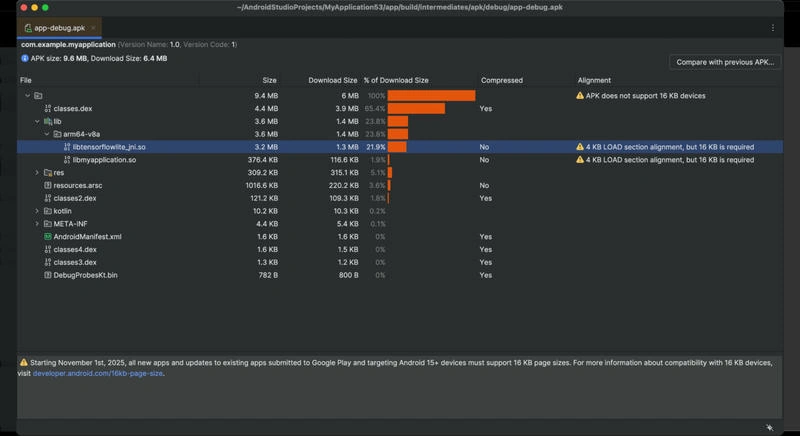
Priority: Check all your dependencies that include .so files.
Action: Update those SDKs to the latest version. Most major vendors have already pushed 16 KB-compatible updates.
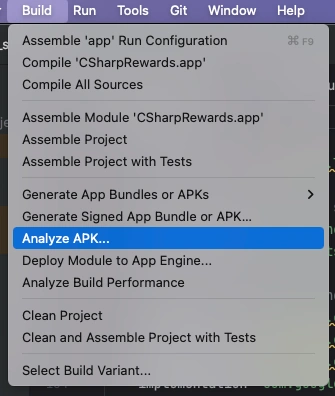
Tool: Use the APK Analyzer in Android Studio to visually inspect your bundled .so files and confirm their alignment.
3. Kill the Hardcoded Assumptions
Some older native codebases explicitly assume a 4 KB page size (e.g., using 4096). This is a crash waiting to happen.
The Fix: Search your C/C++ source code for 4096 or PAGE_SIZE.
The Solution: Replace any hardcoded value with a runtime check that fetches the actual page size from the OS, ensuring your code works on both 4 KB and 16 KB devices:
Bash
adb shell getconf PAGE_SIZE
it should return -> 16384
How to Test (The Confidence Check)
Don't wait for a Play Console rejection. Test your updated app now:
Open SDK Manager in Android Studio.
Install an Android 15+ system image that includes the "16 KB Page Size" label (available for ARM64 architecture).
Create a new AVD using this specific image.
Run your app on this emulator. Look for any immediate crashes, especially during feature launch (e.g., loading a video player or an ML model).
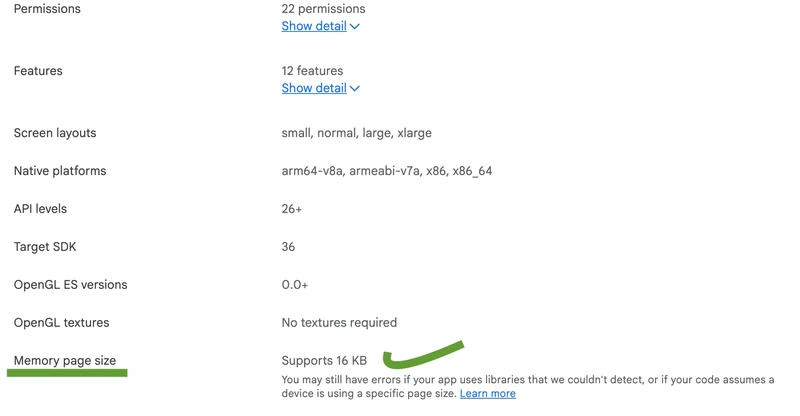
Your goal is an app that runs flawlessly on both 4 KB and 16 KB environments. This transition is a technical necessity that ultimately leads to a faster, more modern Android experience for all your users. This is how i am able to upgrade and see this.


Sanjay KulkarniPosted Nov 17, 2025, 10:30 AM
After updating the libraries to support 16kb memory page size, app is not opening for older devices which supports 4kb memory