

Wherever there is a form or page that allows a user to post up information, there is an opportunity for repeat postings and spam. No one really enjoys being spammed or seeing hundreds of the same comments strewn across their forum, blog or other areas of discussion and this article aims to help curb that.
Using a Custom ActionFilter within ASP.NET MVC, we can create a reusable and flexible solution that will allow you to place time-limit constraints on the Requests being sent to your controllers that will assist in deterring spammers from bombarding you with duplicate items.
The Problem
A user with malicious intent decides that they want to spam your form and that you should have hundreds of duplicate messages decorating your forum, database or anything else you might be using as fast as the spammer can submit your form.
The Solution
To help prevent these multiple submission attempts, we will need to create a Custom ActionFilter that will keep track of the source of the Request (to ensure that it isn’t the same person), a delay value (to indicate the duration between attempts) and possibly some additional information such as error handling.
But first, let’s start with the ActionFilter itself:
- public class PreventSpamAttribute: ActionFilterAttribute
- {
- public override void OnActionExecuting(ActionExecutingContext filterContext)
- {
- base.OnActionExecuting(filterContext);
- }
- }
- A property to handle the delay between Requests.
- A mechanism to uniquely identify the user making the Request (and their target).
- A mechanism to store this information so that it is accessible when a Request occurs.
- Properties to handle the output of ModelState information to display errors.
Let’s begin with adding the delay, which will just be an integer value that will indicate (in seconds) the minimum delay allowed between making Requests to a specific Controller Action along with some additional properties that will store information to handle displaying errors and redirecting invalid requests:
- public class PreventSpamAttribute: ActionFilterAttribute
- {
- // This stores the time between Requests (in seconds)
- public int DelayRequest = 10;
- // The Error Message that will be displayed in case of
- // excessive Requests
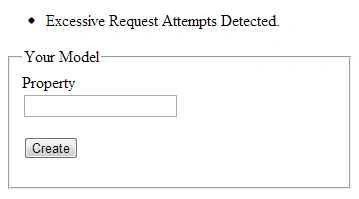
- public string ErrorMessage = "Excessive Request Attempts Detected.";
- // This will store the URL to Redirect errors to
- public string RedirectURL;
- public override void OnActionExecuting(ActionExecutingContext filterContext)
- {
- base.OnActionExecuting(filterContext);
- }
- }
Next, we will need a method to store current information about the User and where their Request is originating from so that we can properly identify them. One method to do this would be to get some identifying information about the user (such as their IP Address) using the HTTP_X_FORWARDED_FOR header (and if that doesn’t exist, falling back on the REMOTE_ADDR header value) and possibly appending the User Agent (using the USER_AGENT header) in as well to further hone in on our User.
- public override void OnActionExecuting(ActionExecutingContext filterContext)
- {
- // Store our HttpContext (for easier reference and code brevity)
- var request = filterContext.HttpContext.Request;
- // Grab the IP Address from the originating Request (example)
- var originationInfo = request.ServerVariables["HTTP_X_FORWARDED_FOR"] ? ? request.UserHostAddress;
- // Append the User Agent
- originationInfo += request.UserAgent;
- // Now we just need the target URL Information
- var targetInfo = request.RawUrl + request.QueryString;
- base.OnActionExecuting(filterContext);
- }
Now that we have the unique Request information for our User and their target, we can use this to generate a hash that will be stored and used to determine if later and possibly spammed requests are valid.
For this we will use the System.Security.Cryptography namespace to create a simple MD5 hash of your string values, so you will need to include the appropriate using statement where your ActionFilter is being declared:
using System.Security.Cryptography;
We can leverage LINQ to perform a short little single line conversion of our strings to a hashed string using this line from this previous post:
- // Generate a hash for your strings (appends each of the bytes of
- // the value into a single hashed string)
- var hashValue = string.Join("", MD5.Create().ComputeHash(Encoding.ASCII.GetBytes(originationInfo + targetInfo)).Select(s => s.ToString("x2")));
Ekrem TapanPosted Oct 29, 2015, 3:33 AM
good article
Sibeesh VenuPosted Oct 28, 2015, 7:28 AM
Nice Share
rahul rathorePosted Oct 28, 2015, 2:29 AM
nice explanation!
Sunny SharmaPosted Oct 28, 2015, 1:19 AM
Welcome to C# Corner Rion!
Nilesh JadavPosted Oct 27, 2015, 9:49 PM
Good one !!
Mukesh KumarPosted Oct 27, 2015, 2:29 PM
Welcome Rion... sounds good to me to see you here
Dinesh BeniwalPosted Oct 27, 2015, 12:37 PM
Welcome to C# Corner Rion ;)
Vincent Maverick DuranoPosted Oct 27, 2015, 12:37 PM
Nice one! Good to see you here Rion :)