

Cross-site scripting (XSS) is one of the most common vulnerabilities found in web applications. It occurs when malicious scripts are injected into web pages or APIs and executed by the victim's browser, potentially compromising sensitive information. This article will explain how to prevent XSS attacks in an ASP.NET Core Web API by sanitizing inputs, encoding outputs, and applying security best practices.
What is XSS?
XSS attacks occur when an attacker injects malicious scripts into content that is sent to users without proper validation or encoding. In the context of Web APIs, the API may process user input and return it to clients (browsers or other consumers), which could lead to script execution and malicious activities.
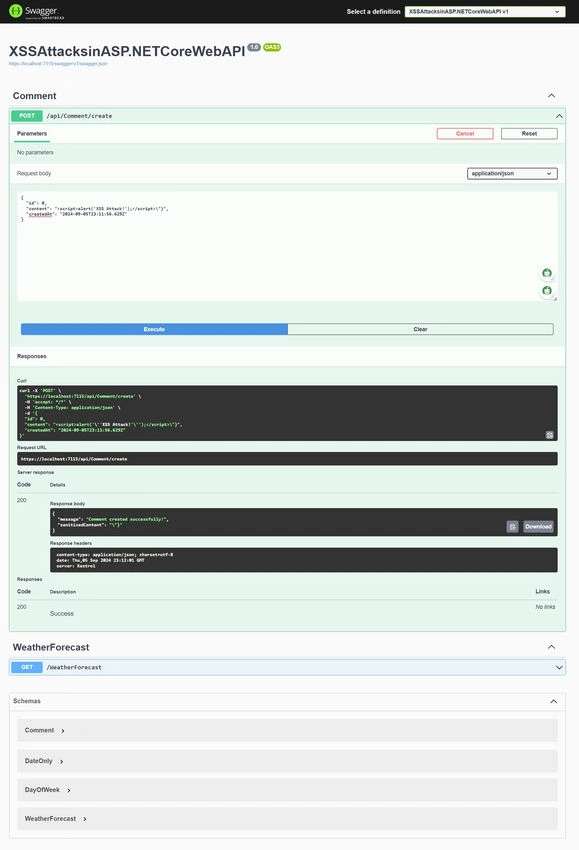
Example of an XSS Attack
Imagine a Web API that accepts user input, such as a name, and returns it back to the client.
{
    "name": "<script>alert('XSS Attack!');</script>"
}
If the API does not sanitize this input, the malicious JavaScript (<script>alert('XSS Attack!');</script>) will be executed in the client’s browser.
Types of XSS Attacks
- Stored XSS: Malicious scripts are stored in the database or file system and executed when the victim visits the page that retrieves and displays the data.
- Reflected XSS: Malicious scripts are embedded in the URL and executed when the victim clicks the link.
- DOM-Based XSS: The vulnerability is within the client-side JavaScript itself.
Preventing XSS in ASP.NET Core Web API
Here’s a step-by-step guide to protect your API from XSS attacks.
1. Input Validation and Data Annotations
The first line of defense against XSS is to validate user inputs using model validation and constraints.
In ASP.NET Core, you can use Data Annotations to specify validation rules for models. For example, a user registration API might look like this:
public class UserInput
{
    [Required]
    [MaxLength(50)]
    [RegularExpression(@"^[a-zA-Z0-9]*$", ErrorMessage = "Invalid characters in name")]
    public string Name { get; set; }

    [Required]
    [EmailAddress]
    public string Email { get; set; }
}
By applying these annotations, the API ensures that only valid data is accepted and limits the possibility of malicious scripts getting through.
Example API Controller
[ApiController]
[Route("api/[controller]")]
public class UserController : ControllerBase
{
    [HttpPost]
    [Route("create")]
    public IActionResult CreateUser([FromBody] UserInput userInput)
    {
        if (!ModelState.IsValid)
        {
            return BadRequest(ModelState);
        }
        return Ok(new { Message = "User created successfully!" });
    }
}
In the above example, the input Name is restricted to alphanumeric characters, which limits the possibility of script injection.
2. Sanitizing User Input
Even with validation in place, you should sanitize inputs that could potentially be harmful. ASP.NET Core provides various ways to sanitize and encode user inputs.
- Using the HtmlEncoder Class: You can use the HtmlEncoder class to encode dangerous characters before processing the input.
using System.Text.Encodings.Web; public string SanitizeInput(string input) { return HtmlEncoder.Default.Encode(input); } - This encodes any special characters like <, >, or & that could be used for XSS attacks.
- Example Usage in API
[HttpPost]
[Route("sanitize")]
public IActionResult SanitizeUserInput([FromBody] string userInput)
{
    var sanitizedInput = HtmlEncoder.Default.Encode(userInput);
    return Ok(new { SanitizedInput = sanitizedInput });
}
3. Using a Third-Party Library for Sanitization
For more complex scenarios, you can use a third-party library like Ganss.XSS, which allows for advanced HTML sanitization.
- Install the NuGet Package
Install-Package Ganss.XSS - Example Code
using Ganss.XSS;
public string SanitizeHtml(string input)
{
    var sanitizer = new HtmlSanitizer();
    return sanitizer.Sanitize(input);
}
4. Content Security Policy (CSP)
A Content Security Policy (CSP) is a security header that helps prevent XSS by controlling which resources (scripts, images, styles) can be loaded by the browser.
You can add CSP headers in ASP.NET Core like this.
public void Configure(IApplicationBuilder app)
{
    app.Use(async (context, next) =>
    {
        context.Response.Headers.Add("Content-Security-Policy", "default-src 'self'; script-src 'self'");
        await next();
    });

}
This policy restricts the loading of scripts to only those from the same domain, making it much harder for attackers to load malicious external scripts.
5. HTTP-Only and Secure Cookies
If your Web API works with cookies (e.g., for authentication), always mark them as HttpOnly and Secure to prevent client-side scripts from accessing them.
options.Cookie.HttpOnly = true;
options.Cookie.SecurePolicy = CookieSecurePolicy.Always;
6. Sanitize Data from Third-Party APIs
If your API consumes data from third-party services, it's important to sanitize that data before returning it to your clients. Even trusted APIs could be compromised, so always validate and sanitize the data.
Example
public IActionResult FetchDataFromExternalApi()
{
    var externalApiData = GetExternalApiData();
    var sanitizedData = HtmlEncoder.Default.Encode(externalApiData);
    return Ok(new { Data = sanitizedData });
}
7. Ensure Proper Response Headers
Return the proper Content-Type headers in your API responses. If you’re returning JSON, ensure the Content-Type is set to application/json. This prevents browsers from interpreting JSON responses as HTML or scripts.
context.Response.ContentType = "application/json";
Join the conversation! Your thoughts help the community grow.