

Summary of how we printing text here
- We Select one character and draw it on document including font color Font Type etc. .
- When we encounter \n we move Y Coordinate variable to +10 in Y Axis so it will be at new Line
That's it. very simple basic intention of article is yo make you start with printing formatted content the below code works for only Courier New Font but you can modify the code to make it work with others too .
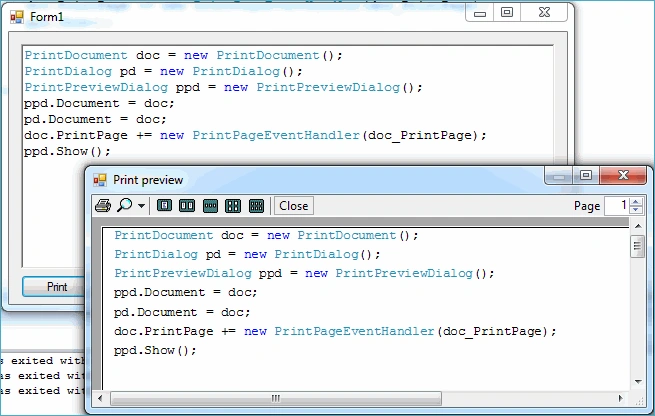
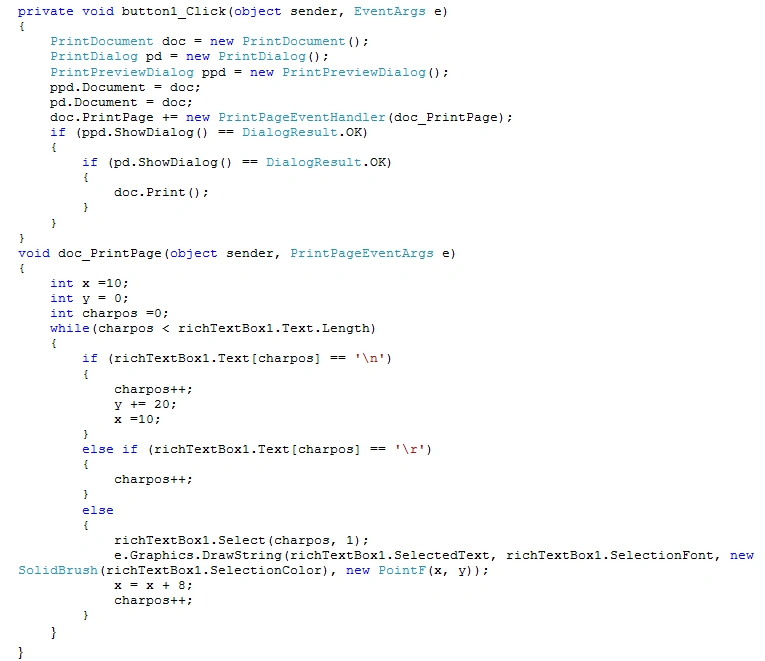
Note :You need to Set position of X variable according to font you use in richtext box I used x+8 because it is appropriate for Courier New font .
Kishor PotdarPosted Oct 23, 2019, 5:28 AM
Hence while printing with this method there is unnecessary gap in text, how to remove that?
Kishor PotdarPosted Oct 23, 2019, 5:27 AM
In my rich text box there is different font & color.
Kishor PotdarPosted Oct 23, 2019, 5:26 AM
I use this code in my priject.
Kishor PotdarPosted Oct 23, 2019, 5:25 AM
Hi kiran sir,
Bhavik PatelPosted Jul 16, 2014, 4:54 AM
very useful
Former memberPosted Jul 30, 2013, 2:23 AM
nice article, i got lot of thinks to learn
Rolando BerronesPosted Jun 25, 2013, 6:12 PM
What happens if my richTextBox.Text.Length fits in 2 pages?
Nick MarinoPosted Jan 25, 2012, 4:50 PM
This does not handle long lines of text (wordwrap). If there are long lines that are wrapped to the next line or even more than one line your code just cuts off the text and doesnt wrap it like it is in the richtextbox.
bjoernPosted Jul 19, 2011, 3:19 AM
I know that printing can be annoying. Anyway, you can use TX Text Control Express as a free replacement with full printing functionality. www.textcontrol.com/express