

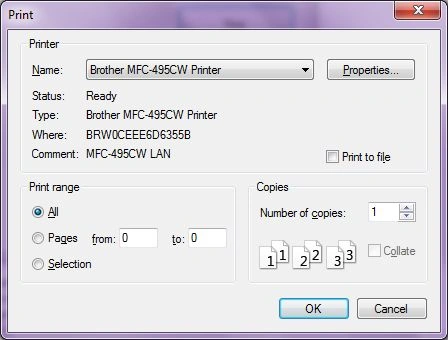
A PrintDialog control is used to open the Windows Print Dialog and let the user select the printer, set printer and paper properties, and print a file. A typical Open File Dialog looks like Figure 1 where you select a printer from available printers, set printer properties, set print range, number of pages and copies and so on. Clicking on the OK button sends the document to the printer.
Creating a PrintDialog
We can create a PrintDialog at design-time as well as at run-time.
Design-time
To create a PrintDialog control at design-time, you simply drag and drop a PrintDialog control from Toolbox to a Form in Visual Studio. After you drag and drop a PrintDialog on a Form, the PrintDialog looks like Figure 2.
Run-time
Creating a PrintDialog control at run-time is simple. The first step is to create an instance of PrintDialog class and then call the ShowDialog method. The following code snippet creates a PrintDialog control.
- PrintDialog PrintDialog1 = newPrintDialog();
- PrintDialog1.ShowDialog();
Printing Documents
PrintDocument object represents a document to be printed. Once a PrintDocument is created, we can set the Document property of PrintDialog as this document. After that we can also set other properties.The following code snippet creates a PrintDialog and sends some text to a printer.
- privatevoid PrintButton_Click(object sender, EventArgs e) {
- PrintDialog printDlg = newPrintDialog();
- PrintDocument printDoc = newPrintDocument();
- printDoc.DocumentName = "Print Document";
- printDlg.Document = printDoc;
- printDlg.AllowSelection = true;
- printDlg.AllowSomePages = true;
- //Call ShowDialog
- if (printDlg.ShowDialog() == DialogResult.OK) printDoc.Print();
- }
More Readings
I do not want to duplicate the work but here are various articles on printing.
- Printing Directly to the Printer by John Donell on Jan 04, 2006
- Printing Invoices using C# and .NET by Mike Gold on Jan 04, 2006
- Printing a Ruler using C# and GDI+ by Mike Gold on Jan 04, 2006
- Printing out your W2 Form using C# and .NET by Mike Gold on Jan 04, 2006
- Notepad.NET - Printing a multiline textbox in C# and .NET by Mike Gold on Aug 29, 2006
- How To: Printing Form Controls in C# and .NET by Mike Gold on Aug 30, 2006
- How To Print a Data Grid in C# and .NET by Mike Gold on Aug 30, 2006
- Print a Text File in C# by Mahesh Chand on Jun 06, 2007
- Printing in C# by Mike Gold on Feb 28, 2010
Summary
A PrintDialog control allows users to launch Windows Open File Dialog and select files. In this article, we discussed how to use a Windows Open File Dialog and set its properties in a Windows Forms application.
Kushal DahalePosted Nov 2, 2023, 9:21 AM
How to print documents from Print Range selection FROM PAGE TO PAGE like 1 to 2 ,3 to 5 as I checked printDlg.AllowSomePages = true; this property is true but not working
Rushi MehtaPosted Sep 26, 2018, 7:45 AM
A very small article...difficult to understand
Suresh BurdakPosted Dec 14, 2017, 1:41 AM
How to access/use PrintDialog in a C# web application NOT in desktop application??? Urgent help is appreciated.
Shameel MuhammadPosted Sep 11, 2017, 2:46 PM
How to mention which file to print?
sagar shindePosted Feb 24, 2014, 4:47 AM
System.Windows.Forms.PrintDialog oDlg = new System.Windows.Forms.PrintDialog();//Set the minimum and max page size to validate correct input from he user oDlg.PrinterSettings.MinimumPage = 1; oDlg.PrinterSettings.MaximumPage = oFile.GetNumberOfPages();//Here get the total number of pages from ur file
sagar shindePosted Feb 24, 2014, 4:47 AM
I came to this link for serching how to set the Page Range, but didnt get the Right info. But anyone is looking for how to set the Page range in PrintDialog then here is 2 lines of code.:
sagar shindePosted Feb 24, 2014, 4:45 AM
HI , nice links.
umair aminPosted Nov 8, 2013, 2:05 PM
hey can we disable the number of copy field?
manjula AruggodaPosted Mar 15, 2011, 2:57 AM
private void PrintButton_Click(object sender, EventArgs e) { PrintDialog printDlg = new PrintDialog(); PrintDocument printDoc = new PrintDocument(); printDoc.DocumentName = "Print Document"; printDlg.Document = printDoc; printDlg.AllowSelection = true; printDlg.AllowSomePages = true; //Call ShowDialog if (printDlg.ShowDialog() == DialogResult.OK) printDoc.Print(); } above code I tryed to set max copy count in to print dialog & also AllowSelection = true ; is not working
Gabor FarkasPosted Feb 28, 2011, 10:22 AM
Nb, this PrintDialog is from the System.Windows.Forms namespace, not System.Windows.Controls. Thanks for the article!
shashi gandhieditedPosted Dec 15, 2010, 4:09 AMEdited Dec 15, 2010, 4:10 AM
Hi this is deepak i am trying to print the contant of richText Box ,i have used many lables in richbox all lables takes data from database when print button to print the result but i am getting only blank page no any data why here is my code plz tell me whats there problem on my ID "[email protected]"reply soon plzzzzz. [ protected void printToolStripMenuItem_Click(object sender, System.EventArgs e) { try { string strText = this.richTextBox1.Text; myReader = new StringReader(strText); PrintPreviewDialog printPreviewDialog1 = new PrintPreviewDialog(); printPreviewDialog1.Document = this.ThePrintDocument; printPreviewDialog1.FormBorderStyle = FormBorderStyle.Fixed3D; printPreviewDialog1.ShowDialog(); } catch (Exception exp) { System.Console.WriteLine(exp.Message.ToString()); } } protected void ThePrintDocument_PrintPage(object sender, System.Drawing.Printing.PrintPageEventArgs ev) { float linesPerPage = 0; float yPosition = 0; int count = 0; float leftMargin = ev.MarginBounds.Left; float topMargin = ev.MarginBounds.Top; string line = null; Font printFont = this.richTextBox1.Font; SolidBrush myBrush = new SolidBrush(Color.Black); // Work out the number of lines per page, using the MarginBounds. linesPerPage = ev.MarginBounds.Height / printFont.GetHeight(ev.Graphics); // Iterate over the string using the StringReader, printing each line. while (count < linesPerPage && ((line = myReader.ReadLine()) != null)) { // calculate the next line position based on the height of the font according to the printing device yPosition = topMargin + (count * printFont.GetHeight(ev.Graphics)); // draw the next line in the rich edit control ev.Graphics.DrawString(line, printFont, myBrush, leftMargin, yPosition, new StringFormat()); count++; } // If there are more lines, print another page. if (line != null) ev.HasMorePages = true; else ev.HasMorePages = false; myBrush.Dispose(); } private void fileToolStripMenuItem_Click(object sender, EventArgs e) { } protected void exitToolStripMenuItem_Click(object sender, EventArgs e) { printDialog1.Document = ThePrintDocument; string strText = this.richTextBox1.Text; myReader = new StringReader(strText); if (printDialog1.ShowDialog() == DialogResult.OK) { try { this.ThePrintDocument.Print(); } catch (Exception ex) { MessageBox.Show(ex.Message); } finally { MessageBox.Show("Printer nt inistall"); } } } ]
Mahesh ChandPosted Nov 7, 2010, 8:18 PM
You're welcome David.