

So far we have discussed printing only an image or a single-page file. Printing multipage files is another important part of printing functionality that developers may need to implement when writing printer applications. Unfortunately, the .NET Framework does not keep track of page numbers for you, but it provides enough support for you to keep track of the current page, the total number of pates, the last page, and a particular page number. Basically, when printing a multipage document, you need to find out the total number of pages and print them from first to last. You can also specify a particular page number. If you are using the default Windows printing dialog, then you don't have to worry about it because you can specify the pages in the dialog, and the framework takes care of this for you.
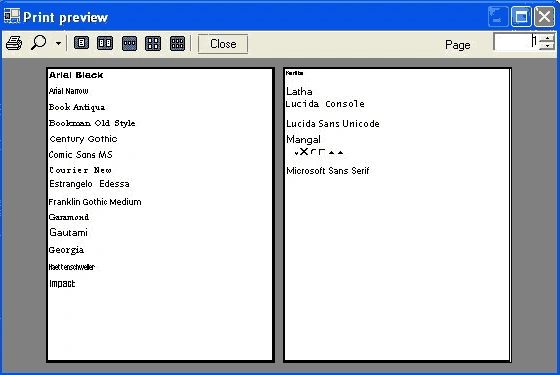
To demonstrate how to do this, our next programs produces a useful printout showing all the fonts installed on your computer. This program is a useful tool for demonstrating the calculation of how many pages to print when you're using graphical commands to print.
We will use the PrintPreview facility to display the output in case you don't have access to a printer and how far down the page we are. If we're going to go over the end of the page, we drop out of the pd_PrintPage event handler and set ev.HasMorePages to true to indicate that we have another page to print.
To see this functionality in action, let's create a Windows application and add a menu with three menu items and a RichTextBox control to the form. The final form is shown in Figure 11.24.

FIGURE 11.24: A form for printing multiple pages
The Display Fonts menu display available fonts on the machine. Before we add code to this menu, we add the following variables:
- private int fontcount;
- private int fontposition = 1;
- private float ypos = 1;
- private PrintPreviewDialog previewDlg = null;
The code for the Display Fonts menu click is given in Listing 11.44. Here we read installed fonts on the system and display them in the rich text box. We use InstalledFontCollection to read all installed fonts on a machine. Then we use the InstalledFontCollection.Families property and make a loop to read all the font families. We also check if these families support different styles, including regular, bold, italic, and underline, and wee add some text to the rich text box with the current font.
LISTING 11.44: Displaying fonts
- private void DisplayFonts_Click1(object sender, Sytem.EventArgs e) {
- //Create InstalledFontCollection objects
- InstalledFontCollection ifc =
- new InstalledFontCollection();
- //Get font families
- FontFamily[] ffs = ifc.Families;
- Font f;
- //Make sure rich text box is empty
- richTextBox1.Clear();
- //Read font families one by one,
- //set font to some text,
- //and add text to the text box
- foreach(FontFamily ff in ffs) {
- if (ff.IsStyleAvailable(FontStyle.Regular))
- f = new Font(ff.GetName(1), 12, FontStyle.Regular);
- else if (ff.IsStyleAvailable(FontStyle.Bold))
- f = new Font(ff.GetName(1), 12, FontStyle.Bold);
- else if (ff.IsStyleAvailable(FontStyle.Italic))
- f = new Font(ff.GetName(1), 12, FontStyle.Italic);
- else
- f = new Font(ff.GetName(1), 12, FontStyle.Underline);
- richTextBox1.SelectionFont = f;
- richTextBox1.AppendText(ff.GetName(1) + "\r\n");
- richTextBox1.SelectionFont = f;
- richTextBox1.AppendText("abcdefghijklmnopqrstuvwxyz\r\n");
- richTextBox1.SelectionFont = f;
- richTextBox1.AppendText("ABCDEFGHIJKLMNOPQRSTUVWXYZ\r\n");
- richTextBox1.AppendText("==========================\r\n");
- }
- }
nwenar abbasPosted Nov 20, 2021, 6:56 PM
This wroks Fine But I want to Print a richtextbox is Lines how can I Handle it with this example?
sajid rajaPosted Oct 18, 2014, 1:08 PM
hello. I want some thing similar but i am having an issue. C# only prints two pages and then print all data on those two page. Please tell me how can i do this. See my post in detail at http://www.c-sharpcorner.com/Forums/Thread/272406/
ahmed allaPosted Oct 13, 2012, 10:46 AM
This is grate job