

Let me begin with the advantages of using Prism framework.
- It helps to make it easier to achieve MVVM, Dependency Injection, Commanding, Event Aggregation, Backbutton Handling and more.
- It helps to write well structured and maintainable XAML applications.
- It contains code that you don't need to write yourself anymore. One example is the ViewModel data saving to local storage when navigating.
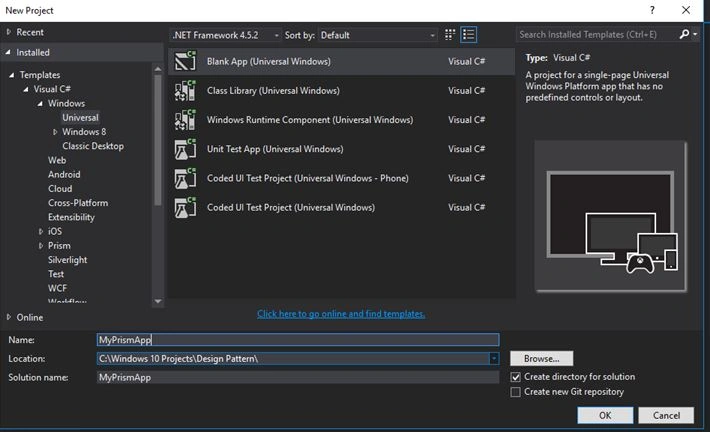
Create new Universal Windows project, I have named it as MyPrismApp.
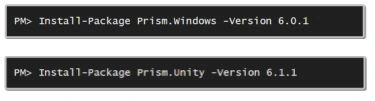
Install the below packages using Package Manager Console.
App.xaml.cs
Remove the class "Application" which was inherited by the class "App" and replace with the class "PrismUnityApplication".
(For those who used prism library in Universal windows 8.1- we are not inheriting with MvvmAppBase any more).
Remove OnLaunched method and add the below code.
- protected override Task OnLaunchApplicationAsync(LaunchActivatedEventArgs args)
- {
- NavigationService.Navigate("Main", null);
- Window.Current.Activate();
- return Task.FromResult<object>(null);
- }
- protected override Task OnInitializeAsync(IActivatedEventArgs args)
- {
- RegisterTypes();
- return base.OnInitializeAsync(args);
- }
- private void RegisterTypes()
- {
- ViewModelLocationProvider.SetDefaultViewTypeToViewModelTypeResolver((viewType) =>
- {
- var viewModelTypeName = string.Format(System.Globalization.CultureInfo.InvariantCulture, "MyPrismApp.ViewModels.{0}ViewModel, MyPrismApp", viewType.Name);
- var viewModelType = Type.GetType(viewModelTypeName);
- return viewModelType;
- });
- }
The ViewModelLocationProvider code tells Prism where to look for ViewModels file with naming convention.
Your App.xaml.cs page looks like below,
- using Prism.Unity.Windows;
- using System;
- using System.Collections.Generic;
- using System.IO;
- using System.Linq;
- using System.Runtime.InteropServices.WindowsRuntime;
- using Prism.Mvvm;
- using System.Threading.Tasks;
- using Windows.ApplicationModel;
- using Windows.ApplicationModel.Activation;
- using Windows.Foundation;
- using Windows.Foundation.Collections;
- using Windows.UI.Xaml;
- using Windows.UI.Xaml.Controls;
- using Windows.UI.Xaml.Controls.Primitives;
- using Windows.UI.Xaml.Data;
- using Windows.UI.Xaml.Input;
- using Windows.UI.Xaml.Media;
- using Windows.UI.Xaml.Navigation;
- namespace MyPrismApp
- {
- /// <summary>
- /// Provides application-specific behavior to supplement the default Application class.
- /// </summary>
- sealed partial class App : PrismUnityApplication
- {
- /// <summary>
- /// Initializes the singleton application object. This is the first line of authored code
- /// executed, and as such is the logical equivalent of main() or WinMain().
- /// </summary>
- public App()
- {
- this.InitializeComponent();
- this.Suspending += OnSuspending;
- }
- protected override Task OnLaunchApplicationAsync(LaunchActivatedEventArgs args)
- {
- NavigationService.Navigate("Main", null);
- Window.Current.Activate();
- return Task.FromResult<object>(null);
- }
- protected override Task OnInitializeAsync(IActivatedEventArgs args)
- {
- RegisterTypes();
- return base.OnInitializeAsync(args);
- }
- private void RegisterTypes()
- {
- ViewModelLocationProvider.SetDefaultViewTypeToViewModelTypeResolver((viewType) =>
- {
- var viewModelTypeName = string.Format(System.Globalization.CultureInfo.InvariantCulture, "MyPrismApp.ViewModels.{0}ViewModel, MyPrismApp", viewType.Name);
- var viewModelType = Type.GetType(viewModelTypeName);
- return viewModelType;
- });
- }
- /// <summary>
- /// Invoked when Navigation to a certain page fails
- /// </summary>
- /// <param name="sender">The Frame which failed navigation</param>
- /// <param name="e">Details about the navigation failure</param>
- void OnNavigationFailed(object sender, NavigationFailedEventArgs e)
- {
- throw new Exception("Failed to load Page " + e.SourcePageType.FullName);
- }
- /// <summary>
- /// Invoked when application execution is being suspended. Application state is saved
- /// without knowing whether the application will be terminated or resumed with the contents
- /// of memory still intact.
- /// </summary>
- /// <param name="sender">The source of the suspend request.</param>
- /// <param name="e">Details about the suspend request.</param>
- private void OnSuspending(object sender, SuspendingEventArgs e)
- {
- var deferral = e.SuspendingOperation.GetDeferral();
- //TODO: Save application state and stop any background activity
- deferral.Complete();
- }
- }
- }
App.xaml
Add the namespace "xmlns:prism="using:Prism.Unity.Windows"" and replace Application with "prism:PrismUnityApplication".
- <prism:PrismUnityApplication
- x:Class="MyPrismApp.App"
- xmlns:prism="using:Prism.Unity.Windows"
- xmlns="http://schemas.microsoft.com/winfx/2006/xaml/presentation"
- xmlns:x="http://schemas.microsoft.com/winfx/2006/xaml"
- xmlns:local="using:MyPrismApp"
- RequestedTheme="Light">
- </prism:PrismUnityApplication>
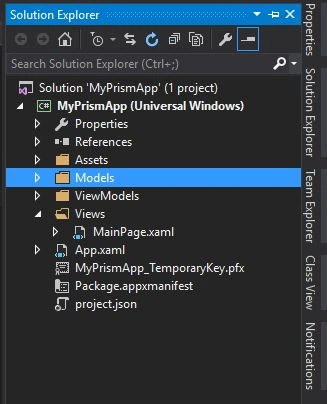
Next we need to delete MainPage and create three folders "Views", "Models", "ViewModels" and create a page under the Views folder and name it as MainPage.
MainPage.xaml
Add the namespace "xmlns:prism="using:Prism.Windows.Mvvm"" and replace "page" with "prism:SessionStateAwarePage" and add "prism:ViewModelLocator.AutoWireViewModel="True""
- <prism:SessionStateAwarePage
- x:Class="MyPrismApp.Views.MainPage"
- xmlns:prism="using:Prism.Windows.Mvvm"
- xmlns="http://schemas.microsoft.com/winfx/2006/xaml/presentation"
- xmlns:x="http://schemas.microsoft.com/winfx/2006/xaml"
- xmlns:local="using:MyPrismApp.Views"
- xmlns:d="http://schemas.microsoft.com/expression/blend/2008"
- xmlns:mc="http://schemas.openxmlformats.org/markup-compatibility/2006"
- prism:ViewModelLocator.AutoWireViewModel="True"
- mc:Ignorable="d">
- <Grid Background="{ThemeResource ApplicationPageBackgroundThemeBrush}">
- <StackPanel>
- <TextBlock Text="{Binding Title}" FontSize="{StaticResource TextStyleExtraLargeFontSize}" Margin="15"/>
- <ListView Margin="15" ItemsSource="{Binding Countries}">
- <ListView.ItemTemplate>
- <DataTemplate>
- <Grid>
- <Grid.ColumnDefinitions>
- <ColumnDefinition Width="100"/>
- <ColumnDefinition Width="*"/>
- </Grid.ColumnDefinitions>
- <TextBlock Text="{Binding CountryCode}"/>
- <TextBlock Text="{Binding CountryName}" Grid.Column="1"/>
- </Grid>
- </DataTemplate>
- </ListView.ItemTemplate>
- </ListView>
- </StackPanel>
- </Grid>
- </prism:SessionStateAwarePage>
MainPage.xaml.cs
Remove the class "Page" which was inherited by the class "MainPage" and replace with the class :SessionStateAwarePage".
(For those who used prism library in Universal windows 8.1- we are not inheriting with VisualStateAwarePage any more).
- using Prism.Windows.Mvvm;
- namespace MyPrismApp.Views
- {
- public sealed partial class MainPage : SessionStateAwarePage
- {
- public MainPage()
- {
- this.InitializeComponent();
- }
- }
- }
Model Class
Add a class file in Models folder and name it as Country.
- namespace MyPrismApp.Models
- {
- public class Country
- {
- private string countryCode;
- private string countryName;
- public string CountryCode
- {
- get { return countryCode; }
- set { countryCode = value; }
- }
- public string CountryName
- {
- get { return countryName; }
- set { countryName = value; }
- }
- }
- }
Add a class in ViewModels folder and name it as MainPageViewModel (Should use the same name of your view followed by ViewModel.)
Inherit your ViewModel class with ViewModelBase.
- using Prism.Windows.Mvvm;
- using System;
- using System.Collections.Generic;
- using System.Linq;
- using System.Text;
- using System.Threading.Tasks;
- using Prism.Windows.Navigation;
- using System.Collections.ObjectModel;
- using MyPrismApp.Models;
- namespace MyPrismApp.ViewModels
- {
- public class MainPageViewModel : ViewModelBase
- {
- private string title = "Countries with code";
- public string Title
- {
- get { return title; }
- set { title = value; }
- }
- private ObservableCollection<Country> countries;
- public ObservableCollection<Country> Countries
- {
- get { return countries; }
- set { countries = value; }
- }
- public override void OnNavigatedTo(NavigatedToEventArgs e, Dictionary<string, object> viewModelState)
- {
- base.OnNavigatedTo(e, viewModelState);
- Countries = new ObservableCollection<Country>();
- Countries.Add(new Country() { CountryCode = "1", CountryName = "Canada" });
- Countries.Add(new Country() { CountryCode = "1", CountryName = "United States" });
- Countries.Add(new Country() { CountryCode = "44", CountryName = "United Kingdom" });
- Countries.Add(new Country() { CountryCode = "91", CountryName = "India" });
- }
- }
- }
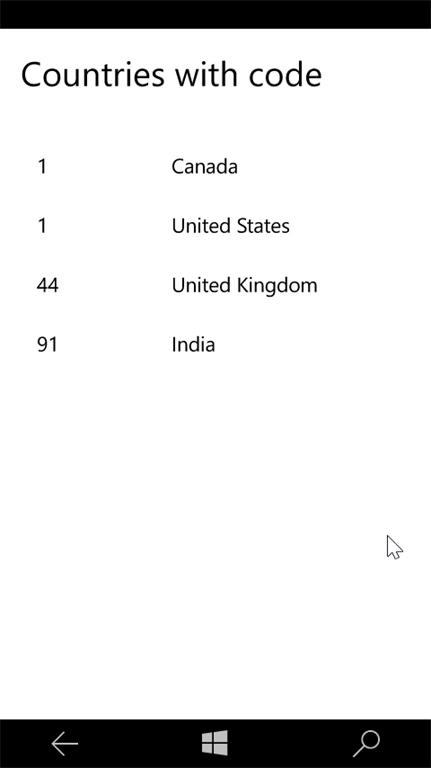
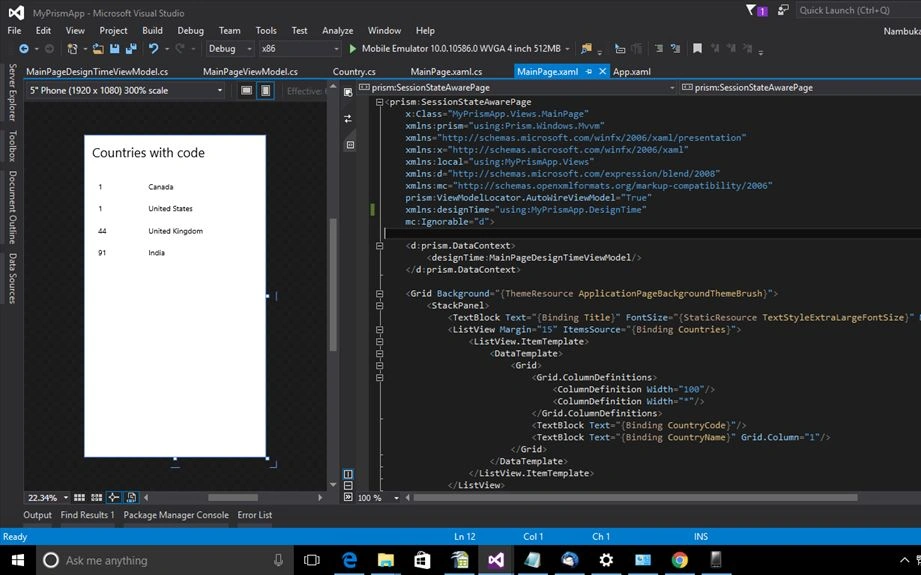
Prism has one more important advantage called "Design Time", we can bind the data and display it in screen before running it, which really helps for design alignment and saves lot of time -- cool isn't it?
DesignTime
Create a folder "DesignTime" and add a class and name it as "MainPageDesignTimeViewModel" and paste the below code.
- using MyPrismApp.Models;
- using System;
- using System.Collections.Generic;
- using System.Collections.ObjectModel;
- using System.Linq;
- using System.Text;
- using System.Threading.Tasks;
- namespace MyPrismApp.DesignTime
- {
- public class MainPageDesignTimeViewModel
- {
- public MainPageDesignTimeViewModel()
- {
- Title = "Countries with code";
- Countries = new ObservableCollection<Country>();
- Countries.Add(new Country() { CountryCode = "1", CountryName = "Canada" });
- Countries.Add(new Country() { CountryCode = "1", CountryName = "United States" });
- Countries.Add(new Country() { CountryCode = "44", CountryName = "United Kingdom" });
- Countries.Add(new Country() { CountryCode = "91", CountryName = "India" });
- }
- private string title;
- public string Title
- {
- get { return title; }
- set { title = value; }
- }
- private ObservableCollection<Country> countries;
- public ObservableCollection<Country> Countries
- {
- get { return countries; }
- set { countries = value; }
- }
- }
- }
Add the namespace "xmlns:designTime="using:MyPrismApp.DesignTime"" and set the data context of designtime viewmodel.
- <d:prism.DataContext>
- <designTime:MainPageDesignTimeViewModel/>
- </d:prism.DataContext>
Source code ha been included, if you have any queries feel free to ask.
Ruchir AgarwalPosted Dec 7, 2018, 4:41 AM
Thank you so much. You saved my many hours !!
Stephan GrafPosted Nov 26, 2016, 10:07 AM
Good starter, thank you.......
Santhakumar MunuswamyPosted Jun 25, 2016, 1:11 AM
Thank you for nice article
Blogprogramisty.NetPosted Jun 22, 2016, 3:44 PM
Something is not good: I hve error Type universe cannot resolve assembly: WindowsBase, Version=4.0.0.0, Culture=neutral,
Davronbek UmirovPosted Jun 20, 2016, 1:17 AM
Nice article ...
Debasis SahaPosted Jun 20, 2016, 12:51 AM
Good One..
Praveen SreeramPosted Jun 19, 2016, 1:57 AM
Does Prism supports Xamarin?