

Overview
After I installed my Windows Server 2012 180 days trial version I decided to install SharePoint Server 2013 and give it a try (I know I'm late but being late is better than never).
I was very excited but once I started to install the SharePoint 2013 prerequisites I got the following error:
It seems that the installer can't install some of the Windows roles (such as Application Server and Web Server (IIS)).
Steps to install SharePoint 2013 Prerequisites
After searching I figured out that Prerequisiteinstaller.exe throws an exception on Windows Server 2012 R2, so the best solution now is to install Windows Roles and Features and SharePoint prerequisites manually.
1- Install Windows Roles and Features
open Server Manager
Click on “Add roles and features”.

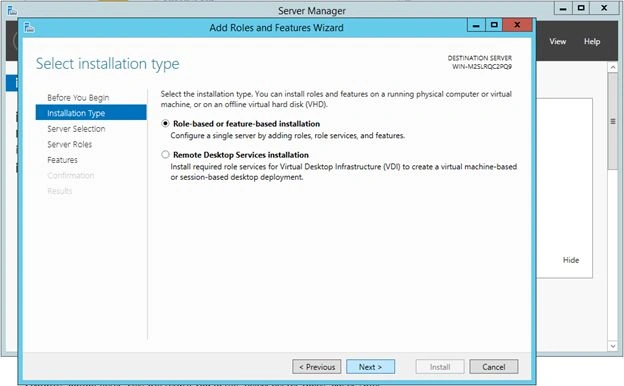
Select “Role based or feature based installation” and click “Next”.
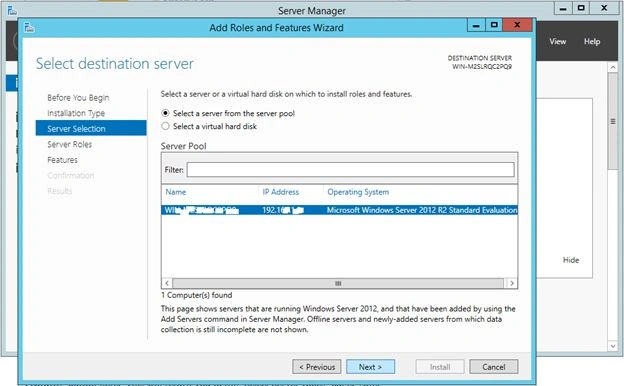
Select “Select a server from the server pool” and the server that you are currently working on and click “Next”.
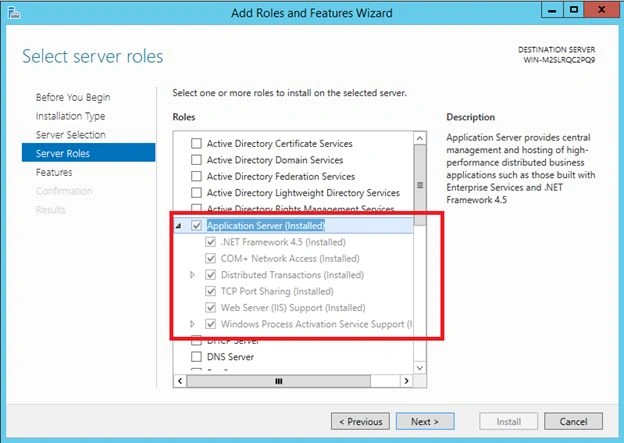
On the “Select server roles” page, check:
- Application Server
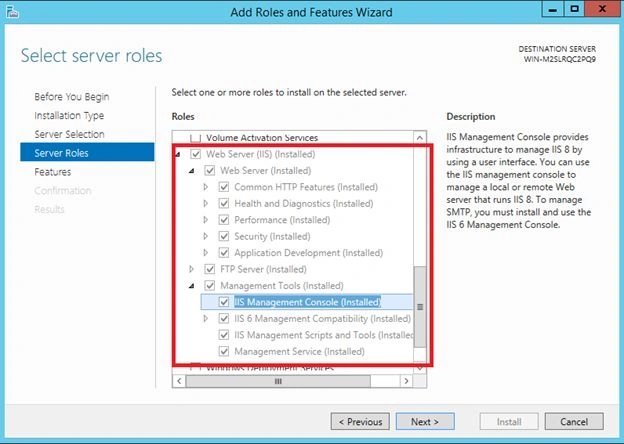
- Web Server (IIS)
- IIS 6 Management Console
- You will find it here: Web Server (IIS) >> Management Tools >> IIS 6 Management Compatibility >> IIS 6 Management Console.
In the Select Features page, expand the “.NET Framework 4.5 Features” group then check “ASP.NET 4.5″.
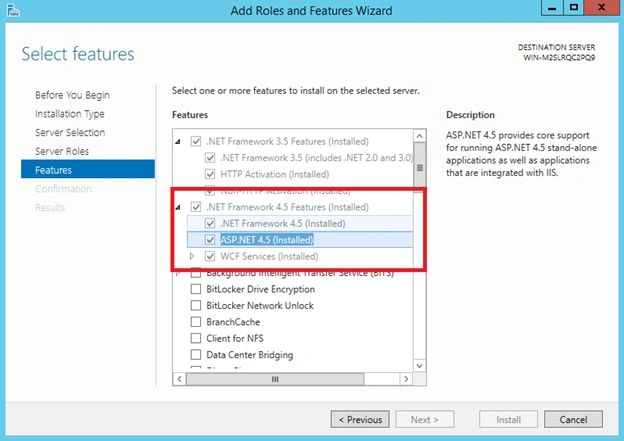
Check "Windows Identity Foundation 3.5″. Click “Next”.

Follow the installer steps and in the “Confirm installation selections” page check “Restart the destination server automatically if required” or you will need to restart the server manually.
2- Install SharePoint prerequisites
The first thing we need to do is download the prerequisites that SharePoint needs.
Download and Install the following:
- Microsoft SQL Server 2008 R2 SP1 Native Client - sqlncli.msi
- Microsoft Sync Framework Runtime v1.0 SP1 (x64) - Synchronization.msi
- Windows Identity Foundation (KB974405) - Windows6.1-KB974405-x64.msu no need to download this as you already installed it in a previous step
- Microsoft Identity Extensions - MicrosoftIdentityExtensions-64.msi
- Microsoft Information Protection and Control Client - setup_msipc_x64.msi
- Microsoft WCF Data Services 5.0 - WcfDataServices.exe
- Download Windows Server App Fabric - WindowsServerAppFabricSetup_x64.exe
- Open Window PowerShell as administrator
- cd the download location, in my case C:\SharePoint2013Prerequisites
- type the following command to install AppFabric
.\WindowsServerAppFabricSetup_x64.exe /i
CacheClient","CachingService","CacheAdmin /gac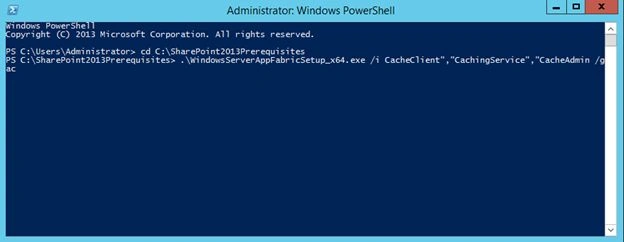
- Wait 2-3 minutes for AppFabric to install
- Download and install Cumulative Update Package 1 for Microsoft AppFabric 1.1 for Windows Server (KB2671763) - AppFabric1.1-RTM-KB2671763-x64-ENU.exe
- Reboot the server
Now you are done and ready to install SharePoint Server 2013.
Mohammed AmerPosted Feb 14, 2018, 8:19 AM
Hi Amr, good Article. so I still have the same issue so could you help and the error is Error when enabling ASP.NET v4.0.30319 or this product requires asp net v4.0 to be in the list of internet information services iis web server extensions. if it is not available in the list, reinstall it.
Mohammad KhalidPosted Sep 12, 2014, 1:12 AM
Thank you very much for sharing the information to install SharePoint.