

Introduction
As I wrote in the previous article, you can update records via a view in SQL but there are some restrictions, for example you can't update records in multiple tables when the view references more than one base table. You can only update columns that belong to a single base table.
That's why this article is based on this problem, to understand what exactly happens. Use the following procedure to create a sample showing that.
Step 1:
- Create a table named "MyEmployee" with some columns.
create table MyEmployee
(
ID int identity,
Name varchar(20),
Salary float,
Department char(2)
)
- Insert some data into the table.
Insert into MyEmployee(Name,Salary,DepartmentID)values('A',20000,'1')
Insert into MyEmployee(Name,Salary,DepartmentID)values('B',10000,'1')
Insert into MyEmployee(Name,Salary,DepartmentID)values('C',28000,'2')
Insert into MyEmployee(Name,Salary,DepartmentID)values('D',15000,'1')
Insert into MyEmployee(Name,Salary,DepartmentID)values('E',39000,'1')
Insert into MyEmployee(Name,Salary,DepartmentID)values('F',12000,'1')
Insert into MyEmployee(Name,Salary,DepartmentID)values('G',40000,'2')
Insert into MyEmployee(Name,Salary,DepartmentID)values('H',32000,'1')
Insert into MyEmployee(Name,Salary,DepartmentID)values('I',56000,'2')
Insert into MyEmployee(Name,Salary,DepartmentID)values('J',29000,'1')
- Select the table to check the values.
select * from MyEmployee

create table Department
(
ID int identity,
DepartmentID char(2),
DepartmentName varchar(20)
)
insert into Department(DepartmentID,DepartmentName)values('1','Finance')
insert into Department(DepartmentID,DepartmentName)values('2','IT')
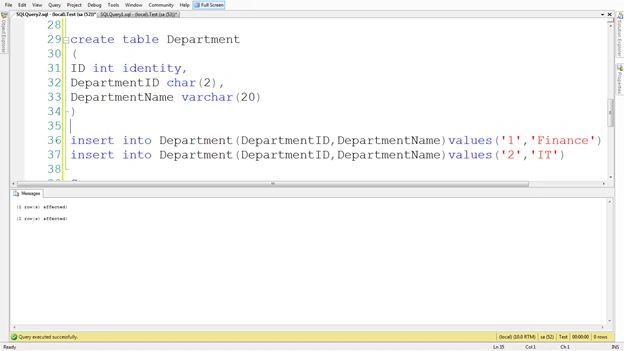
Step 3: Create a primary key in the "Department" table on the DepartmentID column and also create a relationship between the DepartmentID column of the "MyEmployee" table after creating it as a foreign key.
ALTER TABLE Department ADD PRIMARY KEY (DepartmentID)
ALTER TABLE MyEmployee ADD FOREIGN KEY (DepartmentID)
REFERENCES Department(DepartmentID)

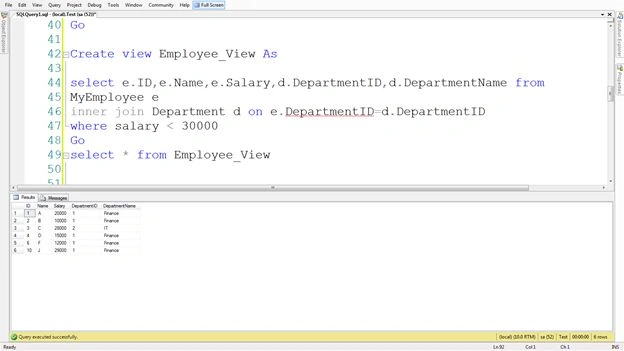
- Create a view named "Employee_View" that gets the employee's records from the "MyEmployee" table whose salary is less than 3000 and also gets the "DepartmentID" and " DepartmentName" from the "Department" table by joining them.
Create view Employee_View As
select e.ID,e.Name,e.Salary,d.DepartmentID,d.DepartmentName from
MyEmployee e
inner join Department d on e.DepartmentID=d.DepartmentID
where salary < 30000
- Select the view as in the following:
Select * from Employee_View
-
update Employee_View set DepartmentName='IT_' where DepartmentID='2'
select * from Employee_View
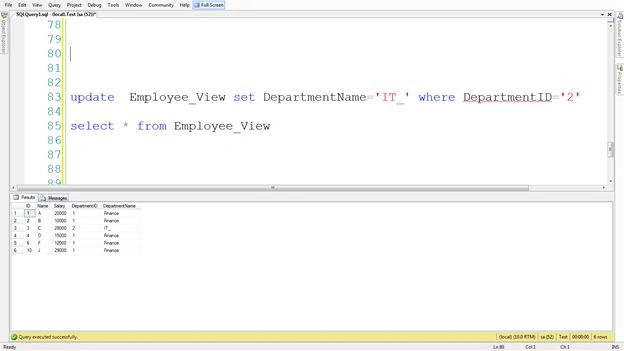
Explaination: This query worked because as I said earlier, "you can only update columns that belong to a single base table" and here we are only updating the data of the "Department" table.
-
update Employee_View set Salary=25000 where DepartmentID='2'
select * from Employee_View
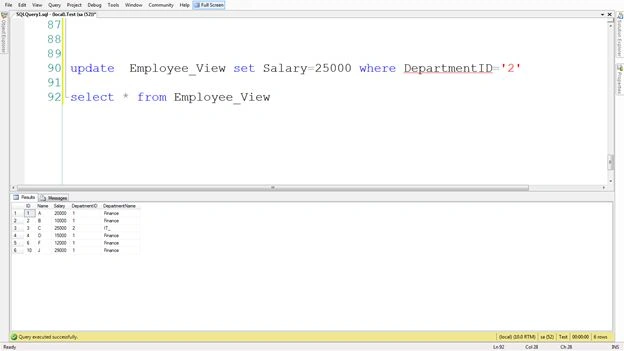
Explaination: This query worked because as I said earlier, "you can only update columns that belong to a single base table" and here we are only updating the data of the "MyEmployee" table.
-
update Employee_View set DepartmentName='IT', Salary=25000
where DepartmentID='2'
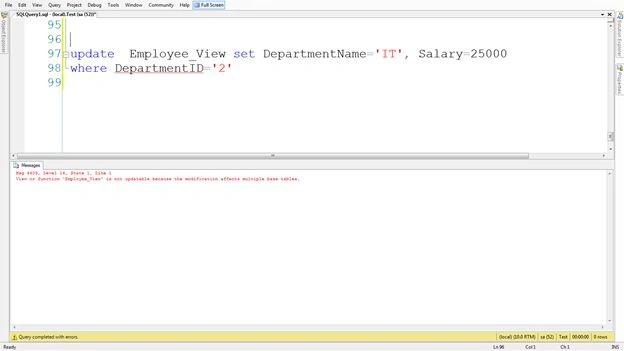
Explaination: This query didn't work because as I said earlier, "you can only update columns that belong to a single base table" and here we are updating the data of both tables "MyEmployee" and "Department" .
Rahul BansalPosted Feb 27, 2014, 11:12 PM
Thanks Vithal
Vithal WadjePosted Feb 26, 2014, 1:32 PM
good one