

Microsoft Graph opens an extensive approach for developers to connect various services across Microsoft Cloud. A Single endpoint requests the Microsoft Cloud to enable the possibility of connecting with various resources in the cloud.
Microsoft Graph requests the endpoint with the resources with properties enabled to get the required values for the requested users. By default, Microsoft Graph’s user resource doesn’t provide a direct way to get the license information for the user.
But, Office 365 Admin Center has the following post request endpoint to retrieve the users and their license information.
POST https://admin.microsoft.com/admin/api/Users/ListUsers
We do not have access to the above endpoint to use it in a custom application. Instead of the admin API, we can use Microsoft Graph as an alternative for retrieving the Users and Subscription information.
After researching the Microsoft Graph’s Users resource of v1.0 version, we can conclude that it doesn’t have the license information with the user data. But the beta version of Users resource has the property assignedLicenses with an array of Subscription Ids.
GET https://graph.microsoft.com/beta/users
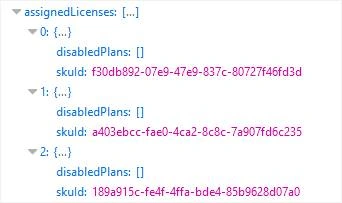
In the future, it may get added to the public version under the Users resource.
The above endpoint returns the only ID of the subscribed licenses. To get the name of each subscription id, we have another resource called “SubscribedSkus”. This endpoint returns the available subscriptions with a name and Id with other properties of each subscription.
Get https://graph.microsoft.com/v1.0/subscribedSkus
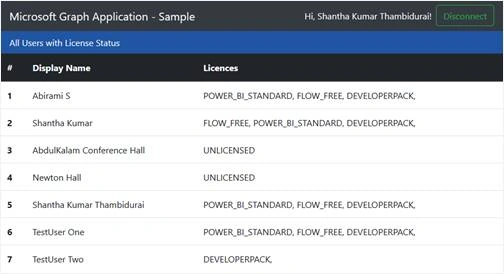
These two endpoints return the values separately. So, we will create a client application to merge the above two endpoint requests and display it in a table format.
Instead of developing the application from scratch, we will download the starter code from “Angular Graph Rest Starter (Sample)” app. This starter comes with a code for authentication, bootstrap for responsive and Angular js to control the data and HTML.
This setup requires a Node.js environment.
Prepare the Application
- Navigate to the Repo https://github.com/ktskumar/angular-graph-rest-starter
- Download the source from GitHub and extract the zipped file.
- Open the extracted folder in your favorite editor. I am using Visual Studio Code editing and managing the client-side source code.
- Use App Registration Portal to generate the Client Id by creating a new app.
- Navigate to public/scripts/config.json file. Then add the client Id and Redirect URI, which you have created in App Registration Portal.
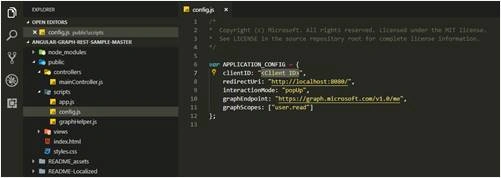
- Replace the below line with graphScopes in config.json to delegate the application to access the resources.
graphScopes: ["user.read user.read.all Directory.ReadWrite.All Directory.AccessAsUser.All"]
- Then open the command terminal and run the command “npm install”. This will download and add the dependencies under the node_modules folder.
Methods to request Microsoft Graph API
- Navigate to public/scripts/graphHelper.js.
- Then add the below snippets, to fetch all the available users and all the subscriptions for the tenant.
- getallusers: function getallusers(){
- return $http.get('https://graph.microsoft.com/beta/users');
- },
Get all users method to send the request to beta endpoint of Microsoft Graph to fetch all users information.
- getlicenses: function getlicenses(){
- return $http.get('https://graph.microsoft.com/v1.0/subscribedSkus?$select=SKUPartNumber,skuId');
- }
The getlicenses method requests the subscibedSKus resource and only retries the Subscription name and Id.
Methods to render fetched values
We have the methods to request the Microsoft Graph. Now, we have to prepare the code for calling those methods and render the value in the HTML.
- Navigate to public/controllers/maincontroller.js
- Then add the below snippets,
- vm.allusers;
- vm.getAllUsers = function(){
- GraphHelper.getallusers().then(function(response){
- vm.allusers = response.data.value;
- });
- }
Vm.getAllUsers method calls the getallusers method from graphHelper file and store to the retrieved users array value in allusers property.
- vm.licences ={};
- vm.getUserswithLicenses = function(){
- GraphHelper.getlicenses().then(function(response){
- var licResponse = response.data.value;
- for (var i = 0; i < licResponse.length; i++) {
- vm.licences[licResponse[i].skuId] = licResponse[i];
- }
- vm.getAllUsers();
- });
- }
vm.getUserswithLicenses method first stores the retrieved subscription information in licenses property and within the success calls the getAllUsers method to retrieve the users. We will Angular js feature to update the users’s skuid to subscription name.
- To change the header of the view, add the below line by replacing vm.view.
- vm.view = "All Users with License Status";
- We are sending the request on page load. So once we are authenticated, we have to the call the method vm.getUserswithLicenses. So within processAuth() method, add the below snippet under the line, emailAddress = user.mail || user.userPrincipalName; in two places.
- vm.getUserswithLicenses();
- Navigate to public/views/main.html file and search for <!-- ENTER HTML CODE HERE --> and replace below HTML snippet.
- <!--Show if there is no users available in the tenant -->
- <div ng-show="main.allusers.length == 0" class="text-danger">No Users found!</div>
- <!-- Render the table with users and subscription names-->
- <table ng-show="main.allusers.length > 0" class="table table-hover">
- <thead class="thead-dark">
- <tr>
- <th scope="col">#</th>
- <th scope="col">Display Name</th>
- <th scope="col">Licences</th>
- </tr>
- </thead>
- <tbody>
- <tr ng-repeat="usr in main.allusers track by $index">
- <th scope="row">{{$index+1}}</th>
- <td>{{usr.displayName}}</td>
- <td>
- <span ng-repeat="lic in usr.assignedLicenses">
- {{main.licences[lic.skuId].skuPartNumber}},
- </span>
- <span ng-show="usr.assignedLicenses.length == 0">
- UNLICENSED
- </span>
- </td>
- </tr>
- </tbody>
- </table>
- Now, run the “npm start” command from the terminal.
- After successfully runs, the app asked you to log in. So click the connect button on the top right corner.

- In the opened popup, log in with your credentials. It redirects you to the page, where you have to click the Accept button to delegate your permission to the app.
- After the approval, the output seems like below,
Mukesh SagarPosted Mar 8, 2024, 3:27 PM
Hi, can you upload the c# code for reference purpose.
Rushi MehtaPosted Nov 19, 2018, 2:29 AM
Nice Article