

In this article we will be seeing how to change the site theme in SharePoint
using SharePoint object model.
Go to Site Actions => Site Settings => Look and Feel => Site theme.

Programmatically change the site theme:
- Open Visual Studio 2010.
- Go to File => New => Project.
- Select Console Application from the installed templates.
- Enter the Name and click on Ok.
- Add the following Namespaces.
o using Microsoft.SharePoint.Utilities;
o using System.Collections.ObjectModel;
- Replace Program.cs with the following
code.
using System;
using System.Collections.Generic;
using System.Linq;
using System.Text;
using Microsoft.SharePoint;
using System.Xml;
using Microsoft.SharePoint.Utilities;
using System.Collections.ObjectModel;namespace ChangeTheme
{
class Program
{
static void Main(string[] args)
{
using (SPSite siteCollection = new SPSite("http://serverName:1111/sites/Sample"))
{
using (SPWeb web = siteCollection.OpenWeb())
{
ThmxTheme theme = ThmxTheme.Open(siteCollection, "_catalogs/theme/Azure.thmx");
theme.ApplyTo(web,false);
web.Update();
}
}
}
}
}
-
Build the solution.
-
Hit F5.
-
Output:
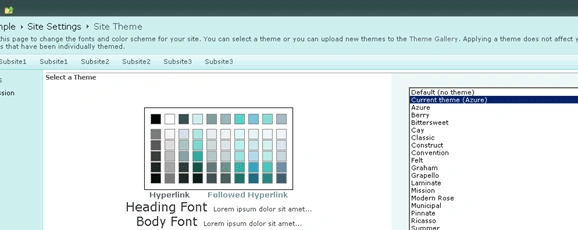
ThmxTheme class:
Represents a Microsoft Office XML theme file. The methods and properties of this
class enable read and write operations on the theme name, the color list, and
the font list. For more information refer
http://msdn.microsoft.com/en-us/library/ee658367.aspx.
ThmxTheme.ApplyTo Method (SPWeb, Boolean):
Applies the current theme to the given web. . For more information refer
http://msdn.microsoft.com/en-us/library/ee659982.aspx
shoeb sayyedPosted Oct 4, 2011, 2:40 AM
can you please tell me the reason as to why this function doesnt work for a WCF service