

In this article we will be seeing how to add a site collection link to global
breadcrumb navigation (Navigate Up button  )
in SharePoint 2010 using the SharePoint Object model.
Portal Site Collection:
A Portal Site Collection is used to link from one site collection to another site
collection. The Portal site will be added to the Navigate Up (global breadcrumb
navigation).
Programmatically Configure Portal Site Collection:
- Open Visual Studio 2010.
- On the File Menu, click on New and then
click on Project.
- Select the Console Application template from
Installed templates.
- Check whether the project is targeted to
.NET Framework 3.5.
- Enter the Name for the project and then
click on Ok.
- Right click on the project and then click
on Properties.
- Click on Build tab, and check whether the
Platform Target is selected as Any CPU.
- Add the following reference.
i) Microsoft.SharePoint.dll
- Add the following namespace.
i) Using Microsoft.SharePoint;
- Replace Program.cs with the following
code.
using System;
using System.Collections.Generic;
using System.Linq;
using System.Text;
using Microsoft.SharePoint;namespace PortalSiteCollection
{
class Program
{
static void Main(string[] args)
{
using (SPSite site = new SPSite("https://serverName:1234/sites/Sample/"))
{
site.PortalName = "Sample Link";
site.PortalUrl = "https://serverName:1236/sites/Test/";
}
}
}
}
- Build the solution.
- Hit F5.
- Go to the SharePoint 2010 site collection.
- Click on Navigate Up, you will be able to
see a new link added as shown in the following.
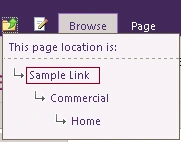
- When you click on the Sample Link, you will be redirected to the corresponding portal site.
ravi ravePosted Jun 22, 2012, 6:05 AM
How to add a custom link to the navigate up button which should be displayed at farm level. Example My Page--> site1-site2