

In this article we will be seeing shows how to get all the External Content
Types by using the Business Data Connectivity (BDC) service Runtime object
model.
Description
The following code example shows how to get all the External Content Types by
using the Business Data Connectivity (BDC) service Runtime object model on the
server. I have one external content type in BDC metadata store ( Go to Central
Administration => Application Management => Manage Service Applications =>
Business Data Connectivity Service Application).

Prerequisites
- Microsoft SharePoint Server 2010 or Microsoft SharePoint Foundation 2010 installed on the server
- Microsoft .NET Framework 3.5 and Microsoft Visual Studio 2010
- At least one external content type registered in the BDC Metadata Store
Example
- Open Visual Studio 2010.
- Go to File => New => project.
- Select Console Application template from the installed templates.
- Select .NET Framework 3.5 when you create the project.
- Add the following references to the
project:
a. Microsoft.BusinessData (from SharePoint_RootFolder\ISAPI)
b. Microsoft.SharePoint - Add the following namespaces:
a. Using Microsoft.BusinessData;
b. Using Microsoft.SharePoint;
c. Using Microsoft.SharePoint.Administration;
d. using Microsoft.SharePoint.BusinessData.SharedService;
e. using Microsoft.BusinessData.MetadataModel;
- Replace Program.cs with the following
code:
using System;
using System.Collections.Generic;
using System.Linq;
using System.Text;
using Microsoft.SharePoint.BusinessData;
using Microsoft.SharePoint;
using Microsoft.SharePoint.BusinessData.SharedService;
using Microsoft.BusinessData.MetadataModel;
using Microsoft.BusinessData;
using Microsoft.SharePoint.Administration;namespace BDCService
{
class Program
{
static void Main(string[] args)
{
using (SPSite site = new SPSite("http://serverName:1111/hr/MP/"))
{
SPServiceContext serviceContext = SPServiceContext.GetContext(site);
BdcService bdc = SPFarm.Local.Services.GetValue<BdcService>();
IMetadataCatalog metadataCatalog = bdc.GetDatabaseBackedMetadataCatalog(serviceContext);
foreach (IEntity ect in metadataCatalog.GetEntities("*"))
{
Console.WriteLine("Name: {0}",ect.Name);
Console.WriteLine("Namespace: {0}", ect.Namespace);
Console.WriteLine("Version: {0}", ect.Version.ToString());
}
Console.ReadLine();
}
}
}
}
-
Right click on the solution, Click on Build.
-
Hit F5.
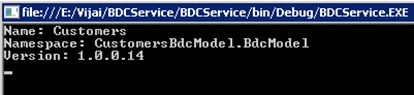
Output:
Join the conversation! Your thoughts help the community grow.