

Introduction
In this article, we will create a progress bar using JavaScript. Here we show two examples of a Progress Bar Image. Now we discuss the first one, for this follow these steps:
Step 1: First we create a table and put four columns in it.
Step 2: After that, we write the Show() function on the onload event of the <body> tag. So when the page is loaded the function will be called.
Step 3: Now we write the JavaScript function. In this function, first, we change the color of the first column, then we call another function with the help of setTimeout and then we change the color of the second column, like this:
The Output will be
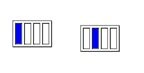
Now we look at another example of a progress bar.
Step 1: First we create a table like this and put some columns in it.
Step 1: First we create a table and put four columns in it.
- <table style="width: 1257px" >
- <tr>
- <td ></td>
- <td >
- <table border="1">
- <tr>
- <td id="td1" class="style8"> </td>
- <td id="td2" class="style8"> </td>
- <td id="td3" class="style8"> </td>
- <td id="td4" class="style8"> </td>
- </tr>
- </table>
- </td>
- <td></td>
- <td></td>
- </tr>
- </table>
- <body onload="Show()">
- .....
- ...
- </body>
- <script language="javascript" type="text/javascript">
- function Show()
- {
- document.getElementById('td1').style.backgroundColor='Blue';
- document.getElementById('td2').style.backgroundColor='White';
- document.getElementById('td3').style.backgroundColor='White';
- document.getElementById('td4').style.backgroundColor='White';
- setTimeout("Show1()",300);
- }
- function Show1()
- {
- document.getElementById('td2').style.backgroundColor='Blue';
- document.getElementById('td1').style.backgroundColor='White';
- document.getElementById('td3').style.backgroundColor='White';
- document.getElementById('td4').style.backgroundColor='White';
- setTimeout("Show2()",300);
- }
- function Show2()
- {
- document.getElementById('td3').style.backgroundColor='Blue';
- document.getElementById('td1').style.backgroundColor='White';
- document.getElementById('td2').style.backgroundColor='White';
- document.getElementById('td4').style.backgroundColor='White';
- setTimeout("Show3()",300);
- }
- function Show3()
- {
- document.getElementById('td4').style.backgroundColor='Blue';
- document.getElementById('td2').style.backgroundColor='White';
- document.getElementById('td3').style.backgroundColor='White';
- document.getElementById('td1').style.backgroundColor='White';
- setTimeout("Show()",300);
- }
- </script>
Now we look at another example of a progress bar.
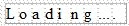
Step 1: First we create a table like this and put some columns in it.
- <table style="width: 1257px" >
- <tr>
- <td class="style6"></td>
- <td class="style1">
- <table border="1" cellpadding="0" cellspacing="0">
- <tr>
- <td id="td1" class="style8" style="border-style: none">L</td>
- <td id="td2" class="style8" style="border-style: none">o</td>
- <td id="td3" class="style8" style="border-style: none">a</td>
- <td id="td4" class="style8" style="border-style: none">d</td>
- <td id="td5" class="style8" style="border-style: none">i</td>
- <td id="td6" class="style8" style="border-style: none">n</td>
- <td id="td7" class="style8" style="border-style: none">g</td>
- <td id="td8" class="style8" style="border-style: none">...</td>
- <td id="td9" class="style8" style="border-style: none">.</td>
- </tr>
- </table>
- </td>
- <td></td>
- <td></td>
- </tr>
- </table>
Step 2: After that, we write the Show() function on the onload event of the <body> tag. So when the page is loaded the function will be called.
- <body onload="Show()">
- .....
- ...
- </body>
Step 3: Now we write the JavaScript function. In this function, first we change the color of the first column and then the second column like this:
- <script language="javascript" type="text/javascript">
- function Show()
- {
- document.getElementById('td1').style.backgroundColor='Blue';
- setTimeout("Show1()",300);
- }
- function Show1()
- {
- document.getElementById('td2').style.backgroundColor='Blue';
- setTimeout("Show2()",300);
- }
- function Show2()
- {
- document.getElementById('td3').style.backgroundColor='Blue';
- setTimeout("Show3()",300);
- }
- function Show3()
- {
- document.getElementById('td4').style.backgroundColor='Blue';
- setTimeout("Show4()",300);
- }
- function Show4()
- {
- document.getElementById('td5').style.backgroundColor='Blue';
- setTimeout("Show5()",300);
- }
- function Show5()
- {
- document.getElementById('td6').style.backgroundColor='Blue';
- setTimeout("Show6()",300);
- }
- function Show6()
- {
- document.getElementById('td7').style.backgroundColor='Blue';
- setTimeout("Show7()",300);
- }
- function Show7()
- {
- document.getElementById('td8').style.backgroundColor='Blue';
- setTimeout("Show8()",300);
- }
- function Show8()
- {
- document.getElementById('td9').style.backgroundColor='Blue';
- }
- </script>
The output will be

Sanjeev SinghPosted Nov 26, 2013, 10:03 AM
please send to me Circular progress bar in share point 2010 using c#.net
Chandra ShekharPosted Jun 26, 2012, 7:49 AM
Progress Bar in Jquery in Asp.net