

Introduction
Today we will use one of the important controls in Metro style applications. It is the best tool to show the progress of any specific task at run time. With the help of a progress bar we can guide user to wait for the next task until your current task is completed.
Here we are implementing a progress bar that is used to show the progress of a form filling status, so to do it we are using four textboxes with a progress bar control.
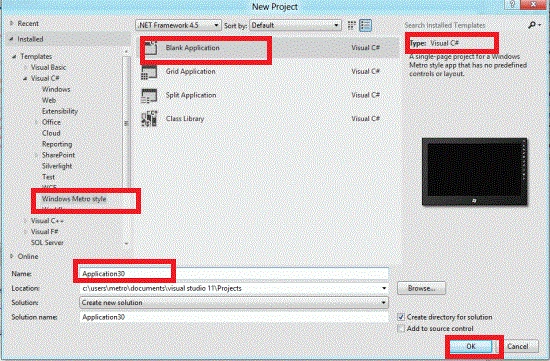
Step 1 : First of all you will create a new Metro Style Application. Let us see the description with images of how you will create it.
- Open Visual Studio 2011
- File -> New -> Project
- Choose Template -> Visual C# ->Metro Style Application
- Rename this Application
Step 2 : In the Solution Explorer there are two files that we will primarily work with; BlankPage.xaml and BlankPage.xaml.cs files.
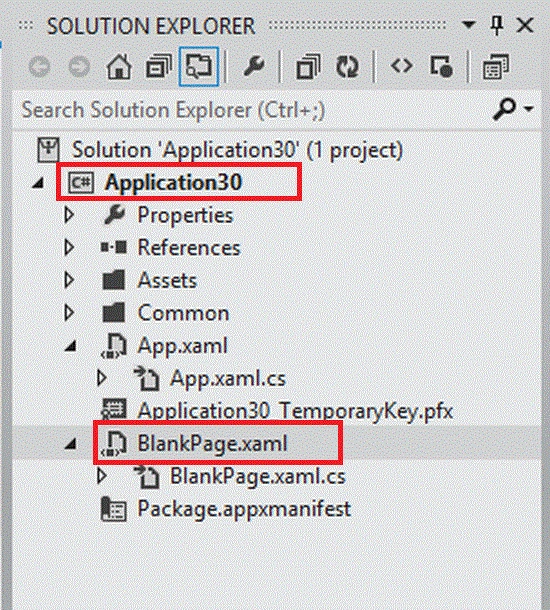
Step 3 : The BlankPage.xaml file is as in the following code:
Code :
<Page
x:Class="Application30.BlankPage"
xmlns="http://schemas.microsoft.com/winfx/2006/xaml/presentation"
xmlns:x="http://schemas.microsoft.com/winfx/2006/xaml"
xmlns:local="using:Application30"
xmlns:d="http://schemas.microsoft.com/expression/blend/2008"
xmlns:mc="http://schemas.openxmlformats.org/markup-compatibility/2006"
mc:Ignorable="d">
<Grid Background="{StaticResource ApplicationPageBackgroundBrush}">
<Grid x:Name="ContentRoot" Background="LimeGreen" Margin="100,20,100,20">
<Grid.RowDefinitions>
<RowDefinition Height="Auto"/>
<RowDefinition Height="*"/>
<RowDefinition Height="Auto"/>
</Grid.RowDefinitions>
<!-- Content -->
<Grid HorizontalAlignment="Center" VerticalAlignment="Top">
<StackPanel>
<TextBlock Text="Progress Bar in Metro Apps" FontSize="30" Foreground="Black"></TextBlock>
<ProgressBar x:Name="myBar" Foreground="Red" Background="White" BorderBrush="Blue"
Maximum="100" Width="200" Height="20" Margin="15"/>
<TextBlock x:Name="blk1" FontSize="10" Margin="15"></TextBlock>
<TextBlock Text="Fill The Form" FontSize="25" Foreground="Blue" Margin="15"></TextBlock>
<TextBox x:Name="txt1" Text="First Name" Width="200" Height="20" Margin="10" GotFocus="txt1_GotFocus_1" ></TextBox>
<TextBox x:Name="txt2" Text="Last Name" Width="200" Height="20" Margin="10" GotFocus="txt2_GotFocus_1" ></TextBox>
<TextBox x:Name="txt3" Text="Address" Width="200" Height="20" Margin="10" GotFocus="txt3_GotFocus_1" ></TextBox>
<TextBox x:Name="txt4" Text="Course" Width="200" Height="20" Margin="10" GotFocus="txt4_GotFocus_1" ></TextBox>
</StackPanel>
</Grid>
</Grid>
</Grid>
</Page>
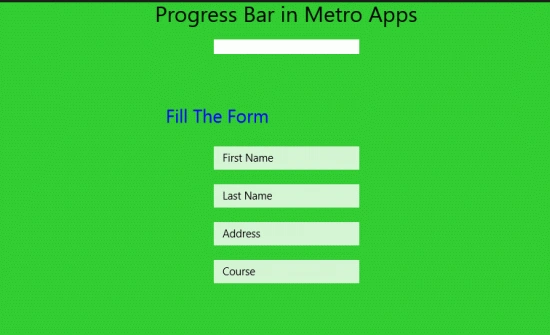
Step 4 : After running this code the output will look like this:
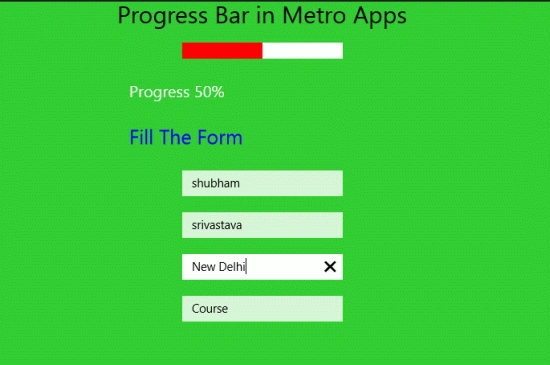
As you fill in the form, the progress bar will show the status:
Jiji MathewPosted Mar 4, 2019, 8:14 AM
No code to complete !!!
manjeet shahPosted Jan 15, 2014, 9:30 PM
progress bar value changing depends upon the form filling.
Praveen VReditedPosted Oct 11, 2012, 7:02 AMEdited Oct 11, 2012, 7:02 AM
Hi, You not mentioned how the progress bar value changing depends upon the form filling.