

Introduction
This is the meaning of promise that I found on Bing: "a particular thing that will happen." But then there is a problem, not all promises are fulfilled.
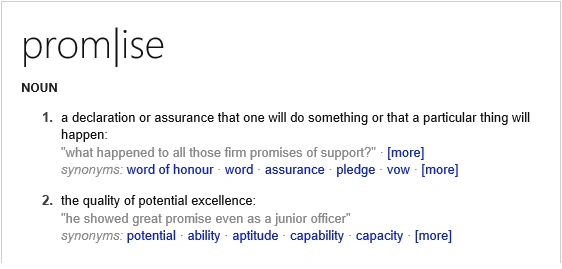
So basically when we make a promise there are two possibilities -- either the promise is fulfilled or not.
The promise in JavaScript is used to represent any operation that is deferred or is expected to be completed in the future, as an asynchronous ajax request. The syntax goes as given below,
- var objPromise = new Promise(function (fulfilled, reject) {
- //Your codes go here
- });
The function passed a parameter to the Promise function known as the executor. The executor function has two parameters which are other callback functions.
As discussed above a promise may have two possible outputs
- Either the Promise is Fulfilled or
- Promise is not Fulfilled i.e rejected
So a promise is in one of these states
- pending (the operation is pending)
- fulfilled (the operation is completed successfully)
- rejected (the operation failed)
If the operation is completed successfully then the fulfilled function is to be called or the rejected function is to be called.
Example
- var objPromise = new Promise(function (fulfilled, reject) {
- $.ajax({
- url: "/JSON/states.json",
- success: function(result){
- fulfilled(result); // on success call the fulfilled function
- }
- error: function(error){
- reject(error); // on error call the reject function
- }
- });
- });
Now that we have created the promise, we can use it by using the method "then" and "catch" which will return the promise.
Example
- objPromise().then(function(data) {
- //Code on fulfillment
- })
- .catch(function(error){
- //Code on rejection
- });
- ////OR/////
- objPromise().then(function(data) {
- //Code on fulfillment
- }, function(error){
- //Code on rejection
- });
So to recognize the need for the promise, let's consider a scenario where we want to bind two dropdowns; one with a list of states and another list of its corresponding city.
Note- I am using ItemTemplate.js to bind the HTML object.
So the traditional way of doing this would be...
- $(document).ready(function () {
- //get list of states and bind it to #ddlState
- $.get('/JSON/state.json', function (data) {
- $('#ddlState').itemTemplate({
- dataSource: data
- });
- });
- //onChange of #ddlState get list of Cities, filer it and bind it to the element with id #ddlCity
- $('#ddlState').change(function () {
- $.get('/JSON/city.json', function (data) {
- var filteredData = [];
- filteredData = filterCityByState(data);
- $('#ddlCity').itemTemplate({
- dataSource: filteredData
- });
- });
- });
- });
- //filter the list of cities belonging to the selected state
- function filterCityByState(data) {
- var filteredData = [];
- $.each(data, function (index, item) {
- if (item.stateId == $('#ddlState').val()) {
- filteredData.push(item);
- }
- });
- return filteredData;
- }
- function filterCityByState(data) {
- var filteredData = [];
- setTimeout(function () {
- $.each(data, function (index, item) {
- if (item.stateId == $('#ddlState').val()) {
- filteredData.push(item);
- }
- });
- }, 3000);
- return filteredData;
- }
Now if you go and debug the code, you will find that the function inside the setTimeout is executed three seconds after all the code is executed outside the setTimeout function. So basically the setTimeout function deferred/delayed the execution of the code inside it which filtered the data, hence returning a blank array.
So to overcome this problem one can remove the setTimeout function or use a promise instead.
- function getJsonData(url) {
- //this function returns a promise that
- //gets data from the url supplied to it as a paramater
- return new Promise(function (fullfilled, reject) {
- $.get(url, function (data) {
- //on successful get, the fullfilled() is called and the data is sent as a parameter
- fullfilled(data);
- }).fail(function (error) {
- //on failure of get, the reject() is called and the error object can be sent as a parameter
- reject(error);
- });
- });
- }
- function filterCityByState(data) {
- //this function returns a promise that
- //filters data after an intrerval of 3 secs.
- return new Promise(function (fullfilled, reject) {
- setTimeout(function () {
- var filteredData = [];
- $.each(data, function (index, item) {
- if (item.stateId == $('#ddlState').val()) {
- filteredData.push(item);
- }
- });
- //Once filtered, the fullfilled() is called and the filterd data is sent as a parameter
- fullfilled(filteredData);
- }, 3000);
- })
- }
- $(document).ready(function () {
- getJsonData('/JSON/state.json').then(function (data) {
- $('#ddlState').itemTemplate({ dataSource: data });
- });
- $('#ddlState').change(function () {
- //Here we call the function getJsonData
- //as the function returns a promise one can use ".then()" and ".catch()"
- //the .then() is executed on the fulfillment/success of the promise
- //else the .catch() is executed
- //Now that the ".then()" to the getJsonData() returns another promise of the filter function
- //one can apply an additional ".then()" to the getJsonData()
- //which will be executed on the success of the filterCityByState()
- getJsonData('/JSON/city.json')
- .then(function (data) { return filterCityByState(data) }).catch(function (error) { alert('Error Occured'); })
- .then(function (filetereddata) { $('#ddlCity').itemTemplate({ dataSource: filetereddata }); });
- });
- });
So basically a Promise is like an event which is fired in response to fulfillment or rejection of a deferred function.
That's all for now.
Please do not forget to provide your valuable suggestions and feel free to ask queries.
That's all for this article, will see you in some other article. Until then,
Keep Learning...
Read more articles on JavaScript
Arweb AroshanzamirPosted Aug 6, 2016, 4:26 AM
Nice article .thanks sir for sharing.
Pradeep SahooPosted Mar 18, 2016, 8:42 PM
these are promises in AJAX calls , .then and .Done are they same..
Vignesh ManiPosted Mar 14, 2016, 5:49 PM
Nice
Saillesh PawarPosted Mar 14, 2016, 2:46 PM
nice one
Mohammed IbrahimPosted Mar 14, 2016, 4:04 AM
nice
Debasis SahaPosted Mar 14, 2016, 12:47 AM
Nice share
Kirtan ParmarPosted Mar 13, 2016, 3:58 AM
great...thanks
Humayun Kabir MamunPosted Mar 13, 2016, 3:13 AM
Nice...
Ankur MistryPosted Mar 13, 2016, 1:08 AM
Nice explanation
Pramod ThakurPosted Mar 12, 2016, 11:23 AM
Nice share..