

Introduction
In this article, you'll learn how to create and manage prompts in Amazon Bedrock using the .NET console application. Note: Prompt management is in preview and is subject to change. Click here to learn more about Prompt management in Amazon Bedrock.
Prerequisites
- Create an AWS account and log in. Ensure the IAM user you use has sufficient permissions to make necessary AWS service calls and manage AWS resources.
- Download and install the AWS Command Line Interface (CLI).
- Configure the AWS CLI.
- Download and install Visual Studio or Visual Studio Code.
- Download and install .NET 8.0 SDK
Tools
Visual Studio 2022
Steps Involved
Perform the following steps to create a .NET console application in Visual Studio 2022 to create and manage prompts.
- Open Visual Studio 2022.
- Click File -> New -> Project.
- Select the Console App template. Click Next.
- Enter the project name and click Next.
- Select the .NET 8.0 framework. Click Create.
- Add the following NuGet packages.
AWSSDK.BedrockAgent - Open Program.cs and replace the code with the following.
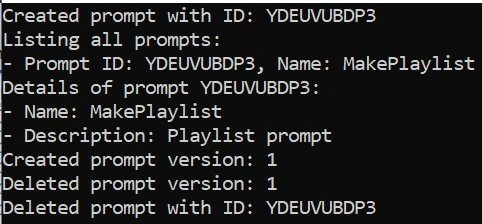
using Amazon.BedrockAgent; using Amazon.BedrockAgent.Model; namespace BedrockPromptManagement { /// <summary> /// Main entry point for the Bedrock Prompt Management application. /// </summary> class Program { /// <summary> /// Main method to execute the application. /// </summary> /// <param name="args">Command line arguments.</param> static async Task Main(string[] args) { var manager = new PromptManager(); try { // Create a new prompt await manager.CreatePrompt(); // List all prompts await manager.ListPrompts(); // Get details of the created prompt await manager.GetPrompt(); // Create a version of the created prompt await manager.CreatePromptVersion(); // Delete the prompt version await manager.DeletePromptVersion(); // Delete the prompt await manager.DeletePrompt(); } catch (Exception ex) { Console.WriteLine($"An error occurred: {ex.Message}"); } } } /// <summary> /// Manages operations related to AWS Bedrock prompts. /// </summary> class PromptManager : IDisposable { private readonly AmazonBedrockAgentClient _client; private string _promptId = string.Empty; private string _promptVersion = string.Empty; /// <summary> /// Initializes a new instance of the <see cref="PromptManager"/> class. /// </summary> public PromptManager() { _client = new AmazonBedrockAgentClient(); } /// <summary> /// Creates a new prompt in AWS Bedrock. /// </summary> public async Task CreatePrompt() { try { var promptInferenceConfiguration = new PromptInferenceConfiguration { Text = new PromptModelInferenceConfiguration { Temperature = 0.8f, MaxTokens = 100, TopK = 50, TopP = 0.9f, StopSequences = new List<string> { "\n", "." } } }; var promptTemplateConfiguration = new PromptTemplateConfiguration { Text = new TextPromptTemplateConfiguration { Text = "Make me a {{genre}} playlist consisting of the following number of songs: {{number}}." } }; var promptVariant = new PromptVariant { Name = "Variant1", ModelId = "amazon.titan-text-express-v1", TemplateType = PromptTemplateType.TEXT, InferenceConfiguration = promptInferenceConfiguration, TemplateConfiguration = promptTemplateConfiguration }; var request = new CreatePromptRequest { Name = "MakePlaylist", Description = "Playlist prompt", DefaultVariant = promptVariant.Name, Variants = new List<PromptVariant> { promptVariant }, ClientToken = Guid.NewGuid().ToString(), Tags = new Dictionary<string, string> { { "Project", "MusicPlaylist" } } }; var response = await _client.CreatePromptAsync(request); _promptId = response.Id; Console.WriteLine($"Created prompt with ID: {_promptId}"); } catch (Exception ex) { Console.WriteLine($"Failed to create prompt: {ex.Message}"); throw; } } /// <summary> /// Lists all prompts in AWS Bedrock. /// </summary> public async Task ListPrompts() { try { var response = await _client.ListPromptsAsync(new ListPromptsRequest()); Console.WriteLine("Listing all prompts:"); foreach (var prompt in response.PromptSummaries) { Console.WriteLine($"- Prompt ID: {prompt.Id}, Name: {prompt.Name}"); } } catch (Exception ex) { Console.WriteLine($"Failed to list prompts: {ex.Message}"); throw; } } /// <summary> /// Retrieves details of the created prompt. /// </summary> public async Task GetPrompt() { try { var response = await _client.GetPromptAsync(new GetPromptRequest { PromptIdentifier = _promptId }); Console.WriteLine($"Details of prompt {_promptId}:"); Console.WriteLine($"- Name: {response.Name}"); Console.WriteLine($"- Description: {response.Description}"); } catch (Exception ex) { Console.WriteLine($"Failed to retrieve prompt details: {ex.Message}"); throw; } } /// <summary> /// Creates a new version of the created prompt. /// </summary> public async Task CreatePromptVersion() { try { var response = await _client.CreatePromptVersionAsync(new CreatePromptVersionRequest { PromptIdentifier = _promptId }); _promptVersion = response.Version; Console.WriteLine($"Created prompt version: {_promptVersion}"); } catch (Exception ex) { Console.WriteLine($"Failed to create prompt version: {ex.Message}"); throw; } } /// <summary> /// Deletes the created version of the prompt. /// </summary> public async Task DeletePromptVersion() { try { await _client.DeletePromptAsync(new DeletePromptRequest { PromptIdentifier = _promptId, PromptVersion = _promptVersion }); Console.WriteLine($"Deleted prompt version: {_promptVersion}"); } catch (Exception ex) { Console.WriteLine($"Failed to delete prompt version: {ex.Message}"); throw; } } /// <summary> /// Deletes the created prompt. /// </summary> public async Task DeletePrompt() { try { await _client.DeletePromptAsync(new DeletePromptRequest { PromptIdentifier = _promptId }); Console.WriteLine($"Deleted prompt with ID: {_promptId}"); } catch (Exception ex) { Console.WriteLine($"Failed to delete prompt: {ex.Message}"); throw; } } /// <summary> /// Disposes the resources used by the PromptManager. /// </summary> public void Dispose() { _client?.Dispose(); } } } - Run the application.
Summary
This article describes how to create and manage prompts in Amazon Bedrock using the .NET console application.
Vijai Anand RamalingamPosted Feb 10, 2025, 4:22 PM
Https://docs.aws.amazon.com/bedrock/latest/APIReference/API_agent_PromptModelInferenceConfiguration.html
Vijai Anand RamalingamPosted Feb 10, 2025, 4:22 PM
Code update: Remove line number 76 ( TopK = 50,)