

Introduction
In C#, properties are a member that provides a flexible mechanism to read, write, or compute the value of a private field.
C# is one of the first languages that offers direct support of Properties. Properties look similar to a public variable on which we can do get() or set() operations.
Syntax
The following is the syntax of Properties.
// Define the Property Accessors
public <type> <Property Name>
{
    get
    {
        return <var>;
    }
    set
    {
        if (IsValid(value))
        {
            <var> = value;
        }
    }
}
In the syntax shown above.
- The access modifier can be Private, Public, Protected or Internal.
- The return type can be any valid C# data type, such as a string or integer.
- The ”this” keyword shows that the object is for the current class.
- The get() and set() operations of the syntax are known as accessors.
There are the following 4 types of Properties.
- Read-Write Property
- Read-Only Property
- Static Property
- Indexer Property
Read and write Property
Programmers allow you to access the internal data of a class in a less cumbersome manner. Earlier programmers were required to define two separate methods, one for assigning a value of a variable and the other for retrieving the value of a variable. When you create a property, the compiler automatically generates class methods to set() and get() the property value and makes calls to these methods automatically when a programmer uses the property .
Here is a simple program of a Read and Write Property.
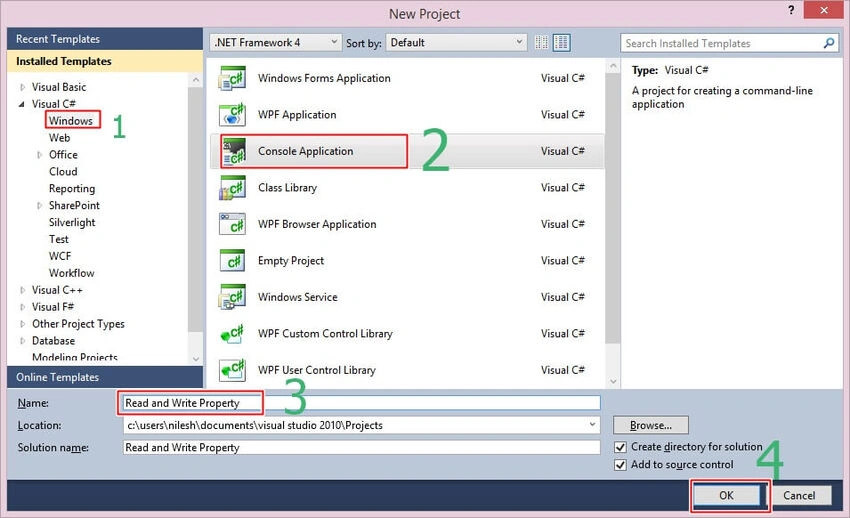
Figure 1. Read and write property
Here is the code for a read-write property.
using System;
using System.Collections.Generic;
using System.Linq;
using System.Text;
namespace Read_and_Write_Property
{
    class student
    {
        public string Myname = "";
        public int Myage = 0;
        // Declare a Name Property of type String
        public string Name
        {
            get
            {
                return Myname;
            }
            set
            {
                Myname = value;
            }
        }
        // Declare an Age Property of type int
        public int Age
        {
            get
            {
                return Myage;
            }
            set
            {
                Myage = value;
            }
        }
        public override string ToString()
        {
            return ("Name=" + Name + ", Age=" + Age);
        }
    }
    class Program
    {
        static void Main(string[] args)
        {
            Console.WriteLine("This is Read and Write Property");
            // Create a new object for student class
            student s = new student();
            Console.WriteLine("Student details:" + s);
            s.Name = "Nilesh";
            s.Age = 24;
            Console.WriteLine("Student details:" + s);
            // increment the age property
            s.Age += 1;
            Console.Write("Student details:" + s);
            Console.ReadKey();
        }
    }
}
Output

Figure 2. Output for read and write property
Read-Only Property
A read-only Property has a get accessor but does not have any set() operation. This means that you can retrieve the value of a variable using the read-only property but you cannot assign a value to the variable.
Example
using System;
using System.Collections.Generic;
using System.Linq;
using System.Text;
namespace ConsoleApplication1
{
    public class PropertyHolder
    {
        private int Myage = 0;

        public PropertyHolder(int PropVal)
        {
            Myage = PropVal;
        }
        public int age
        {
            get
            {
                return Myage;
            }
        }
    }
    class Program
    {
        static void Main(string[] args)
        {
            PropertyHolder p = new PropertyHolder(24);
            Console.WriteLine("My age is: " + p.age);
            Console.ReadKey();
        }
    }
}
Output

Figure 3. Read-Only Output
Static Property
A static Property can be used to access only the static members of the class.
Example
using System;
using System.Collections.Generic;
using System.Linq;
using System.Text;
namespace Static_Property
{
    public class CounterClass
    {
        private static int number = 0;

        public CounterClass()
        {
            number++;
        }
        public static int NumberofObjects
        {
            get
            {
                return number;
            }

            set
            {
                number = value;
            }
        }
    }
    class Program
    {
        static void Main(string[] args)
        {
            Console.WriteLine("Number of Objects: {0}", CounterClass.NumberofObjects);
            CounterClass object1 = new CounterClass();
            Console.WriteLine("Number of Objects: {0}", CounterClass.NumberofObjects);
            CounterClass object2 = new CounterClass();
            Console.WriteLine("Number of Objects: {0}", CounterClass.NumberofObjects);
            CounterClass object3 = new CounterClass();
            Console.WriteLine("Number of Objects: {0}", CounterClass.NumberofObjects);
            Console.ReadKey();
        }
    }
}
Output
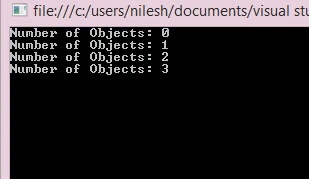
Figure 4. static Property Output
This is all about Properties. I hope you like it. In my next article, I'll tell you about Indexers.
Thank you for reading.
Zeeshan AzimPosted Nov 5, 2015, 12:35 PM
Acha hai. Bahut Acha hai !
Arul RPosted Oct 28, 2015, 5:46 AM
Nice share!!!
Bruno PétersonPosted Jul 9, 2015, 9:02 AM
Good one Nilesh.
Lalit KumarPosted Jun 15, 2015, 11:38 PM
Nice Post
Amol SarkatePosted Jun 9, 2015, 2:09 AM
nice
RakeshPosted May 30, 2015, 1:56 PM
Good explain
Sibeesh VenuPosted May 30, 2015, 1:15 PM
Good one.
Santhakumar MunuswamyPosted May 30, 2015, 12:38 PM
Thanks for nice article..
NitinPosted May 30, 2015, 10:17 AM
Nice
Manoj BhoirPosted May 30, 2015, 12:49 AM
Good one
Santhakumar MunuswamyPosted May 29, 2015, 1:15 PM
Thanks for nice article
Lalit KumarPosted May 29, 2015, 12:42 PM
Great post
Pankaj Kumar ChoudharyPosted May 29, 2015, 9:48 AM
Really Considered Good Points about Properties .......
Former memberPosted May 29, 2015, 9:16 AM
Good One
Atul GuptaPosted May 29, 2015, 8:14 AM
Very well explained !