Publisher/Subscriber pattern
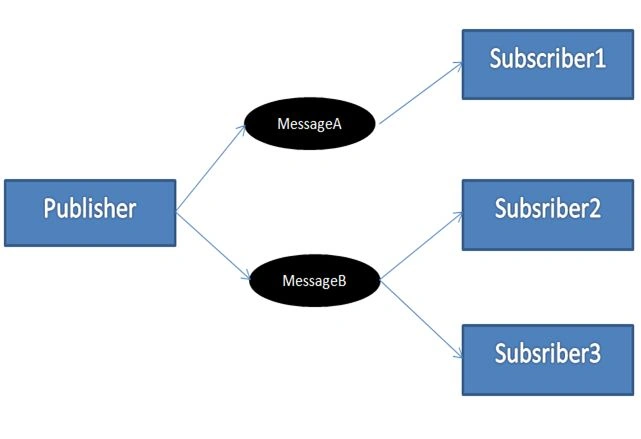
The Publisher/Subscriber pattern is one of the variations of the Observer designer pattern introduced by the GOF in software devlopment. In the Publisher/Subscriber pattern a publisher (entiry responsible for publishing a message) publishes a message and there are one or more Subscribers (entity subsribing, in other words intested in a message of a specified message type) who capture the published message. The following image desribes the senario of the publisher and subscriber pattern where the Publisher publishes two types of messages (MessageA and MessageB) and Subscribers to the messages receive the messages they are subscribed to (Subscriber1 captures MessageA and Subscriber2 and Subscriber3 captures MessageB).
To understand this consider a real-life scenario where Mobile operators are sending messages to their customers.
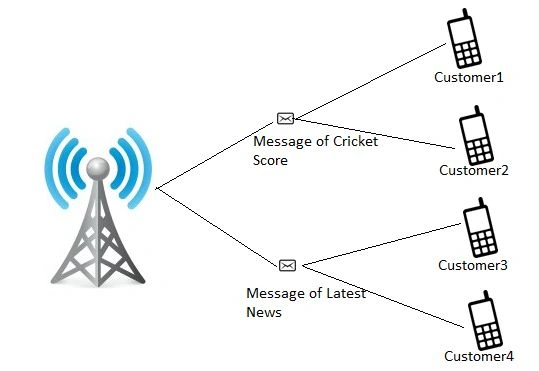
As in the preceding image a Mobile operator publishes (broadcasts) messages (a message of a Cricket score and a message of latest news) and the messages are captured by the customer cells subscribing to the messages (Customer1 and Customer2 captures the Cricket score messages and Customer3 and Customer4 captures the latest news messages).
Implementation with Event
One way to do the Publisher/Subscriber pattern in an application is to use events and delegated, in other words using a framework. The following is a detailed description of a publisher/subscriber implementation
message. The following is a class that represents a message that is published by a Publisher and is captured by an interested Subscriber.
- public class MessageArgument<T> : EventArgs
- {
- public T Message { get; set; }
- public MessageArgument(T message)
- {
- Message = message;
- }
- }
In technical terms a MessageArgument is a generic class so an instance of this class can be of any type that is represented by a T template type.
Publisher: As already described above in the definition, a Publisher is responsible for publishing messages of various types.
- public interface IPublisher<T>
- {
- event EventHandler<MessageArgument<T>> DataPublisher;
- void OnDataPublisher(MessageArgument<T> args);
- void PublishData(T data);
- }
-
- public class Publisher<T> : IPublisher<T>
- {
-
- public event EventHandler<MessageArgument<T>> DataPublisher;
-
- public void OnDataPublisher(MessageArgument<T> args)
- {
- var handler = DataPublisher;
- if (handler != null)
- handler(this, args);
- }
-
-
- public void PublishData(T data)
- {
- MessageArgument<T> message = (MessageArgument<T>)Activator.CreateInstance(typeof(MessageArgument<T>), new object[] { data });
- OnDataPublisher(message);
- }
- }
Technically Publisher is a generic class that inherits the IPublisher interface. Since Publisher is a generic class an instance of it can be of any type represented by a T template type. A Publisher instance is created of a selected type and publishes that type of message only. To publish a different type of message a different type of Publisher instance must be created. To understand better read the following about how to use a publisher in client class code.
The Publisher class provides the event DataPublisher that a subscriber attaches to listen for messages.
PublishData is a publisher class method that publishes data to Subscribers.
Subsriber: Subscriber captures messages of the type it is interested in.
- public class Subscriber<T>
- {
- public IPublisher<T> Publisher { get; private set; }
- public Subscriber(IPublisher<T> publisher)
- {
- Publisher = publisher;
- }
- }
Technically a Subscriber is a generic class that allows creation of multiple instances of a subscriber and each subscriber subscribes to the messages it is interested in using a publisher.
A Subscriber passes an instance of a specific type of publisher to capture messages published by that Publisher.
How it works
- public class Client
- {
- private readonly IPublisher<int> IntPublisher;
- private readonly Subscriber<int> IntSublisher1;
- private readonly Subscriber<int> IntSublisher2;
-
- public Client()
- {
- IntPublisher = new Publisher<int>();
-
- IntSublisher1 = new Subscriber<int>(IntPublisher);
- IntSublisher1.Publisher.DataPublisher += publisher_DataPublisher1;
-
- IntSublisher2 = new Subscriber<int>(IntPublisher);
- IntSublisher2.Publisher.DataPublisher += publisher_DataPublisher2;
-
- IntPublisher.PublishData(10);
- }
-
- void publisher_DataPublisher1(object sender, MessageArgument<int> e)
- {
- Console.WriteLine("Subscriber 1 : " + e.Message);
- }
-
- void publisher_DataPublisher2(object sender, MessageArgument<int> e)
- {
- Console.WriteLine("Subscriber 2 : " + e.Message);
- }
- }
As you can see in the preceding code, Client is a class that creates a publisher and subscriber. The Client class creates a Publisher of integer type (in practice you can create any time of publisher) and creates two Subscriber classes that subscribe to the publisher message by attaching a DataPublisher event that is provided by the Publisher class.
So when you create an instance of the Client class you will receive the following output:
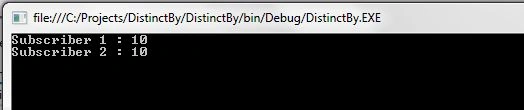
So as per the output the Publisher of integer type publishes the message "10" and two Subscribers subscribing to the publisher capture and display the message to output.
In a practical scenario, in other words in an actual application, one must create all the publishers during the application start, in other words at the entrypoint of the app and pass the instances of publishers when creating subscribers.
For example in a Windows application create a publisher in the Main() method and in a Web Application create a publisher in the Appication_Start method of Global.asax use Dependency Injection to register your publisher and use a container to create it when needed.
Once yu have created them you can pass the publisher in the subscriber as done in the preceding client class code.
Implementation with EventAggregator
EventAggregator: by the name one can easily say it aggregates events. An Publisher/Subscriber EventAggregator woks as a HUB whose task is to aggregate all the published messages and send the message to the interested subscribers.

As you can see in the preceding image, an EventAggregator comes as a HUB between a publisher and a subscriber. It works like this:
- Publisher publishes a message.
- EventAggregator receives a message sent by publishers.
- EventAggregator gets a list of all subscriber interested messages.
- EventAgregator sends the messages to the interested subscriber.
EventAggregator Implementation
SubScription: It is a class to create subscription tokens. When a Subscriber subscribes to interested message types via EventAggregator the EventAggregator returns a subscription token that is further used by the subscriber to keep track of its subscriptions.
-
- public class Subscription<Tmessage> : IDisposable
- {
- public Action<Tmessage> Action { get; private set; }
- private readonly EventAggregator EventAggregator;
- private bool isDisposed;
- public Subscription(Action<Tmessage> action, EventAggregator eventAggregator)
- {
- Action = action;
- EventAggregator = eventAggregator;
- }
-
- ~Subscription()
- {
- if (!isDisposed)
- Dispose();
- }
-
- public void Dispose()
- {
- EventAggregator.UnSbscribe(this);
- isDisposed = true;
- }
- }
EventAggregator
- public class EventAggregator
- {
- private Dictionary<Type, IList> subscriber;
-
- public EventAggregator()
- {
- subscriber = new Dictionary<Type, IList>();
- }
-
- public void Publish<TMessageType>(TMessageType message)
- {
- Type t = typeof(TMessageType);
- IList actionlst;
- if (subscriber.ContainsKey(t))
- {
- actionlst = new List<Subscription<TMessageType>>(subscriber[t].Cast<Subscription<TMessageType>>());
-
- foreach (Subscription<TMessageType> a in actionlst)
- {
- a.Action(message);
- }
- }
- }
-
- public Subscription<TMessageType> Subscribe<TMessageType>(Action<TMessageType> action)
- {
- Type t = typeof(TMessageType);
- IList actionlst;
- var actiondetail = new Subscription<TMessageType>(action,this);
-
- if (!subscriber.TryGetValue(t, out actionlst))
- {
- actionlst = new List<Subscription<TMessageType>>();
- actionlst.Add(actiondetail);
- subscriber.Add(t, actionlst);
- }
- else
- {
- actionlst.Add(actiondetail);
- }
-
- return actiondetail;
- }
-
- public void UnSbscribe<TMessageType>(Subscription<TMessageType> subscription)
- {
- Type t = typeof(TMessageType);
- if (subscriber.ContainsKey(t))
- {
- subscriber[t].Remove(subscription);
- }
- }
-
- }
In the preceding code
Dictionary<Type, IList> subscriber: is a dictionary in which Type is the type of message and IList is a list of actions. So it holds a list of actions mapped to specific Message Types.
public void Publish<TMessageType>(TMessageType message): is a method to publish messages. As in the code, this method receives messages as input then filters out a list of all subscribers by message type and publishes messages to the subscriber.
public Subscription<TMessageType> Subscribe<TMessageType>(Action<TMessageType> action): is a method for subsribing to interested message types. As in the code this method recevies an Action delegate as input. It maps an Action to a specific MessageType, in other words it creates an entry for message type if not present in the dictionary and maps a Subscription object (that waps an Action) to a message entry.
public void UnSbscribe<TMessageType>(Subscription<TMessageType> subscription): is a method for unsubscribing from a specific message type. It receives a Subscription object as input and removes an object from the dictionary.
How To Use
- static void Main(string[] args)
- {
- EventAggregator eve = new EventAggregator();
- Publisher pub = new Publisher(eve);
- Subscriber sub = new Subscriber(eve);
-
- pub.PublishMessage();
-
- Console.ReadLine();
-
- }
The preceding code shows, first create an instance of EventAggregator that passes as an argument to a publisher and subscriber, then the publisher publishes message.
Publisher: Code of Publisher class that shows how a publisher publishes a message using EventAggregator.
- public class Publisher
- {
- EventAggregator EventAggregator;
- public Publisher(EventAggregator eventAggregator)
- {
- EventAggregator = eventAggregator;
- }
-
- public void PublishMessage()
- {
- EventAggregator.Publish(new Mymessage());
- EventAggregator.Publish(10);
- }
- }
Subscriber: Code of the Subscriber class that shows a subscriber subscribing to messages that it is interested in using EventAggregator.
- public class Subscriber
- {
- Subscription<Mymessage> myMessageToken;
- Subscription<int> intToken;
- EventAggregator eventAggregator;
-
- public Subscriber(EventAggregator eve)
- {
- eventAggregator = eve;
- eve.Subscribe<Mymessage>(this.Test);
- eve.Subscribe<int>(this.IntTest);
- }
-
- private void IntTest(int obj)
- {
- Console.WriteLine(obj);
- eventAggregator.UnSbscribe(intToken);
- }
-
- private void Test(Mymessage test)
- {
- Console.WriteLine(test.ToString());
- eventAggregator.UnSbscribe(myMessageToken);
- }
- }
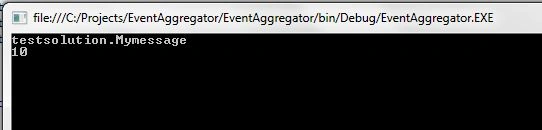
Output
 Note:
Note:In practical scenarios, in other words in an actual application, one must create an EventAggregator at the application start point, in other words at the entrypoint of the app and pass an instance of a publisher and subscriber.
For example in a Windows application create an EventAggregator in the Main() Method as in the preceding example code then in a Web Application create a publisher in the Appication_Start method of Global.asax or use Dependency Injection to register your publisher and use a container to create when needed.
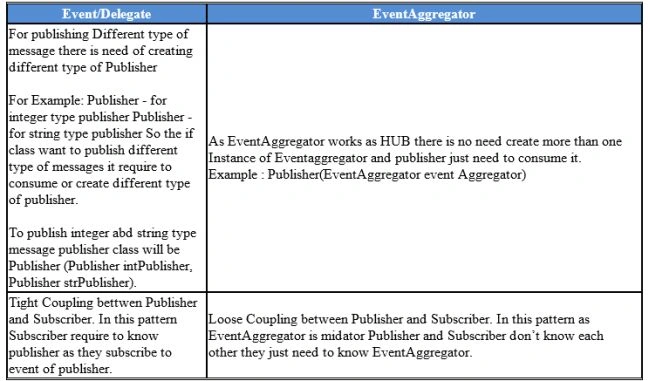
Event/Delegate Vs. EventAggregatorDifference between Event/Delegate and EventAggregator is:
 Conclusion
In my point of view, an Event/Delegate is easy to implement and good for small projects or in a project where there are fewer Publishers and Subscribers. An EventAggregator is suitable for large projects or projects with a large number of Publishers and Subscirbers.
But I think it's always good to use EventAggregator because it offers loose coupling.
Note
This article represents my experience and my point of view. Please comment on this and provide your feedback.


dbnex BPosted Mar 2, 2018, 4:48 PM
Nor does your 2nd example demonstrates your claim in the 1st image in your article??
dbnex BPosted Mar 2, 2018, 4:40 PM
So, how does Subscriber1 get Message-A and Subscriber2 get Message-B??? You talk about it but your Event Delegate example does not solve it at all. You created Subcriber1 and Subscriber2 and your Publisher published 10. They both got 10. Cool. But your article talks about sending Message-A to Subscriber1 and Message-B to Subscriber2. You do not demonstrate that in Event/Delegate example and the other example does not provide working code either
Alex MiaffoPosted Apr 14, 2016, 5:04 AM
Good. But the question now is how to implement it in wpf using mvvm pattern instead of code behind? When I am trying to compare it with the coupling between publisher and subscriber when do not using eventaggregator the event pup pop. But here where/what it the event? Thanks
Pranay RanaPosted Jan 31, 2015, 1:20 AM
Welcome...
Srinivasan K KPosted Jan 30, 2015, 6:56 AM
I was about to get through Publisher / Subscriber concept. This post really helped me to get through quickly. Thanks.
Pranay RanaPosted Jan 29, 2015, 10:52 AM
welcome...
Dinesh BeniwalPosted Jan 29, 2015, 4:25 AM
Thanks for sharing.
Pranay RanaPosted Jan 29, 2015, 3:01 AM
Atul Gupta - welcome and thanks for reading...its really helpful when comments are provided so that i can improve...
Atul GuptaPosted Jan 29, 2015, 2:41 AM
Good Article, Thanks for sharing!