

In my previous article I explained the HTTP Get and Post methods in the ASP.NET Web API.
This article explains the HTTP Put and Delete methods.
| SNO. | Action | HTTP Method | Relative URI |
| 1 | Update Exiting Employee | PUT | /api/Employee?uid=uid |
| 2 | Delete Record from list | DELETE | /api/Employee?uid=uid |
Creating Resources HTTP PUT
Note: The method name should start with PUT.
This method takes two parameters, one is UID from the URI of the request and emp is from the request body.
This method calls the Update(Emp) method. This method takes employee as a parameter then finds the employee from the list using the uid of the employee given by the client. Then finds the index of this employee from the list of employees then removes the employee and again adds this employee in the list and returns true or false.
This method updates the employee in the list and creates a response with a successful message and adds in a header of the response and returns the response.
- /// <summary>
- /// This Method update existing record.
- /// </summary>
- /// <param name="uid">uid of employee</param>
- /// <param name="emp">employee updated record</param>
- /// <returns>after successful updation return httpresponse message with Message.</returns>
- public HttpResponseMessage PutUpdateEmployee(int uid,Employee emp)
- {
- emp.Uid = uid;
- if (!Update(emp))
- {
- throw new HttpResponseException(HttpStatusCode.NotFound);
- }
- else
- {
- var response = new HttpResponseMessage();
- response.Headers.Add("Message", "Succsessfuly Updated!!!");
- return response;
- }
- }
- /// <summary>
- /// This method take employee object and find index of employee from list
- /// and Remove record from particular index and add record in list.
- /// </summary>
- /// <param name="emp">epmployee record with updated data. </param>
- /// <returns>return true after updation.</returns>
- private Boolean Update(Employee emp)
- {
- if (emp == null)
- {
- throw new ArgumentNullException("emp");
- }
- int index = _emp.FindIndex(p => p.Uid == emp.Uid);
- if (index == -1)
- {
- return false;
- }
- _emp.RemoveAt(index);
- _emp.Add(emp);
- return true;
- }
Now In this step I will explain how to consume a HTTP service Web API PUT Method in a console application.
Create a Resource (HTTP PUT)
In this method set the base address of the ASP.NET Web API and sets the accept header to application/json that tells the server to send data in JSON format.
PutAsJsonAsyn: This method serializes the object into JSON format and sends a PUT request to.
Then this method returns a Response object.
- private static HttpResponseMessage ClientPutRequest(string RequestURI, Employee emp)
- {
- HttpClient client = new HttpClient();
- client.BaseAddress = new Uri("http://localhost:1379/");
- client.DefaultRequestHeaders.Accept.Clear();
- client.DefaultRequestHeaders.Accept.Add(new MediaTypeWithQualityHeaderValue("application/json"));
- HttpResponseMessage response = client.PutAsJsonAsync(RequestURI, emp).Result;
- return response;
- }
Add this code to the Main function of program.cs.->Update Record of employee.
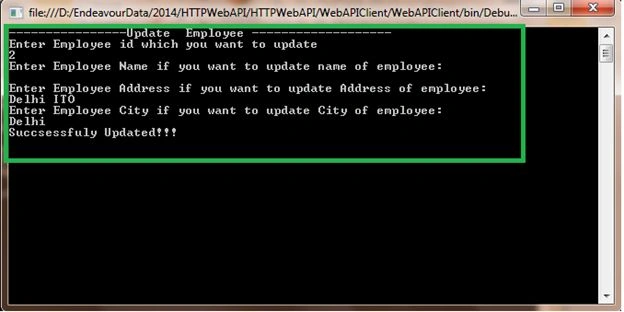
In this method enter the employee id that you want to update then set the employee name, address and city if you want to update any field of the employee and call the method created above and pass the employee object as a parameter then receive the response from this method then call the EnsureSuccessStatusCode method. This method throws an exception when the response status in not success.
Then check IsSuccessStatusCode true and false and return Httpresponsemessage with a header.
- //HTTP PUT
- Console.WriteLine("----------------Update Employee -------------------");
- Console.WriteLine("Enter Employee id which you want to update");
- int id =Convert.ToInt16(Console.ReadLine());
- Console.WriteLine("Enter Employee Name if you want to update name of employee");
- string Emppame = Console.ReadLine();
- Console.WriteLine("Enter Employee Address if you want to update Address of employee");
- string EmpAddress = Console.ReadLine();
- Console.WriteLine("Enter Employee City if you want to update City of employee");
- string EmpCity = Console.ReadLine();
- Employee emp = new Employee() { Name = Emppame, Address = EmpAddress, City = EmpCity };
- HttpResponseMessage responsePutMethod = ClientPutRequest("api/Employee?uid=" + id, emp);
- responsePutMethod.EnsureSuccessStatusCode();
- if (responsePutMethod.IsSuccessStatusCode)
- {
- IEnumerable<string> headerValues = responsePutMethod.Headers.GetValues("Message");
- Console.WriteLine(headerValues.FirstOrDefault().ToString());
- }
Then run your application and see the output.
Delete Resources HTTP DELETE
Note: The method name should start with Delete.
This method takes employee id as a parameter then gets the employee from the list using employee id given by the client and removes the employee from the list then sends a successful message with response to the client.
- /// <summary>
- /// Delete employee from list.
- /// </summary>
- /// <param name="Uid"></param>
- /// <returns></returns>
- public HttpResponseMessage DeleteEmployee(int Uid)
- {
- Employee emp = this.GetEmployee(Uid);
- if (emp == null)
- {
- throw new HttpResponseException(HttpStatusCode.NotFound);
- }
- _emp.Remove(emp);
- var response = new HttpResponseMessage();
- response.Headers.Add("DeleteMessage", "Succsessfuly Deleted!!!");
- return response;
- }
Now In this step I will explain how to consume a HTTP service Web API DELETE Method in a console application.
Delete a Resource (HTTP Delete)
In this method set the base address of the ASP.NET Web API and set the accept header to application/json that tells the server to send data in JSON Format.
DeleteAsync: This method request web API with employeeid.
- private static HttpResponseMessage ClientDeleteRequest(string RequestURI)
- {
- HttpClient client = new HttpClient();
- client.BaseAddress = new Uri("http://localhost:1379/");
- client.DefaultRequestHeaders.Accept.Clear();
- HttpResponseMessage response = client.DeleteAsync(RequestURI).Result;
- return response;
- }
Then Press F5 and see the output in the console window.

Bijendra RathodPosted Jun 13, 2019, 7:22 AM
How to write post,put,delete method using request url in c#? plz help me..(note: the request url is "http://ide1.vivasa.in:59725/bag" ..
prakash patelPosted Aug 16, 2018, 3:52 AM
I wanted more example for delete and put methods so please provide me
Venkatesh 🇮🇳Posted Jul 31, 2017, 8:29 AM
But this article shows less code to create web api http://www.fourthbottle.com/2017/07/create-put-method-in-web-api-using-dotnet.html
ali radPosted Jan 18, 2017, 6:16 AM
Well done. Priti Kumari .
Bhavik PatelPosted May 2, 2016, 4:44 AM
good expained
jitendra singhPosted Jan 22, 2016, 1:49 AM
Hello priti..plz provide link for relicate same view in on button click in mvc
jitendra singhPosted Jan 10, 2016, 11:50 PM
hello priri..plz proide link for registration web api with MongoDB
jitendra singhPosted Jan 1, 2016, 1:43 AM
hi priti....how can i use MongoDb database in MVC
Priti KumariPosted Dec 29, 2015, 7:31 AM
You can also refer this link http://www.c-sharpcorner.com/UploadFile/0c1bb2/inserting-Asp-Net-form-data-into-database-using-web-api/
jitendra singhPosted Dec 27, 2015, 11:51 PM
its urgent
jitendra singhPosted Dec 27, 2015, 11:51 PM
Plz...priti can u tell me how to update and delete record in web api
Hamza LamzadriPosted Dec 20, 2015, 10:03 AM
For put method: is there a way to update an employee without removing it and adding a new record again?
Shalin BhavsarPosted Jun 26, 2015, 2:50 AM
Write now i made one signalR 2.2.0 Hub module..interact with Clint Application
Shalin BhavsarPosted Jun 26, 2015, 2:49 AM
I want to display list of records using SignalR c# to client web applicatiopn...plaese any one konw then reply a sample on [email protected] or contact me on 8451877933.
PUNIT RAIPosted May 8, 2015, 1:09 AM
plz priti can u tell me how to update and delete record with jason plz provide me any link or code plz .my email id is [email protected]
maulin shahPosted Feb 25, 2015, 2:27 AM
My Email ID is [email protected]
maulin shahPosted Feb 25, 2015, 2:26 AM
Nice 1...Can you give me more Examples of MVC web API projects so i can improve more.
Rajeev RanjanPosted Jun 25, 2014, 7:53 AM
my email id is [email protected]
Rajeev RanjanPosted Jun 24, 2014, 11:31 PM
if this would be possible for you to can you gave the same example in jQuery(AJAX)
Rajeev RanjanPosted Jun 24, 2014, 11:30 PM
awsm article, i was stucked in these thing a very long time and couldn't find out the solution , so i was just move out, from now as i seen your article , i got all the concept clear "crystal clear" thanks again.