

File Management in Python
Python programming language supports file management using File object which provides different methods to perform operations like open, read, write and append text into the files.
In this article, we will see the following methods and try to understand the file management concept in detail
Open()
This method is used to open the file. This method accepts two parameters, i.e., path or address of the file and access mode (read, write or append) open (file_address, access_mode). Access mode can be any of the following,
- r: open a file with the read access mode
- r+: open a file with the read and write access mode
- w: open a file with write access mode
- w+: open a file with write and read access mode
- a: open a file with append access mode
- a+: open a file with append and read access mode
Please note that ‘access_mode’ is an optional parameter and, by default, it is set to ‘read’. Let’s have a look at the example given below wherein you open a file that contains two lines of data and iterate through each line and print as an output to the console window.
- with open("c:\welcome.txt") as file: # Use file to refer to the file object
- for data in file: # this statement reads each line but one at a time
- print(data)
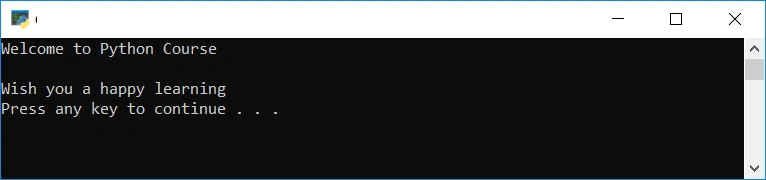
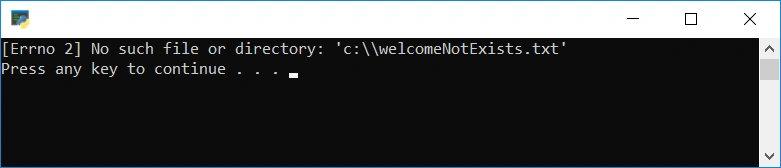
Open method raises an error ‘FileNotFoundError’ if the given file does not exist, as shown in the below example.
- try:
- with open("c:\welcomeNotExists.txt") as file: # Use file to refer to the file object
- #data = file.read()
- for data in file:
- print(data)
- except FileNotFoundError as fileNotFoundError:
- print(fileNotFoundError)
read([size])
This method is used to read and return the file data as a string. This method accepts one parameter (optional) i.e., size (characters) of the data to be read. Let’s have a look at the example given below
Example 1
Open a file and read the entire data, i.e., two lines of data and print to the console window.
- with open("c:\\welcome.txt") as file:
- data = file.read()
- print(data)

Example 2
Open a file and read first six characters data and print to the console window.
- with open("c:\\welcome.txt") as file:
- data = file.read(6)
- print(data)

readline[size]
This method is used to read the first line and return as a string. This method accepts one parameter (optional), i.e., size (characters) of the data to be read. Let’s have a look at the example given below
Example 1
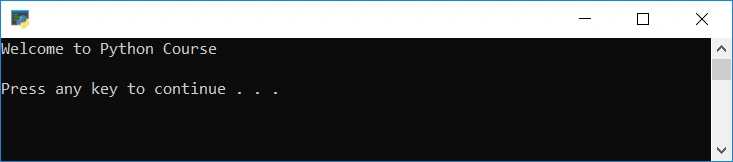
Open a file and read the first line whereas file contains two lines of data
- with open("c:\\welcome.txt") as file:
- data = file.readline()
- print(data)
Example 2
Open a file and read the first six characters of the first line whereas file contains two lines of data
- with open("c:\\welcome.txt") as file:
- data = file.readline(6)
- print(data)

readlines[size]
This method is used to read the entire data line by line and return as a list. This method accepts one parameter (optional) i.e., size (number of bytes) to be read. Let’s have a look at the example given below,
Example
Open a file and read the entire data line by line and return a list. You can pass an index to print any chosen line from the list output or the entire data to the console output
- with open("c:\\welcome.txt") as file:
- data = file.readlines()
- print(data)

write()
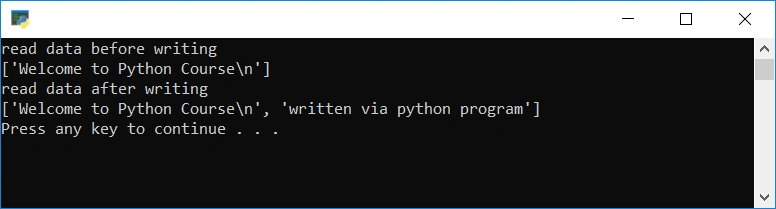
This method is used to write the data into the file. Either flush or close the file after writing data otherwise it will not save and reflect the changes. In the below example, we have read the data before and after writing the data for better understanding of the write operation,
- def readData():
- with open("c:\\welcome.txt") as file:
- data = file.readlines()
- print(data)
- try:
- print('read data before writing')
- readData()
- with open("c:\\welcome.txt", 'a+') as file:
- file.write('written via python program')
- file.flush()
- print('read data after writing')
- readData()
- except FileNotFoundError as fileNotFoundError:
- print(fileNotFoundError)
- except Exception as ex:
- print(ex)
writelines()
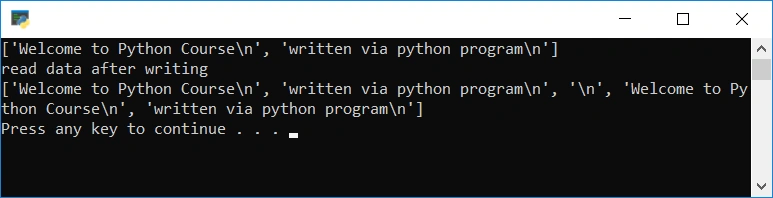
This method is used to write multiple lines in a sequence. Let’s have a look at the below example to understand the method in a better way,
- def readData():
- with open("c:\\welcome.txt") as file: # Use file to refer to the file object
- data = file.readlines()
- return data
- try:
- print('read data before writing')
- data = readData()
- print(data)
- with open("c:\\welcome.txt", 'a+') as file: # Use file to refer to the file object
- file.write('\n')
- file.writelines(data)
- file.flush()
- print('read data after writing')
- data = readData()
- print(data)
- except FileNotFoundError as fileNotFoundError:
- print(fileNotFoundError)
- except Exception as ex:
- print(ex)
next()
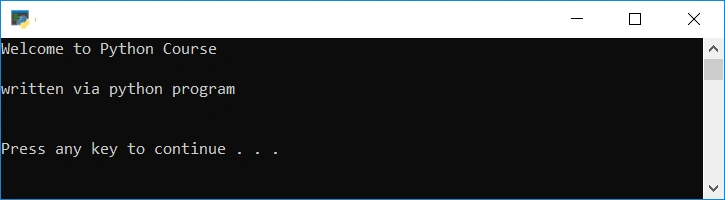
This method is used to iterate through the file data ( line by line) when a file is used as an iterator. This method returns the next input line. Let’s have a look the code implementation
- try:
- with open("c:\\welcome.txt") as file:
- try:
- line = next(file)
- while line:
- print(line)
- line=next(file)
- except Exception as e:
- print(e)
- file.close()
- except FileNotFoundError as fileNotFoundError:
- print(fileNotFoundError)
- except Exception as ex:
- print(ex)
flush()
This method is used to flush the internal buffer. It has no return value. close() automatically flushes the data but if you want to flush the data before closing the file then you can use this method.
close()
Used to close an open file. A closed file cannot be read or written any more.
Conclusion
In this article we have read about various operations Python program provides for the text file management.
Join the conversation! Your thoughts help the community grow.