

This article describes a new method introduced in .NET 4.0 using which developers can interact with file systems very quickly, especially for searching files and folders. In .NET Framework version 4, you can enumerate directories and files by using methods that return an enumerable collection. You can also use methods that return an enumerable collection of DirectoryInfo, FileInfo, or FileSystemInfo objects. In previous versions of the .NET Framework, you could only obtain arrays of these collections. Enumerable collections provide better performance than arrays.
I created a small tool for searching folders and files inside a root path using .NET 4.0 ways. I have a folderbrowserdialog control to set a root path and 2 list boxes. First list box will display all folders and subfolders of the selected root path and second listbox will display the files directly under selected folder of first listbox. Once running the application, you will feel the smoothness of updated way of .NET 4.0 file system queries. In below section, I am explaining the code which has attached to this article.
Setting Root Path
You just browse a folder by clicking button "Set Search Directory" and I selected C drive.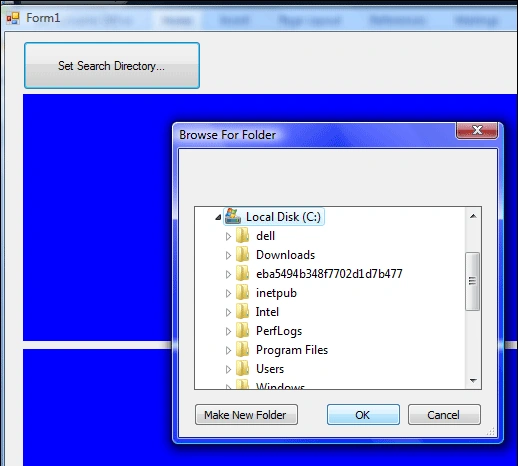
Once above selection happening below code will be executed.
Loading Folders using Enumerable Collection Methods
if (folderBrowserDialog1.ShowDialog().Equals(DialogResult.OK))
{
try
{
var dirNames = from dirs in Directory.EnumerateDirectories(folderBrowserDialog1.SelectedPath, "*.*", SearchOption.AllDirectories) select dirs;


Steven van DijkPosted Jun 15, 2010, 2:08 PM
The zip attached to this article shows something about Tuple's. It doesn't contain the code from the article.