

Selecting the right PDF library is a critical decision for any .NET developer tasked with generating PDF documents. The landscape has evolved significantly, moving from simple wrappers to sophisticated engines. In this guide, we will explore PDF document hierarchy and compare two of the most popular choices: QuestPDF and IronPDF .
The Evolution of the Modern PDF Library
In the early days of .NET, generating PDF documents often required manual calculation of coordinates or using outdated wrappers. Today, a modern library needs to offer more than just basic drawing capabilities. Developers look for tools that offer a comprehensive layout engine to handle complex layouts without the headache of manual positioning.
QuestPDF has emerged as a production ready library that prioritizes a code-first approach, while IronPDF has built its reputation on the strength of its HTML to PDF conversion capabilities. Both tools aim to simplify the document structure, but they do so using very different philosophies.
QuestPDF: A Code-First Approach to Document Design
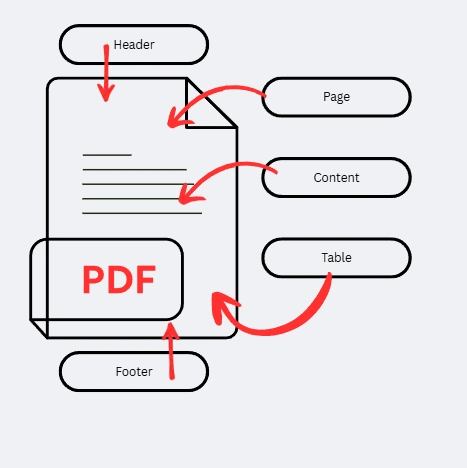
QuestPDF is a modern library designed specifically for PDF generation using a fluent API. Unlike libraries that rely on HTML rendering, QuestPDF uses its own specialized engine built on top of SkiaSharp. This allows for precise content positioning and high throughput enterprise applications where performance is paramount.
When you use QuestPDF, you are not just drawing shapes; you are building a PDF document hierarchy. Every element is part of a larger document structure that is automatically validated during the build process. This ensures that the QuestPDF engine can render the generated PDF with pixel-perfect accuracy.
Key Features of QuestPDF
The QuestPDF library offers a range of tools designed for modern developers:
A fluent API for readable code.
A comprehensive layout engine for complex layouts.
Full paging support and automatic pagination.
Live document preview with hot reload capability.
Complete data privacy with no external API calls.
Feature Highlight: The Fluent API for Generating PDF Documents
The fluent API is the heart of the QuestPDF experience. It allows you to create documents using familiar programming patterns rather than learning a new templating language. Below is a code snippets identify example of how the fluent API looks in practice for a basic document.
    using QuestPDF.Fluent;
using QuestPDF.Helpers;
using QuestPDF.Infrastructure;

// Essential setup for QuestPDF
QuestPDF.Settings.License = LicenseType.Community;

Document.Create(container =>
{
    container.Page(page =>
    {
        page.Size(PageSizes.A4);
        page.Margin(1, Unit.Centimetre);
        page.PageColor(Colors.White);
        page.DefaultTextStyle(x => x.FontSize(12));

        page.Header().Text("Corporate Report").SemiBold().FontSize(20).FontColor(Colors.Blue.Medium);

        page.Content().PaddingVertical(1, Unit.Centimetre).Column(x =>
        {
            x.Spacing(20);
            x.Item().Text(Placeholders.LoremIpsum());
            x.Item().Image(Placeholders.Image(200, 100));
        });

        page.Footer().AlignCenter().Text(x =>
        {
            x.Span("Page ");
            x.CurrentPageNumber();
        });
    });
}).GeneratePdf("sample_document.pdf");
Output
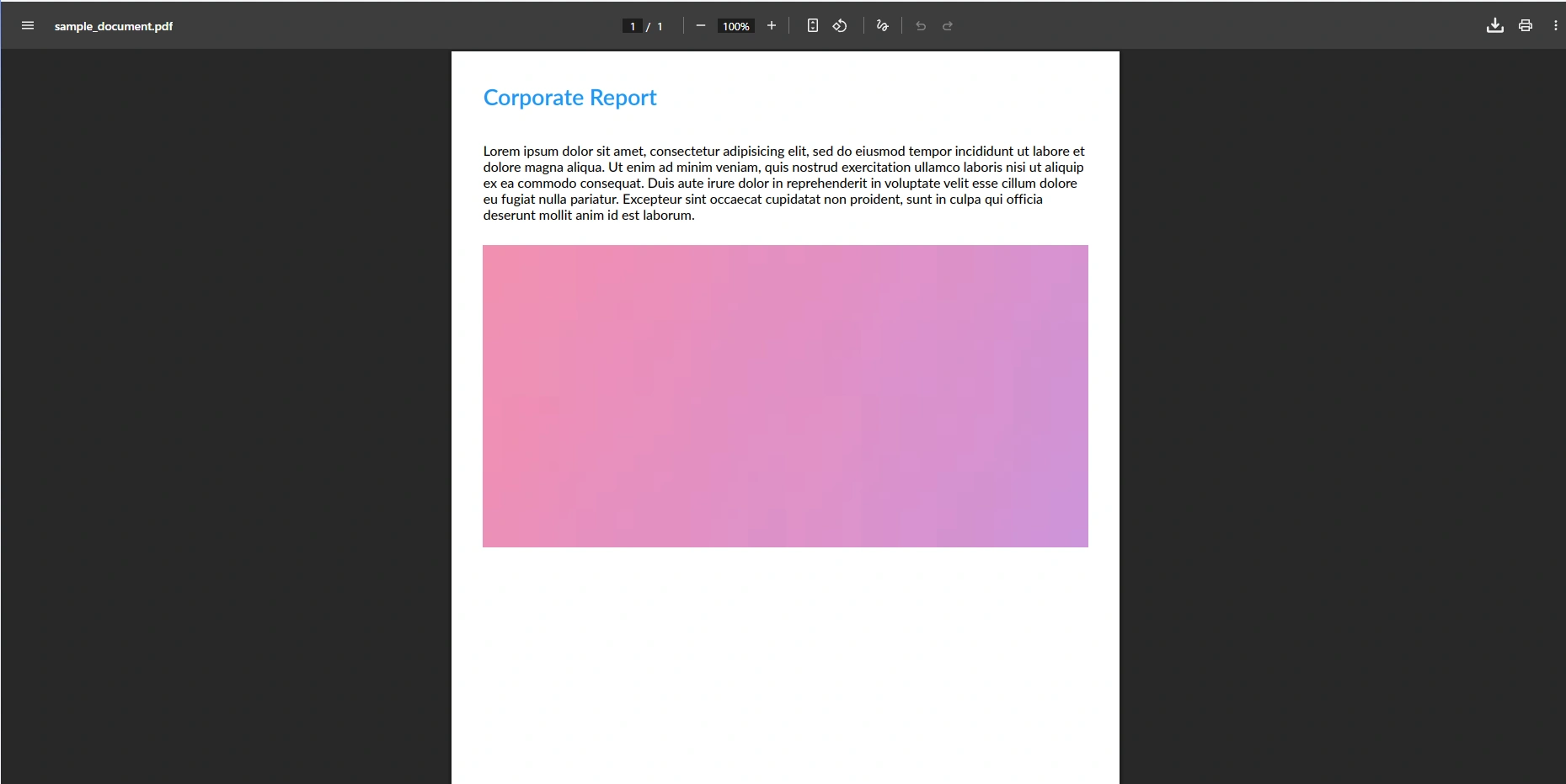
In this code snippets identify how the fluent API allows you to chain methods to build the PDF document hierarchy. The QuestPDF engine handles the heavy lifting of automatic pagination and precise content positioning.
IronPDF: The HTML to PDF Powerhouse
While QuestPDF focuses on a programmatic approach, IronPDF is a robust PDF library that excels at HTML to PDF conversion. It allows developers to use their existing programming language skills alongside web technologies like HTML and CSS to create documents.
IronPDF is a powerful PDF converter that uses the Google Chromium engine to render content. This makes it ideal for teams who want to reuse existing web layouts for their PDF document generation needs.
Key Features of IronPDF
IronPDF provides features that differ from the QuestPDF library:
High-fidelity HTML to PDF capabilities.
Support for CSS3, JavaScript, and images.
The ability to merge, split, and edit existing PDF documents.
Digital signatures and advanced security settings.
PDF conversion from URLs or Razor views.
Feature Highlight: IronPDF Convert HTML to PDF with Ease
Using IronPDF is straightforward for those familiar with web design. It allows you to convert HTML into a generated PDF in just a few lines of code.
    using IronPdf;

// Instantiate the renderer
var renderer = new ChromePdfRenderer();

// Create a PDF from an HTML string
var htmlContent = @"
    <html>
    <head>
        <style>
            body { font-family: 'Arial', sans-serif; margin: 40px; }
            h1 { color: #2c3e50; }
            table { width: 100%; border-collapse: collapse; }
            th, td { border: 1px solid #ddd; padding: 8px; text-align: left; }
        </style>
    </head>
    <body>
        <h1>Corporate Overview</h1>
        <p>This document was generated using IronPDF conversion logic.</p>
        <table>
            <tr><th>Department</th><th>Status</th></tr>
            <tr><td>Development</td><td>Active</td></tr>
        </table>
    </body>
    </html>";

var pdf = renderer.RenderHtmlAsPdf(htmlContent);

// Save the PDF file
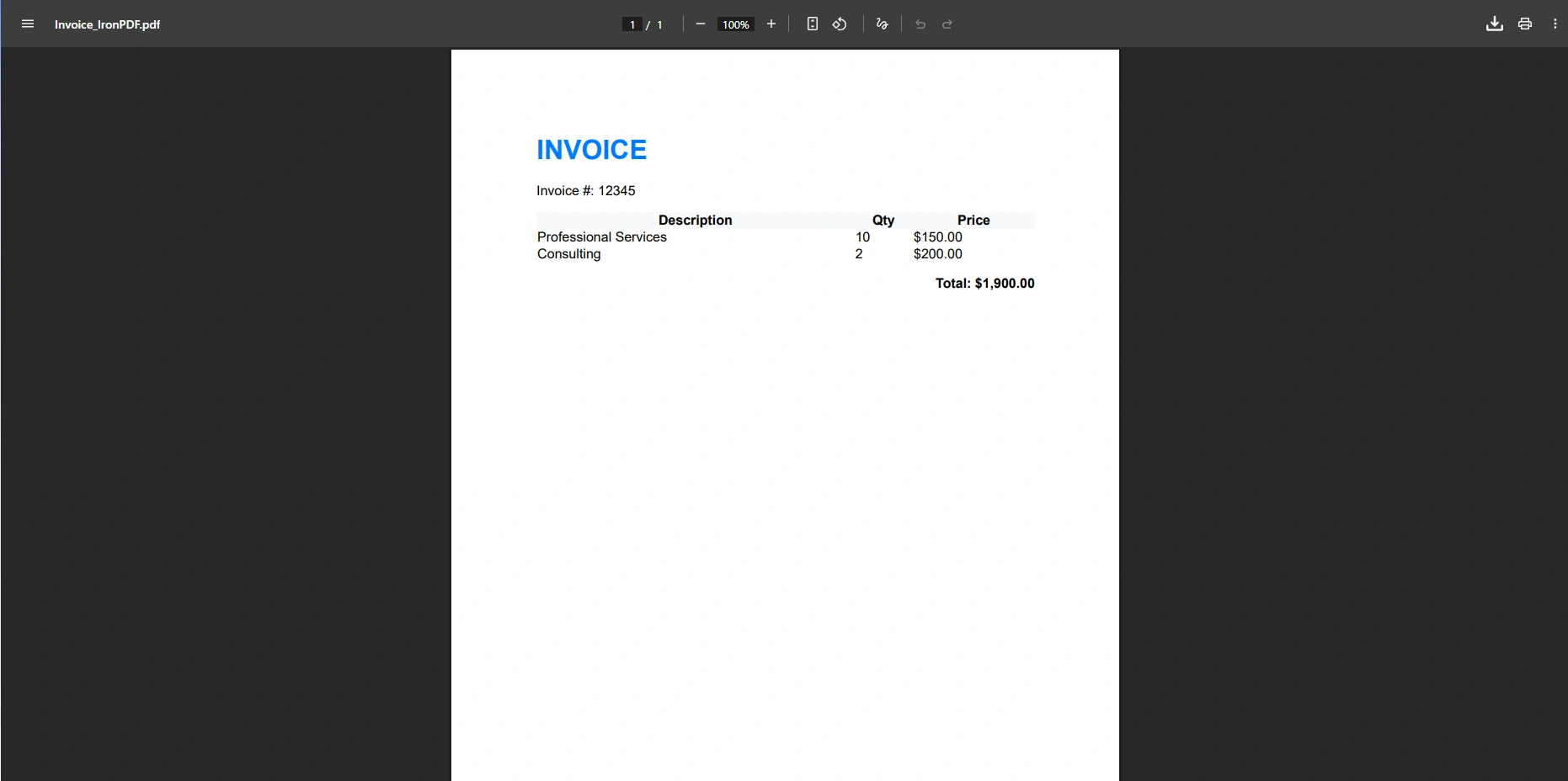
pdf.SaveAs("IronPDF_Output.pdf");
Output
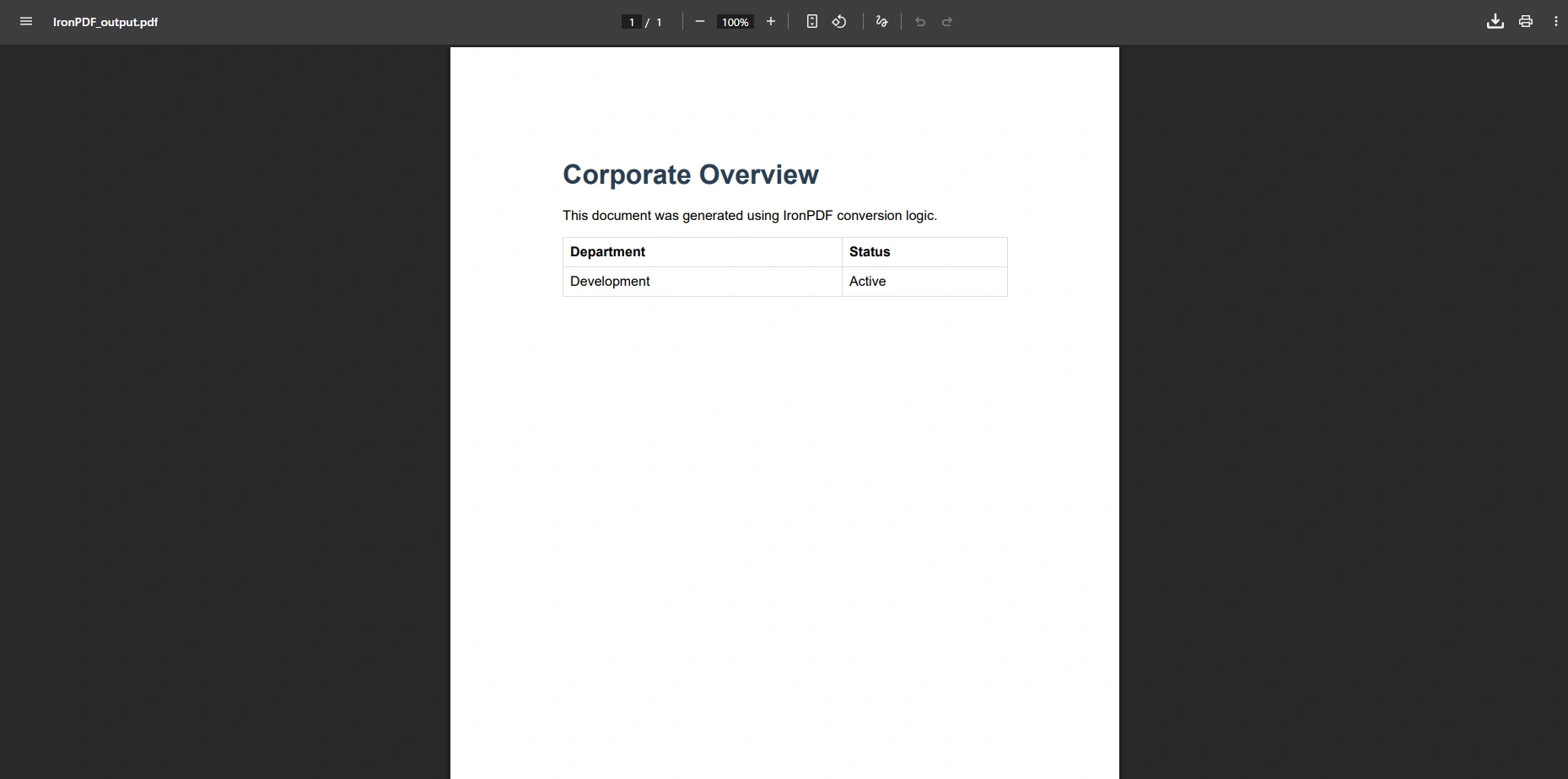
This approach is highly effective if you want to convert HTML fragments or full web pages. However, it requires a browser engine to be bundled, which can increase the memory usage and CPU footprint compared to the leaner QuestPDF approach.
Comparing Document Structure and Layout Engines
When we explore PDF document hierarchy, we see that QuestPDF treats the document as a series of nested containers. This document structure is highly predictable and prevents common layout issues found in CSS-based rendering.
The comprehensive layout engine in QuestPDF is built specifically for paging support. It knows how to split a table across multiple pages while keeping headers visible, a task that can sometimes be difficult with traditional HTML to PDF conversion.
Conversely, IronPDF relies on the Chromium engine's print-to-PDF logic. While this provides visually identical output to a web browser, it may not offer the same level of full control over the specific PDF document hierarchy that a code-first library provides.
Security, Privacy, and Data Handling
Data privacy is a non-negotiable requirement for enterprise software. Both libraries excel here by operating entirely on-premise; since no data ever leaves your server for external API processing, your sensitive information remains secure within your infrastructure.
However, IronPDF offers a distinct advantage for security-conscious organizations. As a long-standing commercial product, IronPDF is backed by a dedicated security team and offers a comprehensive support structure that many enterprises require for compliance and risk management. Furthermore, because IronPDF utilizes the Google Chromium engine, it benefits from the massive, ongoing security investments and sandboxing technologies developed by one of the world's largest tech companies. For organizations that need "bank-grade" assurance and a vendor they can hold accountable via a commercial agreement, IronPDF is the established choice for production environments.
Join the conversation! Your thoughts help the community grow.