

Read the previous parts of the series here,
- Quick Start Tutorial: Creating Universal Apps Via Xamarin - Part One
- Quick Start Tutorial: Creating Universal Apps Via Xamarin - Part Two
- Quick Start Tutorial: Creating Universal Apps via Xamarin: Label and Button - Part Three
- Quick Start Tutorial: Creating Universal Apps Via Xamarin: Device class - Part Four
- Quick Start Tutorial: Creating Universal Apps via Xamarin: Device Class (cont.) - Part Five
- Quick Start Tutorial: Creating Universal Apps Via Xamarin: Entry Control - Part Six
- Quick Start Tutorial: Creating Universal Apps Via Xamarin: StackLayout and Layout Options - Part Seven
- Quick Start Tutorial: Creating Universal Apps Via Xamarin: DisplayAlert and DisplayActionSheet - Part Eight
- Quick Start Tutorial: Creating Universal Apps Via Xamarin: Date Picker, Time Picker and Activity Indicator - Part Nine
- Quick Start Tutorial: Creating Universal Apps Via Xamarin: XAML And Resource Dictionary - Part Ten
- Quick Start Tutorial: Creating Universal Apps via Xamarin: Style in XAML - Part Eleven
Style in Inheritance
Style can be derived from another style; BasedOn and BaseResoruceKey can be used to implement the inheritance concept.
BasedOn
BasedOn style supports the StaticResource (value can’t be changed at runtime) and the inheritance of both types are Base Style and Derive type, and should be of the same target type.
Syntax of Inheritance Style
- <Style x: Key="KeyName" TargetType="Control Type" BasedOn="{StaticResource StyleName}”>
- <Setter Property="PropertyName" Value="PropertyValue"/>
- < /Style>
Example
- <ContentPage.Resources>
- <ResourceDictionary>
- <Style x:Key="BaseLabelStyle" TargetType="Label">
- <Setter Property="FontSize" Value="20" />
- </Style>
- <Style x:Key="LabelStyle" TargetType="Label" BasedOn="{StaticResource BaseLabelStyle}">
- <Setter Property="TextColor" Value="Red" />
- </Style>
- </ResourceDictionary>
- </ContentPage.Resources>
- <StackLayout>
- <Label Text="BasedOn Style" Style="{StaticResource LabelStyle}"/>
- </StackLayout>

BaseResourceKey
BaseResourceKey is used at runtime to change the base type value and assign it to the control. If key is not present in the ResourceDictionary, it won’t throw an exception.
Syntax
- <Style x: Key="KeyName" TargetType="Control Type" BaseResourceKey="{StyleName}”>
- <Setter Property="PropertyName" Value="PropertyValue"/>
- < /Style>
Example: Runtime change the values,
- <ContentPage.Resources>
- <ResourceDictionary>
- <Style x:Key="baseLabelResourceKey" TargetType="Label">
- <Setter Property="TextColor" Value="Green" />
- </Style>
- <Style x:Key="DynamicStyle" TargetType="Label" BaseResourceKey="baseLabelResourceKey">
- <Setter Property="FontSize" Value="50" />
- </Style>
- </ResourceDictionary>
- </ContentPage.Resources>
- <StackLayout>
- <Label Text="BaseResourceKey" Style="{StaticResource DynamicStyle}"/>
- <Button Text="Click to Change" Clicked="Button_OnClicked" />
- </StackLayout>
- private void Button_OnClicked(object sender, EventArgs e)
- {
- CreateDynamicStyle();
- }
- private void CreateDynamicStyle()
- {
- var labelStyle = new Style(typeof(Label))
- {
- Setters =
- {
- new Setter { Property = Label.TextColorProperty, Value = Color.Maroon }
- }
- };
- this.Resources["baseLabelResourceKey"] = labelStyle;
- }

Xamarin Supports Pre-Defined Styles
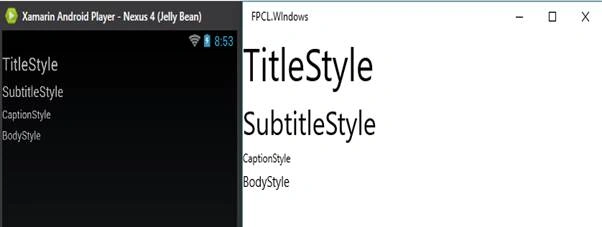
Xamarin supports some of the predefined styles by default; it includes OnPlatform functionality, and based on the platform, style will change and the predefined style should be defined as the DynamicResource.

We can inherit the system style into the user defined styles.
Example
- <StackLayout>
- <Label Text="TitleStyle" Style="{DynamicResource TitleStyle}"/>
- <Label Text="SubtitleStyle" Style="{DynamicResource SubtitleStyle}"/>
- <Label Text="CaptionStyle" Style="{DynamicResource CaptionStyle}"/>
- <Label Text="BodyStyle" Style="{DynamicResource BodyStyle}"/>
- </StackLayout>
Davronbek UmirovPosted Jun 28, 2016, 3:54 AM
Nice..
Debasis SahaPosted Jun 27, 2016, 2:53 AM
Nice one..
kalu singh raoPosted Jun 27, 2016, 1:44 AM
Nice...
Thiruppathi RPosted Jun 27, 2016, 1:04 AM
Nice
Anu VPosted Jun 27, 2016, 12:29 AM
Nice
RajaPosted Jun 27, 2016, 12:26 AM
Good One...
Vignesh ManiPosted Jun 26, 2016, 4:41 PM
Ncie
Debasis SahaPosted Jun 25, 2016, 2:53 AM
Nice one..
Santhakumar MunuswamyPosted Jun 25, 2016, 12:20 AM
Nice share
Prasanna MuraliPosted Jun 24, 2016, 9:41 PM
Nice one..
Bhuvanesh MohankumarPosted Jun 24, 2016, 12:38 PM
Good one