Most RabbitMQ samples stop at sending "Hello World" and receiving it. That shows the API, but it skips the questions you face in a real service. What happens if the broker never received the message? What happens when the email provider is down? Where does a message go when it can never succeed?
In this article, we build a small order API with .NET 10 Minimal APIs and answer those three questions. An HTTP endpoint publishes an OrderPlaced event, and a background consumer sends a confirmation email. Failed messages wait 10 seconds and try again. After four attempts, they move to a dead-letter queue for a person to inspect.
What We Are Building
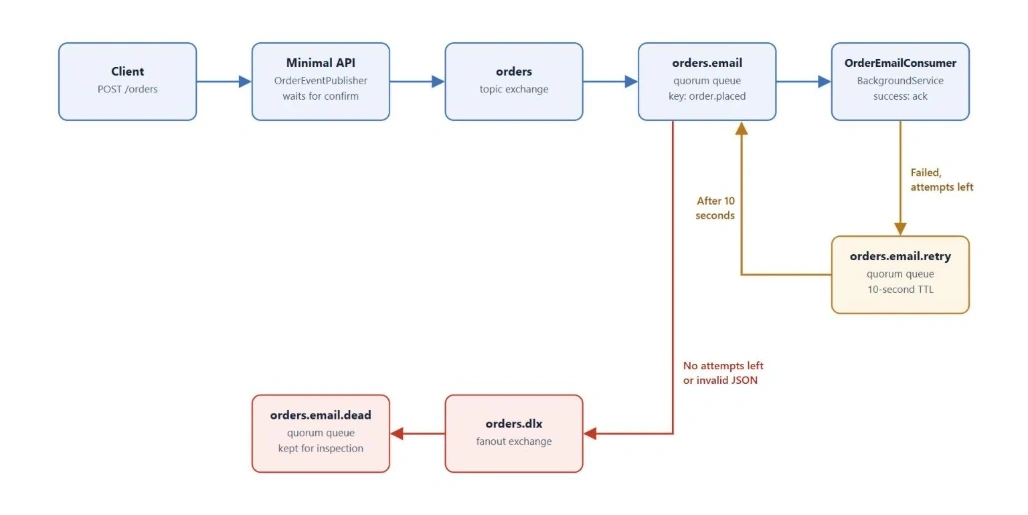
Name | Type | Purpose |
|---|
orders | Topic exchange | Receives all order events |
orders.email | Quorum queue | Holds work for the email consumer |
orders.email.retry | Quorum queue | Holds failed messages for 10 seconds |
orders.dlx | Fanout exchange | Receives messages that have given up |
orders.email.dead | Quorum queue | Stores those messages for inspection |
Prerequisites
Start RabbitMQ with the management UI:
docker run -d --name rabbitmq -p 5672:5672 -p 15672:15672 rabbitmq:4-management
The management UI is at http://localhost:15672. The default login is guest / guest, which only works from localhost.
Create the project and add the client:
dotnet new web -n OrderFlow.Api
cd OrderFlow.Api
dotnet add package RabbitMQ.Client --version 7.2.2
Step 1: Add the Configuration
Add this section to appsettings.json. In production, keep the password in a secret store or an environment variable.
"RabbitMq": {
  "HostName": "localhost",
  "Port": 5672,
  "UserName": "guest",
  "Password": "guest",
  "VirtualHost": "/"
}
Create RabbitMqOptions.cs:
public sealed class RabbitMqOptions
{
    public string HostName { get; set; } = "localhost";
    public int Port { get; set; } = 5672;
    public string UserName { get; set; } = "guest";
    public string Password { get; set; } = "guest";
    public string VirtualHost { get; set; } = "/";
}
Step 2: Define the Contracts
Create Contracts.cs. The request uses data annotations because .NET 10 Minimal APIs can validate them without extra packages.
using System.ComponentModel.DataAnnotations;

public sealed record PlaceOrderRequest(
    [Required, EmailAddress] string CustomerEmail,
    [Range(1, 1000000)] decimal Amount);

public sealed record OrderPlaced(
    Guid OrderId,
    string CustomerEmail,
    decimal Amount,
    DateTimeOffset PlacedAt);
Step 3: Share One Long-Lived Connection
The RabbitMQ documentation strongly discourages opening a connection for each operation. Connections are expensive, so we keep one for the life of the app.
In client version 7, creating a connection is asynchronous, so a simple singleton registration doesn't fit well. This small provider creates the connection on first use. It also lets the app start while the broker is down.
using Microsoft.Extensions.Options;
using RabbitMQ.Client;

public sealed class RabbitMqConnectionProvider(IOptions<RabbitMqOptions> options)
    : IAsyncDisposable
{
    private readonly SemaphoreSlim _gate = new(1, 1);
    private IConnection? _connection;

    public async Task<IConnection> GetAsync(CancellationToken ct)
    {
        if (_connection is not null)
        {
            return _connection;
        }

        await _gate.WaitAsync(ct);
        try
        {
            if (_connection is null)
            {
                var settings = options.Value;
                var factory = new ConnectionFactory
                {
                    HostName = settings.HostName,
                    Port = settings.Port,
                    UserName = settings.UserName,
                    Password = settings.Password,
                    VirtualHost = settings.VirtualHost,
                    ClientProvidedName = "orderflow-api",
                    AutomaticRecoveryEnabled = true,
                    NetworkRecoveryInterval = TimeSpan.FromSeconds(5)
                };

                _connection = await factory.CreateConnectionAsync(ct);
            }

            return _connection;
        }
        finally
        {
            _gate.Release();
        }
    }

    public async ValueTask DisposeAsync()
    {
        if (_connection is not null)
        {
            await _connection.DisposeAsync();
        }

        _gate.Dispose();
    }
}
ClientProvidedName is a small detail that helps later. It shows this name in the management UI and server logs, so you can identify which app owns a connection.
Step 4: Declare the Topology in One Place
The publisher and the consumer can start in any order, so both declare the topology. Declaring is safe to repeat when the settings match.
Create OrderTopology.cs:
using RabbitMQ.Client;

public static class OrderTopology
{
    public const string Exchange = "orders";
    public const string PlacedRoutingKey = "order.placed";
    public const string EmailQueue = "orders.email";
    public const string RetryQueue = "orders.email.retry";
    public const string DeadLetterExchange = "orders.dlx";
    public const string DeadLetterQueue = "orders.email.dead";

    public static readonly CreateChannelOptions ConfirmedChannel = new(
        publisherConfirmationsEnabled: true,
        publisherConfirmationTrackingEnabled: true);

    public static async Task DeclareAsync(IChannel channel, CancellationToken ct)
    {
        await channel.ExchangeDeclareAsync(
            Exchange, ExchangeType.Topic, durable: true, autoDelete: false,
            cancellationToken: ct);

        await channel.ExchangeDeclareAsync(
            DeadLetterExchange, ExchangeType.Fanout, durable: true, autoDelete: false,
            cancellationToken: ct);

        await channel.QueueDeclareAsync(
            DeadLetterQueue, durable: true, exclusive: false, autoDelete: false,
            arguments: new Dictionary<string, object?>
            {
                ["x-queue-type"] = "quorum"
            },
            cancellationToken: ct);

        await channel.QueueBindAsync(
            DeadLetterQueue, DeadLetterExchange, routingKey: string.Empty,
            cancellationToken: ct);

        await channel.QueueDeclareAsync(
            EmailQueue, durable: true, exclusive: false, autoDelete: false,
            arguments: new Dictionary<string, object?>
            {
                ["x-queue-type"] = "quorum",
                ["x-dead-letter-exchange"] = DeadLetterExchange
            },
            cancellationToken: ct);

        await channel.QueueBindAsync(
            EmailQueue, Exchange, PlacedRoutingKey,
            cancellationToken: ct);

        await channel.QueueDeclareAsync(
            RetryQueue, durable: true, exclusive: false, autoDelete: false,
            arguments: new Dictionary<string, object?>
            {
                ["x-queue-type"] = "quorum",
                ["x-message-ttl"] = 10000,
                ["x-dead-letter-exchange"] = string.Empty,
                ["x-dead-letter-routing-key"] = EmailQueue
            },
            cancellationToken: ct);
    }
}
The retry queue has no consumer, and that is what creates the delay. A message waits there for 10 seconds, expires, and is dead-lettered back to orders.email through the default exchange. No timer runs in our app.
Step 5: Publish with Confirms
By default, publishing doesn't prove that the broker accepted your message. With publisher confirmations and tracking enabled on the channel, BasicPublishAsync finishes only after the broker confirms the message.
Setting mandatory: true covers a second case: a message that matches no queue is returned to the publisher instead of being dropped silently.
The documentation also says a channel must not be shared by threads that publish on it. A Minimal API singleton serves many requests at once, so we protect the channel with a semaphore.
Create OrderEventPublisher.cs:
using System.Text.Json;
using RabbitMQ.Client;

public sealed class OrderEventPublisher(RabbitMqConnectionProvider connections)
    : IAsyncDisposable
{
    private readonly SemaphoreSlim _gate = new(1, 1);
    private IChannel? _channel;

    public async Task PublishAsync(OrderPlaced order, CancellationToken ct)
    {
        var body = JsonSerializer.SerializeToUtf8Bytes(order);
        var properties = new BasicProperties
        {
            ContentType = "application/json",
            DeliveryMode = DeliveryModes.Persistent,
            MessageId = order.OrderId.ToString(),
            Type = nameof(OrderPlaced)
        };

        await _gate.WaitAsync(ct);
        try
        {
            var channel = await GetChannelAsync(ct);
            await channel.BasicPublishAsync(
                OrderTopology.Exchange,
                OrderTopology.PlacedRoutingKey,
                mandatory: true,
                basicProperties: properties,
                body: body,
                cancellationToken: ct);
        }
        finally
        {
            _gate.Release();
        }
    }

    private async Task<IChannel> GetChannelAsync(CancellationToken ct)
    {
        if (_channel is { IsOpen: true })
        {
            return _channel;
        }

        if (_channel is not null)
        {
            await _channel.DisposeAsync();
        }

        var connection = await connections.GetAsync(ct);
        _channel = await connection.CreateChannelAsync(OrderTopology.ConfirmedChannel, ct);
        await OrderTopology.DeclareAsync(_channel, ct);
        return _channel;
    }

    public async ValueTask DisposeAsync()
    {
        if (_channel is not null)
        {
            await _channel.DisposeAsync();
        }

        _gate.Dispose();
    }
}
The trade-off is throughput, because one request waits for the previous confirmation. That is fine for an order API. For high-volume publishing, use a small pool of channels or publish in batches.
Step 6: Consume with Retries
The consumer runs as a BackgroundService. Each message ends in one of four ways:
Success: acknowledge it.
Invalid JSON: reject it immediately, because a retry can't fix it.
Failure with attempts left: copy it to the retry queue with a higher attempt count, then acknowledge the original.
Failure with no attempts left: reject it so it moves to the dead-letter queue.
Why not just use BasicNackAsync with requeue: true? The message would return immediately, so a provider outage would burn through your retries in moments. We also keep our own x-attempt header, so the retry count doesn't depend on how a broker version counts requeues.
Create OrderEmailConsumer.cs:
using System.Text.Json;
using RabbitMQ.Client;
using RabbitMQ.Client.Events;
using RabbitMQ.Client.Exceptions;

public sealed class OrderEmailConsumer(
    RabbitMqConnectionProvider connections,
    ILogger<OrderEmailConsumer> logger) : BackgroundService
{
    private const int MaxAttempts = 4;
    private const string AttemptHeader = "x-attempt";

    private IChannel? _channel;

    protected override async Task ExecuteAsync(CancellationToken stoppingToken)
    {
        while (!stoppingToken.IsCancellationRequested)
        {
            try
            {
                await StartConsumingAsync(stoppingToken);
                return;
            }
            catch (BrokerUnreachableException ex)
            {
                logger.LogWarning(ex, "RabbitMQ is unreachable. Retrying in 5 seconds.");
                await Task.Delay(TimeSpan.FromSeconds(5), stoppingToken);
            }
        }
    }

    private async Task StartConsumingAsync(CancellationToken ct)
    {
        var connection = await connections.GetAsync(ct);
        var channel = await connection.CreateChannelAsync(OrderTopology.ConfirmedChannel, ct);
        _channel = channel;

        await OrderTopology.DeclareAsync(channel, ct);
        await channel.BasicQosAsync(prefetchSize: 0, prefetchCount: 10, global: false, ct);

        var consumer = new AsyncEventingBasicConsumer(channel);
        consumer.ReceivedAsync += (_, delivery) => HandleAsync(channel, delivery, ct);

        await channel.BasicConsumeAsync(OrderTopology.EmailQueue, autoAck: false, consumer, ct);
    }

    private async Task HandleAsync(
        IChannel channel, BasicDeliverEventArgs delivery, CancellationToken ct)
    {
        var attempt = GetAttempt(delivery.BasicProperties);

        try
        {
            var order = JsonSerializer.Deserialize<OrderPlaced>(delivery.Body.Span)
                ?? throw new JsonException("The message body is empty.");

            await SendConfirmationEmailAsync(order, ct);
            await channel.BasicAckAsync(delivery.DeliveryTag, multiple: false);
        }
        catch (OperationCanceledException) when (ct.IsCancellationRequested)
        {
            // The app is stopping. The unacknowledged message will be redelivered.
        }
        catch (JsonException ex)
        {
            logger.LogError(ex, "Invalid message {MessageId}.", delivery.BasicProperties.MessageId);
            await channel.BasicRejectAsync(delivery.DeliveryTag, requeue: false);
        }
        catch (Exception ex) when (attempt < MaxAttempts)
        {
            logger.LogWarning(ex, "Attempt {Attempt} failed for {MessageId}.",
                attempt, delivery.BasicProperties.MessageId);

            await ScheduleRetryAsync(channel, delivery, attempt + 1);
            await channel.BasicAckAsync(delivery.DeliveryTag, multiple: false);
        }
        catch (Exception ex)
        {
            logger.LogError(ex, "Giving up on {MessageId} after {Attempt} attempts.",
                delivery.BasicProperties.MessageId, attempt);

            await channel.BasicRejectAsync(delivery.DeliveryTag, requeue: false);
        }
    }

    private static int GetAttempt(IReadOnlyBasicProperties properties) =>
        properties.Headers?.TryGetValue(AttemptHeader, out var value) == true
        && value is int attempt
            ? attempt
            : 1;

    private static async Task ScheduleRetryAsync(
        IChannel channel, BasicDeliverEventArgs delivery, int nextAttempt)
    {
        var properties = new BasicProperties
        {
            ContentType = delivery.BasicProperties.ContentType,
            DeliveryMode = DeliveryModes.Persistent,
            MessageId = delivery.BasicProperties.MessageId,
            Type = delivery.BasicProperties.Type,
            Headers = new Dictionary<string, object?>
            {
                [AttemptHeader] = nextAttempt
            }
        };

        await channel.BasicPublishAsync(
            exchange: string.Empty,
            routingKey: OrderTopology.RetryQueue,
            mandatory: true,
            basicProperties: properties,
            body: delivery.Body);
    }

    private async Task SendConfirmationEmailAsync(OrderPlaced order, CancellationToken ct)
    {
        await Task.Delay(200, ct);

        // Simulates a failing email provider so you can test the retry flow.
        if (order.CustomerEmail.EndsWith("@fail.test", StringComparison.OrdinalIgnoreCase))
        {
            throw new InvalidOperationException("The email provider rejected the message.");
        }

        logger.LogInformation("Confirmation sent for order {OrderId}.", order.OrderId);
    }

    public override async Task StopAsync(CancellationToken cancellationToken)
    {
        await base.StopAsync(cancellationToken);

        if (_channel is not null)
        {
            await _channel.DisposeAsync();
        }
    }
}
Two details are easy to miss:
We publish the retry before acknowledging the original. If the app crashes between those two calls, the message may run twice, but it won't be lost.
delivery.Body is only safe to use while the handler is running. Deserialize it or copy it before the handler returns. Our code awaits everything inside the handler, so this is safe.
Step 7: Wire Up the Minimal API
Replace Program.cs with this code:
using RabbitMQ.Client.Exceptions;

var builder = WebApplication.CreateBuilder(args);

builder.Services.Configure<RabbitMqOptions>(builder.Configuration.GetSection("RabbitMq"));
builder.Services.AddValidation();
builder.Services.AddSingleton<RabbitMqConnectionProvider>();
builder.Services.AddSingleton<OrderEventPublisher>();
builder.Services.AddHostedService<OrderEmailConsumer>();

var app = builder.Build();

app.MapPost("/orders", async (
    PlaceOrderRequest request,
    OrderEventPublisher publisher,
    ILogger<Program> logger,
    CancellationToken ct) =>
{
    var order = new OrderPlaced(
        Guid.NewGuid(), request.CustomerEmail, request.Amount, DateTimeOffset.UtcNow);

    try
    {
        await publisher.PublishAsync(order, ct);
    }
    catch (Exception ex) when (ex is BrokerUnreachableException
        or OperationInterruptedException
        or PublishException)
    {
        logger.LogError(ex, "Could not publish order {OrderId}.", order.OrderId);
        return Results.Problem(
            "The order could not be queued. Please try again.",
            statusCode: StatusCodes.Status503ServiceUnavailable);
    }

    return Results.Accepted($"/orders/{order.OrderId}", new { order.OrderId });
});

app.Run();
The endpoint returns 202 Accepted because the email hasn't been sent yet. It only promises that the broker has the work. If the broker can't confirm the message, the client gets 503 and knows to try again.
With AddValidation(), an invalid request gets 400 Bad Request before the handler runs.
Step 8: Try It
Run the app with dotnet run and use the port shown in the console. Replace 5000 below if yours is different.
Successful order:
curl -i -X POST http://localhost:5000/orders \
  -H "Content-Type: application/json" \
  -d '{"customerEmail":"[email protected]","amount":499}'
You should get 202 Accepted, and the log should show that the confirmation was sent.
Failing order:
curl -i -X POST http://localhost:5000/orders \
  -H "Content-Type: application/json" \
  -d '{"customerEmail":"[email protected]","amount":499}'
The API still returns 202, because publishing succeeded. The log should show three failed attempts about 10 seconds apart, then a final failure. After that, the message appears in orders.email.dead in the management UI.
Invalid order: send an invalid email address or an amount of 0, and you should get 400 Bad Request.
Before You Go to Production
Make consumers idempotent. RabbitMQ delivery here is at-least-once, so a customer could get two emails. Use MessageId with a unique database constraint to skip duplicates.
Use an outbox for database writes. Saving an order and publishing an event are two separate operations. If you do both, the transactional outbox pattern stops one from succeeding without the other.
Don't re-register consumers after recovery. Automatic recovery restores connections and consumers. Registering them again can cause a duplicate consumer tag error.
Handle channel errors. Automatic recovery doesn't cover channels closed by a channel-level exception, such as consuming from a queue that doesn't exist. Log those failures and alert on them.
Watch out for changed queue settings. Declaring an existing queue with different arguments fails. To change the TTL, delete the queue or create a new one.
Monitor the dead-letter queue. A growing queue that nobody watches is just a slower way to lose data. Add an alert and a way to replay messages.
Scale deliberately. Consumer callbacks run one at a time by default. Raise ConsumerDispatchConcurrency only when your handler is safe to run in parallel.
Conclusion
RabbitMQ.Client 7 fits Minimal APIs well because its API is asynchronous from connection to acknowledgement. The reliability comes from a few decisions: confirm every publish, keep connections long-lived, retry with a delay, and give failed messages a place to go.
The 202 response in this sample is meaningful because the broker has confirmed the order. From there, a failed email either retries or ends up somewhere you can inspect it.
RabbitMQ.NET 10ASP.NET Core Minimal APIspublisher confirmsretry queuedead-letter queueRabbitMQ.Client


Join the conversation! Your thoughts help the community grow.