

Introduction
In this article, you will learn about RANK, DENSE_RANK and ROW_NUMBER functions in SQL Server.
RANK, DENSE_RANK and ROW_NUMBER functions in SQL Server
- The RANK, DENSE_RANK and ROW_NUMBER functions are used to get the increasing integer value, based on the ordering of rows by imposing ORDER BY clause in SELECT statement.
- When we use RANK, DENSE_RANK or ROW_NUMBER functions, the ORDER BY clause is required and PARTITION BY clause is optional.
- When we use PARTITION BY clause, the selected data will get partitioned, and the integer value is reset to 1 when the partition changes.
Let’s see an example.
For this example, I have created a table called Employees in which I have added three columns EMPID, Name, and Salary respectively. To create table and column, the script is as given below.
Creating a table
CREATE TABLE [dbo].[Employee](
    [EMPID] [nvarchar](30) NOT NULL,
    [Name] [nvarchar](150) NULL,
    [Salary] [money] NULL
)
Insert some data into this table, script as follows
INSERT [dbo].[Employee] ([EMPID], [Name], [Salary]) VALUES ('EMP101', 'Vishal', 15000)
INSERT [dbo].[Employee] ([EMPID], [Name], [Salary]) VALUES ('EMP102', 'Sam', 20000)
INSERT [dbo].[Employee] ([EMPID], [Name], [Salary]) VALUES ('EMP105', 'Ravi', 10000)
INSERT [dbo].[Employee] ([EMPID], [Name], [Salary]) VALUES ('EMP106', 'Mahesh', 18000)
The table is created and data is inserted. Now, let’s see how these about RANK, DENSE_RANK and ROW_NUMBER functions behave.
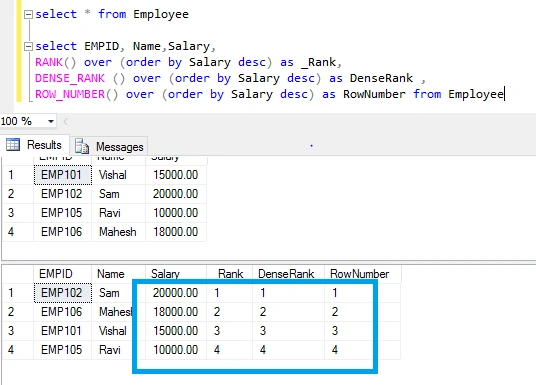
For this, we can write Select statement as shown below.
select EMPID, Name,Salary,
RANK() over (order by Salary desc) as _Rank,
DENSE_RANK () over (order by Salary desc) as DenseRank ,
ROW_NUMBER() over (order by Salary desc) as RowNumber from Employee
You can see the below output that RANK, DENSE_RANK and ROW_NUMBER functions give the same output and returning integer values based on highest salary.
I am assuming you have got what RANK, DENSE_RANK and ROW_NUMBER functions do.
RANK vs DENSE_RANK vs ROW_NUMBER functions
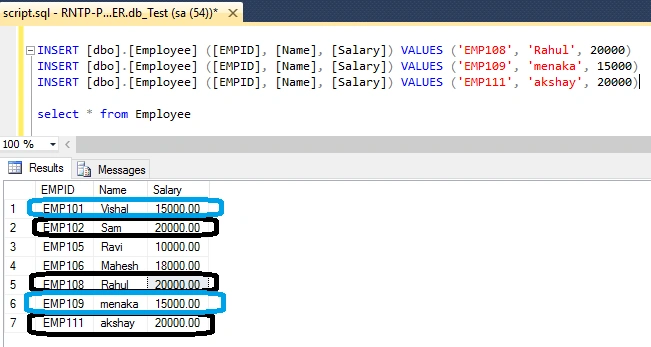
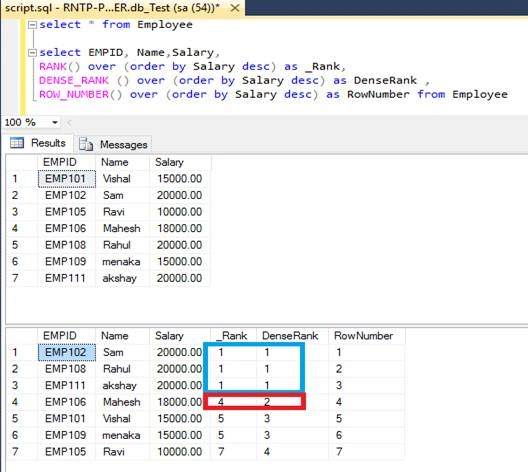
Now, let’s see what is the difference between those functions. For this, we need to insert some duplicate salary into this table. The script below will insert some more data with same salary.
INSERT [dbo].[Employee] ([EMPID], [Name], [Salary]) VALUES ('EMP108', 'Rahul', 20000)
INSERT [dbo].[Employee] ([EMPID], [Name], [Salary]) VALUES ('EMP109', 'menaka', 15000)
INSERT [dbo].[Employee] ([EMPID], [Name], [Salary]) VALUES ('EMP111', 'akshay', 20000)
Now, you can see the table which has got some duplicate salary records.
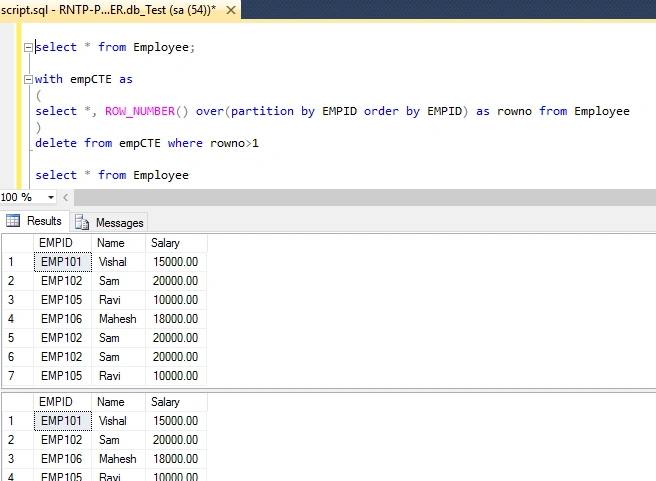
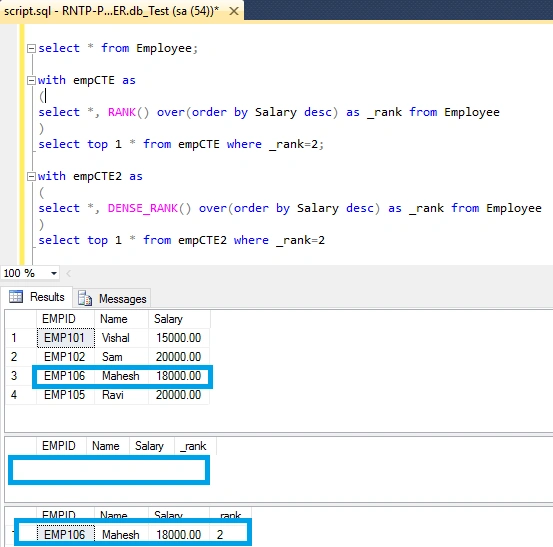
Lata KumarPosted Aug 29, 2018, 3:54 AM
Hi, I wanted to understand why we would we ever need to use RANK() then, wouldn't only DENSE_RANK() yield the correct results, what's the use of RANK() then?
Tejesh BabuPosted May 8, 2018, 6:05 AM
Great explaination... thanks a lot !
Ashish ShuklaPosted Apr 28, 2018, 2:02 AM
Deleting the duplicate records from table - the example given is only considering the EmpID and if empId is duplicate then it will delete the records, otherwise it will not. Generally on Id columns we have Identity column so it will never be duplicate in real life examples.
SubashPosted Apr 19, 2017, 8:45 PM
Good examples and nice explaanation
Cap'n VegetablePosted Apr 19, 2017, 8:36 PM
Excellent breakdown of some very useful functions. Well done
Lalit RaghavPosted Apr 19, 2017, 4:32 AM
Nice example Thanks Rafnas
Rajesh KadamPosted Apr 19, 2017, 2:14 AM
Very nice examples and explanation..thanks
Amit KumarPosted Apr 18, 2017, 11:33 PM
Nice Explanation ...........
Vignesh ManiPosted Apr 18, 2017, 4:35 PM
Nice one thank you for sharing.