

Introduction
In the sixth part of my React article series, we are going to learn what is State and how to use it in the React Component. Before moving to components, please read my previous articles.
- React Introduction – Day One
- React Environment Setup – Day Two
- React Fundamentals – Day Three
- Creating And Using React Components – Day Four
- React JSX and Props – Day Five
State
In React, each component has a state. A state is an object with values. It determines a component's rendering and behavior. It is used when a component needs to change independently of its parent. Components with the state have more complexity.
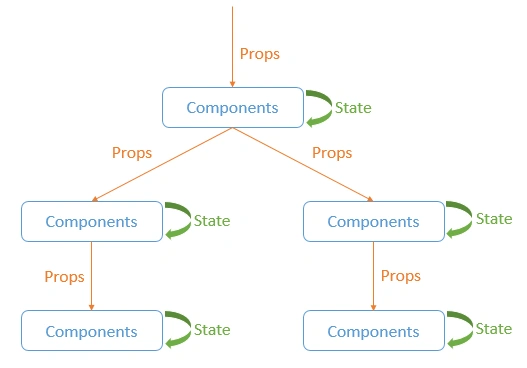
Note - Image Source Google
Defining the state in React component.
- constructor(props) {
- super(props);
- this.state = {
- articleName: "What is State in React?"
- }
- }
Accessing a state via the state property and supplied as attribute.
- <Article articleName={this.state.articleName}/>
As in the above screenshot, we have to pass the props as the attributes in elements, i.e., ‘articleName’.
Following are the steps to use States in React Component
- Create a React application using ‘create-react-app app-name’.
- After creating the application, open the src/App.js file. Paste the following code in that file.
- import React, { Component } from 'react';
- import logo from './logo.svg';
- import './App.css';
- class App extends Component {
- constructor(props) {
- super(props);
- this.state = {
- articleName: "What is Props in React?"
- };
- this.handleClick = this.handleClick.bind(this);
- }
- handleClick(){
- this.setState({
- articleName: "What is State in React?"
- });
- }
- render() {
- return (
- <div className="App">
- <header className="App-header">
- <img src={logo} className="App-logo" alt="logo" />
- <h1 className="App-title">Welcome to C# Corner</h1>
- </header>
- <Article articleName={this.state.articleName}/>
- <Author authorName="Jeetendra"/>
- <button onClick={this.handleClick}> Click to Change State </button>
- </div>
- );
- }
- }
- const Article = (props) =>{
- return(
- <h1 className="App-intro">{props.articleName}</h1>
- );
- }
- class Author extends React.Component {
- render(){
- return(
- <h1 className="App-intro">By {this.props.authorName}</h1>
- );
- }
- }
- export default App;
- Finally, we have done with the changes. Now, the next step is to run the application using the command ‘npm start’.
- Next, after running the command, the application is opening in the browser, as in the following screenshot.
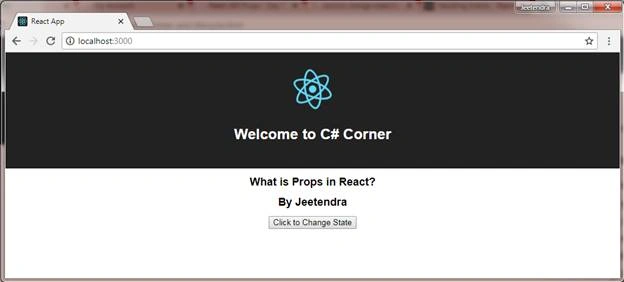
You can see the output in the browser with one button text ‘Click to change State’. Click on that button and it changes the output from the above to the below one.
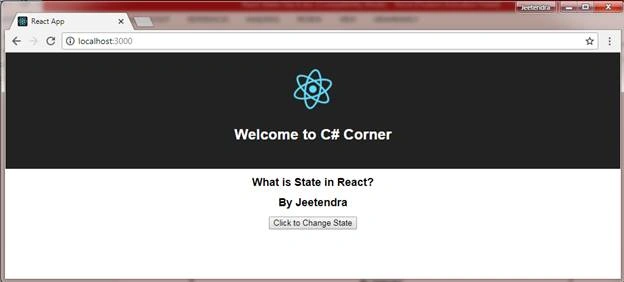
We have changed the previous state's value to the new state using the ‘setState’ function. It is used for updating the state values. In the below code, you can see that we have changed the state on that basis of ‘onClick’ event and used the ‘setState’ function in ‘handleClick’ function.
- class App extends Component {
- constructor(props) {
- super(props);
- this.state = {
- articleName: "What is Props in React?"
- };
- this.handleClick = this.handleClick.bind(this);
- }
- handleClick(){
- this.setState({
- articleName: "What is State in React?"
- });
- }
- render() {
- return (
- <div className="App">
- <header className="App-header">
- <img src={logo} className="App-logo" alt="logo" />
- <h1 className="App-title">Welcome to C# Corner</h1>
- </header>
- <Article articleName={this.state.articleName}/>
- <Author authorName="Jeetendra"/>
- <button onClick={this.handleClick}> Click to Change State </button>
- </div>
- );
- }
- }
Finally, we have used ‘state’ property ‘articleName’ in the React component and updated it ‘onClick’ using the ‘setState’ function. Also, you can send the ‘prevState’ as well for this ‘setState’ function.
Summary
I hope that beginners, as well as students, now understand what a State is and how to use it in the React Component. If you have any suggestions regarding this article, please contact me.
Stay tuned for other concepts of React.
“Learn It, Share it.”
| <= Previous Article | Next Article => |
kalu singh raoPosted Nov 2, 2018, 8:40 AM
Good Job. Thanks
Laxmi narayanaPosted Oct 9, 2018, 7:52 AM
When can i expect next article on react js like redux session..
Jasminder SinghPosted Aug 11, 2018, 7:09 AM
Can you give an example when we should use State and when we should use Props
Hadshana KamalanathanPosted Aug 3, 2018, 10:01 AM
Nice article...
Shrimant TelgavePosted Aug 2, 2018, 11:33 AM
Nice article..............