

Today, in this article let see how to create
the XML file accepting the values from user using textboxes. The values passed
from textboxes are converted into xml format and stored in xml file. So here we
are writing into xml file and later in next session based on the created date in
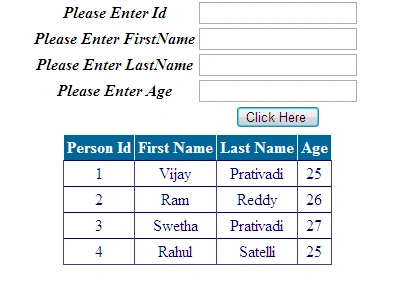
xml file we need to show the data to a grid such that it data which is in grid
can be read through a UI grid.
Code Toolbox Requirements:
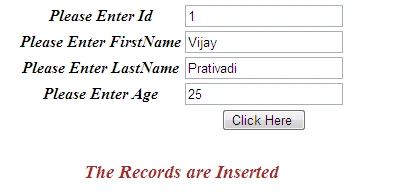
- 5 Labels, 1 Gridview, 1 Button and 4 Textboxes.
Here I have taken 2 methods bind and data,
where the bind is used to write to xml document and data to retrieve the values
from xml file.
The Complete Code of Default.aspx looks like this:
<%@
Page Language="C#"
AutoEventWireup="true"
CodeBehind="Default.aspx.cs"
Inherits="Xml_Grid_Write_and_Read.Default"
%>
<!DOCTYPE
html PUBLIC
"-//W3C//DTD XHTML 1.0 Transitional//EN"
"http://www.w3.org/TR/xhtml1/DTD/xhtml1-transitional.dtd">
<html
xmlns="http://www.w3.org/1999/xhtml">
<head
id="Head1" runat="server">
<title></title>
</head>
<body>
<form
id="form1"
runat="server">
<div>
<center>
<table>
<tr>
<td>
<asp:Label
ID="Label1"
runat="server"
Text="Please Enter Id"
Font-Bold="true"
Font-Italic="true"></asp:Label>
</td>
<td>
<asp:TextBox
ID="TextBox1"
runat="server"></asp:TextBox>
</td>
</tr>
<tr>
<td>
<asp:Label
ID="Label2"
runat="server"
Text="Please Enter
FirstName" Font-Bold="true"
Font-Italic="true"></asp:Label>
</td>
<td>
<asp:TextBox
ID="TextBox2"
runat="server"></asp:TextBox>
</td>
</tr>
<tr>
<td>
<asp:Label
ID="Label3"
runat="server"
Text="Please Enter
LastName" Font-Bold="true"
Font-Italic="true"></asp:Label>
</td>
<td>
<asp:TextBox
ID="TextBox3"
runat="server"></asp:TextBox>
</td>
</tr>
<tr>
<td>
<asp:Label
ID="Label4"
runat="server"
Text="Please Enter Age"
Font-Bold="true"
Font-Italic="true"></asp:Label>
</td>
<td>
<asp:TextBox
ID="TextBox4"
runat="server"></asp:TextBox>
</td>
</tr>
<tr>
<td>
</td>
<td>
<asp:Button
ID="Button1"
runat="server"
Text="Click Here "
OnClick="Button1Click"
/>
</td>
</tr>
</table>
</center>
<center>
<table>
<tr>
<td>
</td>
<td>
<asp:GridView
ID="GridView1"
runat="server"
BackColor="White"
BorderColor="#CCCCCC"
BorderStyle="None"
BorderWidth="1px"
CellPadding="3"
EnableModelValidation="True"
AutoGenerateColumns="False"
OnLoad="PageLoad">
<FooterStyle
BackColor="White"
ForeColor="#000066"
/>
<HeaderStyle
BackColor="#006699"
Font-Bold="True"
ForeColor="White"
/>
<PagerStyle
BackColor="White"
ForeColor="#000066"
HorizontalAlign="Left"
/>
<RowStyle
ForeColor="#000066"
/>
<SelectedRowStyle
BackColor="#669999"
Font-Bold="True"
ForeColor="White"
/>
<Columns>
<asp:BoundField
HeaderText="Person Id"
DataField="PersonId" />
<asp:BoundField
HeaderText="First Name"
DataField="FirstName"
/>
<asp:BoundField
HeaderText="Last Name"
DataField="LastName"
/>
<asp:BoundField
HeaderText="Age"
DataField="Age"
/>
</Columns>
</asp:GridView>
</td>
</tr>
</table>
</center>
<center>
<asp:Label
ID="Label5"
runat="server"
Font-Size="Larger"></asp:Label>
</center>
</div>
</form>
</body>
</html>
The Complete Code of Default.aspx.cs looks like this:
using
System;
using System.Xml;
using
System.Data;
Ilkin EastPosted Apr 15, 2012, 3:23 PM
Thank from c# learner from Baku,Azerbaijan
Monika AroraPosted Dec 20, 2011, 12:25 AM
Great work.
Alok PandeyPosted Dec 19, 2011, 11:55 PM
Nice article, Vijay.
Arjun PanwarPosted Dec 19, 2011, 11:54 PM
Very good work Mr.Vijay