

Phase 01 — System Design Fundamentals | Topic 09
Imagine two applications that receive exactly 500,000 requests every day.
At first glance, they appear to have the same traffic.
But there is an important difference.
The first application receives mostly requests to read data.
The second application receives mostly requests that create or update data.
Should we design both systems in the same way?
No.
The ratio between read and write traffic can significantly influence database design, caching, scaling, consistency, and the overall architecture.
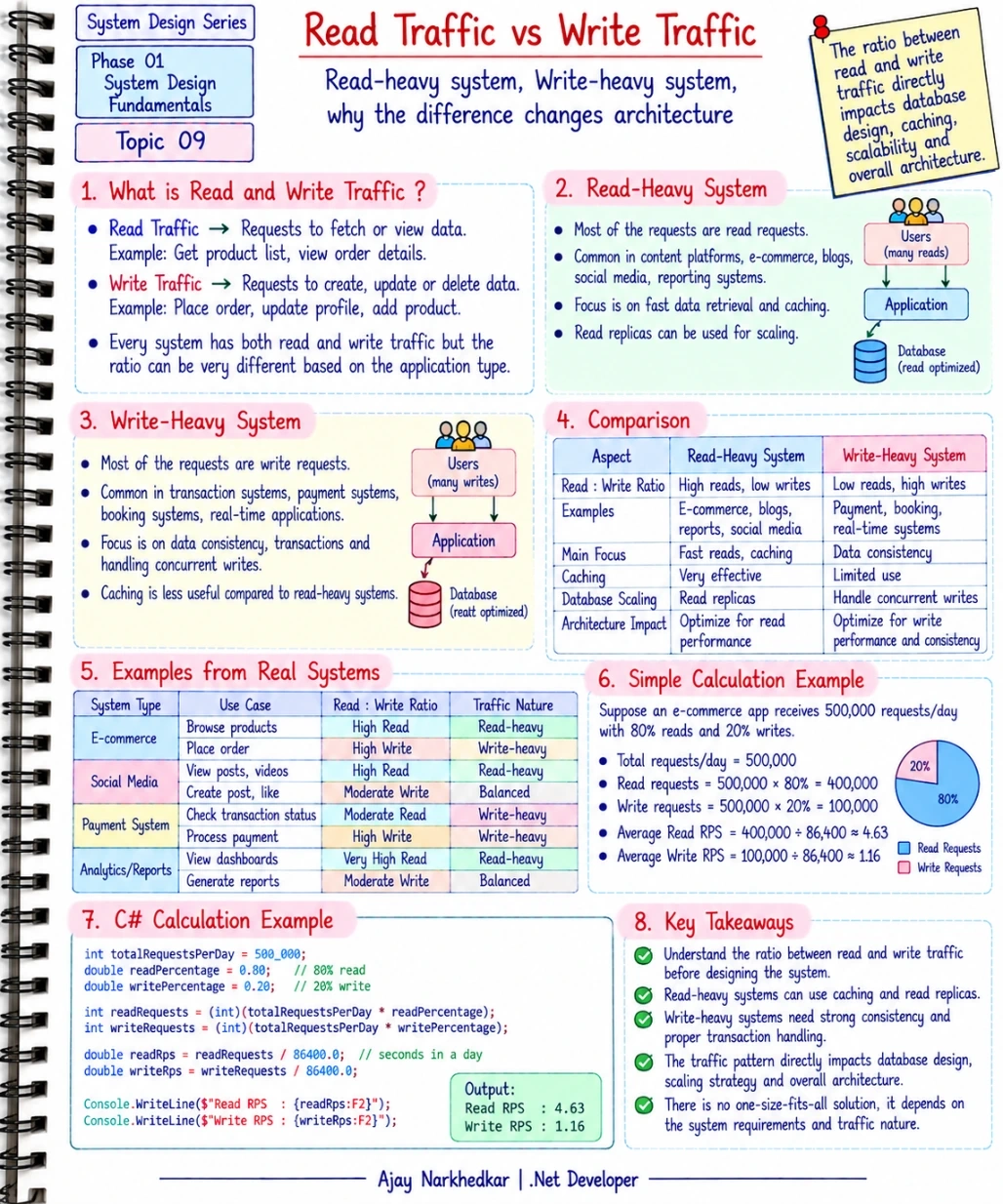
What Is Read Traffic?
Read traffic consists of requests that retrieve existing information without changing the stored data.
For example, an e-commerce application may receive requests such as:
GET /api/products
GET /api/products/25
GET /api/orders/1001
GET /api/categories
These operations are primarily reading information from the system.
When a user opens a product page, checks an order, or views a list of products, the application is generating read traffic.
What Is Write Traffic?
Write traffic consists of requests that create, update, or delete information.
For example:
POST /api/orders
PUT /api/orders/1001
DELETE /api/cart/25
These operations modify data.
When a customer places an order, the application may need to create an order, update inventory, store payment information, and update other related data.
Write operations therefore require more careful handling of data consistency and concurrency.
Every System Has Both
Most real-world applications have both read and write traffic.
The important question is:
What is the ratio between them?
For example, imagine an application receives:
500,000 requests per day
If:
80% are reads
and:
20% are writes
then the application receives:
400,000 read requests
and:
100,000 write requests
That makes the workload relatively read-heavy.
Now imagine another application with:
20% reads
and:
80% writes
That application has a very different workload.
The total traffic is the same, but the architecture may need to be different.
What Is a Read-Heavy System?
A read-heavy system receives significantly more read requests than write requests.
Consider an e-commerce application.
A customer may:
Browse many products.
Open product details.
Check categories.
Search for products.
View reviews.
But that same customer may place only one or two orders during a session.
Therefore, the system may receive many more read operations than write operations.
Other examples can include:
Content platforms.
News websites.
Product catalog systems.
Reporting applications.
Documentation platforms.
Social media feeds.
In these systems, improving read performance can have a significant impact.
How Can We Handle Read-Heavy Traffic?
One common technique is caching.
Suppose thousands of users repeatedly request the same product information.
Without caching, every request may go to the database.
Users
  ↓
ASP.NET Core API
  ↓
SQL Server
With caching, frequently requested information can be served from a cache.
Users
  ↓
ASP.NET Core API
  ↓
Cache
  ↓
SQL Server
For example, Redis can be used as a distributed cache in a multi-server ASP.NET Core application.
The goal is to reduce unnecessary database reads and improve response time.
Read Replicas
Another technique that can help larger read-heavy systems is using read replicas.
The basic idea is that read operations can be distributed to additional database instances while writes continue through the primary database.
Conceptually:
                 ┌── Read Replica
                 │
Application ─────┼── Read Replica
                 │
                 └── Primary Database
                        ↑
                      Writes
This can reduce the pressure on the primary database when the application has a large amount of read traffic.
The exact implementation depends on the database technology and consistency requirements.
What Is a Write-Heavy System?
A write-heavy system receives a large proportion of requests that create or modify data.
Examples include:
Payment processing systems.
Booking systems.
Transaction systems.
Inventory systems.
High-frequency data collection systems.
Certain real-time applications.
For example, consider an inventory system during a major sale.
Thousands of customers may attempt to purchase products at the same time.
The application may need to update stock quantities while ensuring that the same inventory is not incorrectly sold to multiple customers.
This makes write performance, concurrency, and consistency extremely important.
Why Are Writes Different?
A read operation can often retrieve existing data without changing anything.
A write operation may need to:
Validate business rules.
Modify existing records.
Create new records.
Maintain relationships.
Execute a transaction.
Handle concurrent requests.
Maintain data consistency.
For example, when placing an order, the application may need to update inventory.
If two customers try to purchase the last available product simultaneously, the system must carefully handle the concurrent writes.
Otherwise, the database could end up with an incorrect inventory value.
Caching Is Not the Same Solution for Everything
Caching is extremely useful for read-heavy workloads.
However, it does not solve every write-related problem.
Imagine an inventory system where the latest stock quantity is critical.
If the cache contains outdated inventory information, the application could make an incorrect decision.
Write-heavy systems therefore require more attention to:
Transactions.
Concurrency control.
Database performance.
Indexing.
Data consistency.
Write throughput.
This does not mean caching can never be used in a write-heavy system.
It means the caching strategy must be designed carefully around the consistency requirements.
Simple Traffic Calculation
Let's take an example.
Suppose an e-commerce application receives:
500,000 requests per day
Assume:
80% are reads
and:
20% are writes
The calculation is straightforward:
Read Requests
= 500,000 × 80%
= 400,000 requests/day

Write Requests
= 500,000 × 20%
= 100,000 requests/day
The approximate average traffic becomes:
Read RPS
= 400,000 ÷ 86,400
≈ 4.63 RPS

Write RPS
= 100,000 ÷ 86,400
≈ 1.16 RPS
This gives us a basic understanding of the workload.
A Small C# Calculation
We can represent the same calculation in C#:
int totalRequestsPerDay = 500_000;

double readPercentage = 0.80;
double writePercentage = 0.20;

int readRequests =
    (int)(totalRequestsPerDay * readPercentage);

int writeRequests =
    (int)(totalRequestsPerDay * writePercentage);

double readRps =
    readRequests / 86_400.0;

double writeRps =
    writeRequests / 86_400.0;

Console.WriteLine($"Read RPS: {readRps:F2}");
Console.WriteLine($"Write RPS: {writeRps:F2}");
The result is approximately:
Read RPS: 4.63
Write RPS: 1.16
The calculation itself is simple.
The important part is what these numbers tell us about the system.
Read-Heavy vs Write-Heavy
Let's compare the two workloads.
Area | Read-Heavy System | Write-Heavy System |
|---|---|---|
Main workload | Data retrieval | Data creation or modification |
Common concern | Fast reads | Write throughput and consistency |
Caching | Often very useful | Requires careful consideration |
Database scaling | Read replicas may help | Write scaling is more challenging |
Important focus | Query performance | Transactions and concurrency |
Example | Product catalog | Payment processing |
This does not mean every read-heavy system must use caching or every write-heavy system must use a particular database architecture.
The actual design depends on the system's requirements and constraints.
Why Does the Ratio Change Architecture?
Imagine two systems with the same total traffic:
System A
90% reads + 10% writes
The architecture may focus heavily on:
Caching.
Query optimization.
Read replicas.
Efficient read APIs.
System B
10% reads + 90% writes
The architecture may focus more heavily on:
Database write performance.
Transaction handling.
Concurrency.
Locking.
Data consistency.
The total number of requests is the same.
But the problems created by those requests are different.
That is the important System Design insight.
Read and Write Traffic Also Affect Database Design
Suppose your application has many read operations.
You may spend more time optimizing:
SELECT queries.
Indexes.
Projections.
Pagination.
Caching.
Now consider an application with many writes.
You may need to pay more attention to:
INSERT and UPDATE performance.
Transactions.
Locking.
Deadlocks.
Index maintenance.
Connection management.
Concurrent updates.
Therefore, traffic analysis should not stop at:
“How many requests do we receive?”
You should also ask:
“What are those requests doing?”
A .NET Developer's Perspective
When working with ASP.NET Core and EF Core, this distinction becomes very practical.
For read-heavy APIs, you might use techniques such as:
var products = await _context.Products
    .AsNoTracking()
    .Select(p => new ProductDto
    {
        Id = p.Id,
        Name = p.Name,
        Price = p.Price
    })
    .ToListAsync();
Here, AsNoTracking() is useful for a read-only query because EF Core does not need to track the returned entities.
For write operations, you may instead need to think carefully about transactions and concurrency:
await using var transaction =
    await _context.Database.BeginTransactionAsync();

try
{
    // Create the order.
    // Update inventory.
    // Save related changes.

    await _context.SaveChangesAsync();

    await transaction.CommitAsync();
}
catch
{
    await transaction.RollbackAsync();
    throw;
}
The exact implementation depends on the business requirements, but the important point is that read and write operations often have different performance and consistency concerns.
Don't Design Based Only on the Average
Another important point is that the read/write ratio can change.
For example, during a product launch, an e-commerce application may suddenly receive a huge number of product-page reads.
During checkout, write traffic may increase because customers are creating orders.
Therefore, you should consider:
Normal traffic.
Peak traffic.
Read/write ratio.
Growth over time.
Different workload patterns during important business events.
Real systems are rarely perfectly predictable.
IMPORTANT Takeaway
When estimating traffic, don't stop at:
“Our system receives 500,000 requests per day.”
Ask another question:
“How many of those requests are reads and how many are writes?”
Because:
Read-heavy systems often focus on fast data retrieval, caching, and read scaling.
Write-heavy systems often require more attention to transactions, concurrency, consistency, and write performance.
The same amount of traffic can therefore lead to very different architecture decisions.
A simple way to remember it is:
Traffic tells you how much work the system receives.
Read/write ratio tells you what kind of work the system is receiving.
Both are important before designing a scalable system.
What's Next?
We now understand users, traffic, and the difference between read and write workloads.
But there is another question that users immediately notice:
How long does the system take to respond?
Phase 01 — System Design Fundamentals | Topic 10 — Latency: Why Is an API Slow?
We will break down where API latency comes from and how a .NET developer can identify the real reason behind a slow API.
Join the conversation! Your thoughts help the community grow.