

Introduction
In our last article, we started with an introduction to XML and created a physical XML file. Now, we will try to read from an existing XML file using the XmlReader class.
Before proceeding, go through my previous article: Get Started With XML Using C#.
Background
You need an existing XML file to implement this. Except this, we need a basic understanding of C# and XML file structures.
So, my XML file looks like:
- <?xml version="1.0" encoding="utf-8"?>
- <Students>
- <Student>
- <Name>Abhishek</Name>
- <Location>Dhanbad</Location>
- </Student>
- <Student>
- <Name>Aman</Name>
- <Location>Samastipur</Location>
- </Student>
- <Student>
- <Name>Vicky</Name>
- <Location>Munger</Location>
- </Student>
- <Student>
- <Name>Chandan</Name>
- <Location>Bhagalpur</Location>
- </Student>
- <Student>
- <Name>Ravi</Name>
- <Location>Dhanbad</Location>
- </Student>
- </Students>
So, in our code we will try to read data from the XML file.
- using System;
- using System.Collections.Generic;
- using System.Linq;
- using System.Text;
- using System.Xml;
- namespace XMLdemo2
- {
- class Program
- {
- static void Main(string[] args)
- {
- // Start with XmlReader object
- //here, we try to setup Stream between the XML file nad xmlReader
- using (XmlReader reader = XmlReader.Create(@"c:\users\gr33n synt4x\documents\visual studio 2010\Projects\XMLdemo2\XMLdemo2\myData.xml"))
- {
- while (reader.Read())
- {
- if (reader.IsStartElement())
- {
- //return only when you have START tag
- switch (reader.Name.ToString())
- {
- case "Name":
- Console.WriteLine("Name of the Element is : " + reader.ReadString());
- break;
- case "Location":
- Console.WriteLine("Your Location is : " + reader.ReadString());
- break;
- }
- }
- Console.WriteLine("");
- }
- }
- Console.ReadKey();
- }
- }
- }
So, we start with the using( ) statement. Inside that, we created a reference of XmlReader. Then assigned a reader stream of a XML file using the Create() method.
Now, we start reading the XML file and reader.Read() returns the Boolean value indicating whether there is a XML statement or not.
If Yes, then we try to check if the current statement contains a starting element or not using reader.IsStartElement().
Since we have a number of different element fields in the Student elements, we are using a switch block. All the cases are names of Element. Since we want an actual text string of the element, for that we used the ReadString(). Since it returns a string type.
Output
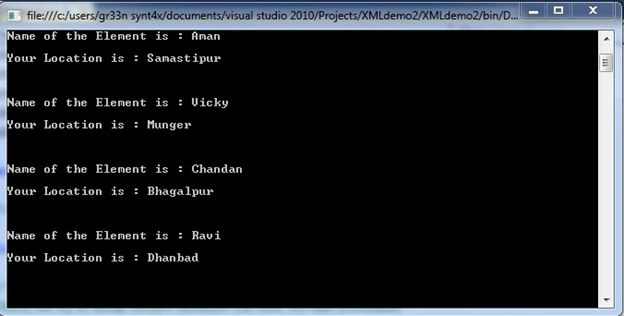
Sumit KumawatPosted May 1, 2019, 12:03 AM
Why it is not showing result for first node ie. <Student> <Name>Abhishek</Name> <Location>Dhanbad</Location> </Student>
Nikhil KulshresthaPosted Apr 17, 2018, 1:00 PM
Once I read the two different XML. Now I want to compare both and write the difference in the separate file. Can anyone please suggest.
yashraj solankiPosted Aug 22, 2017, 4:35 PM
How to add if condition to find particular data of xml file . like i am enter name chandan dn out put sow me only chandan data
Ananth KumblaPosted Apr 2, 2015, 2:55 AM
What if the file is stored on the sever? How do you specify the path of the file then ?
superbeto superbetoPosted Aug 27, 2014, 7:13 PM
Thank you, great article!!