

Objective
To develop a Windows application to read an xml file; perform insert, search, update, and delete operations, and navigation of records and display respective images.
Design
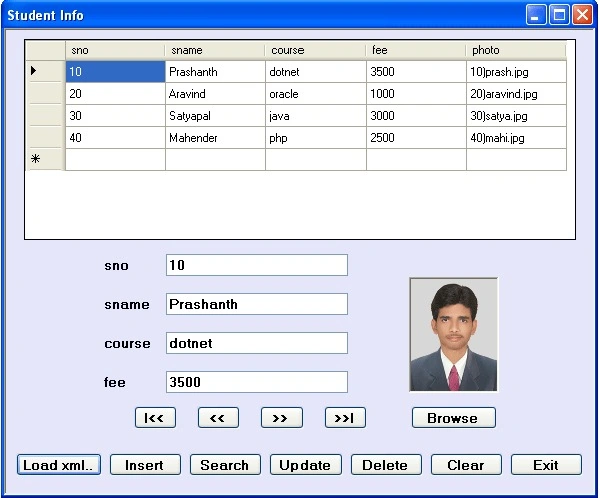
Design the form as above with 1 DataGridView, 1 PictureBox control, 2 OpenFileDialog controls, 4 Labels, 4 TextBoxes, and 12 Buttons.
PictureBox1 Properties
BorderStyle = Fixed3D;
SizeMode = StrechImage;
Code
using System;
using System.Data;
using System.Drawing;
using System.Windows.Forms;
using Microsoft.VisualBasic;
using System.IO;
namespace xmlapp
{
    public partial class studdata : Form
    {
        public studdata()
        {
            InitializeComponent();
        }
        DataSet ds; string fpath, fdir, ppath, pname, pdestin; int rno = 0; DataRow drow;
        private void loadbtn_Click(object sender, EventArgs e)
        {
            try
            {
                openFileDialog1.Filter = "xml|*.xml|all files|*.*";
                DialogResult res = openFileDialog1.ShowDialog();
                if (res == DialogResult.OK)
                {
                    dataGridView1.DataSource = null;
                    clearbtn.PerformClick();
                    fpath = openFileDialog1.FileName;
                    ds = new DataSet();
                    ds.ReadXml(fpath);
                    ds.Tables[0].Constraints.Add("pk_sno", ds.Tables[0].Columns[0], true);
                    dataGridView1.DataSource = ds.Tables[0];
                    fdir = fpath.Substring(0, fpath.LastIndexOf("\\") + 1);
                    showdata();
                }
            }
            catch
            { MessageBox.Show("invalid input");  }
        }
        void showdata()
        {
            if (ds.Tables[0].Rows.Count > 0)
            {
                pictureBox1.Image = null;
                sno_txtbx.Text = ds.Tables[0].Rows[rno][0].ToString();
                sname_txtbx.Text = ds.Tables[0].Rows[rno][1].ToString();
                course_txtbx.Text = ds.Tables[0].Rows[rno][2].ToString();
                fee_txtbx.Text = ds.Tables[0].Rows[rno][3].ToString();
                pictureBox1.ImageLocation = fdir + ds.Tables[0].Rows[rno][4].ToString();
            }
            else
                MessageBox.Show("No records");
        }
        private void browsebtn_Click(object sender, EventArgs e)
        {
            openFileDialog2.InitialDirectory = fdir;
            openFileDialog2.Filter = "bmp,jpeg,png|*.bmp;*.jpg;*.png|all files|*.*";
            DialogResult res = openFileDialog2.ShowDialog();
            if (res == DialogResult.OK)
            {
                pictureBox1.ImageLocation = openFileDialog2.FileName;
            }
        }
        private void insertbtn_Click(object sender, EventArgs e)
        {
            drow = null;
            drow = ds.Tables[0].Rows.Find(sno_txtbx.Text);
            if (drow == null)
            {
                drow = ds.Tables[0].NewRow();
                drow[0] = sno_txtbx.Text;
                drow[1] = sname_txtbx.Text;
                drow[2] = course_txtbx.Text;
                drow[3] = fee_txtbx.Text;
                phototask();
                drow[4] = pname;
                ds.Tables[0].Rows.Add(drow);
                rno = ds.Tables[0].Rows.IndexOf(drow);
                ds.WriteXml(fpath);
                MessageBox.Show("record inserted");
            }
            else
                MessageBox.Show("sno. should be unique");
        }
        void phototask()
        {
            ppath = pictureBox1.ImageLocation;
            pname = sno_txtbx.Text + ")" + (ppath.Substring(ppath.LastIndexOf('\\') + 1));
            pdestin = fdir + pname;
            pictureBox1.Image.Save(pdestin);
        }
        private void searchbtn_Click(object sender, EventArgs e)
        {
            int n = Convert.ToInt32(Interaction.InputBox("Enter sno to search:", "Search", "10", 200, 200));
            drow = null;
            drow = ds.Tables[0].Rows.Find(n);
            if (drow != null)
            {
                rno = ds.Tables[0].Rows.IndexOf(drow);
                sno_txtbx.Text = drow[0].ToString();
                sname_txtbx.Text = drow[1].ToString();
                course_txtbx.Text = drow[2].ToString();
                fee_txtbx.Text = drow[3].ToString();
                pictureBox1.ImageLocation = fdir + drow[4];
            }
            else
                MessageBox.Show("record not found");
        }
        private void updatebtn_Click(object sender, EventArgs e)
        {
            DataRow drow = ds.Tables[0].Rows.Find(sno_txtbx.Text);
            if (drow!= null)
            {
                rno = ds.Tables[0].Rows.IndexOf(drow);
                ds.Tables[0].Rows[rno][0] = sno_txtbx.Text;
                ds.Tables[0].Rows[rno][1] = sname_txtbx.Text;
                ds.Tables[0].Rows[rno][2] = course_txtbx.Text;
                ds.Tables[0].Rows[rno][3] = fee_txtbx.Text;
                File.Delete(fdir + drow[4]);
                phototask();
                ds.Tables[0].Rows[rno][4] = pname;
                ds.WriteXml(fpath);
                MessageBox.Show("record updated");
            }
            else
                MessageBox.Show("no record exists with this sno.");
        }
        private void deletebtn_Click(object sender, EventArgs e)
        {
            DataRow drow = ds.Tables[0].Rows.Find(sno_txtbx.Text);
            if (drow!= null)
            {
                File.Delete(fdir + drow[4]);
                ds.Tables[0].Rows.Remove(drow);
                ds.WriteXml(openFileDialog1.FileName);
                MessageBox.Show("record deleted");
                rno = 0;
                showdata();
            }
            else
                MessageBox.Show("no record exists with this sno.");
        }
        private void firstbtn_Click(object sender, EventArgs e)
        {
            rno = 0;
            showdata();
        }
        private void prevbtn_Click(object sender, EventArgs e)
        {
            if (rno > 0)
            {
                rno--;
                showdata();
            }
            else
            { MessageBox.Show("first record"); }
        }
        private void nextbtn_Click(object sender, EventArgs e)
        {
            if (rno < ds.Tables[0].Rows.Count - 1)
            {
                rno++;
                showdata();
            }
            else
            { MessageBox.Show("LastRecord"); }
        }
        private void lastbtn_Click(object sender, EventArgs e)
        {
            rno = ds.Tables[0].Rows.Count - 1;
            showdata();
        }
        private void clearbtn_Click(object sender, EventArgs e)
        {
            sno_txtbx.Text = sname_txtbx.Text = course_txtbx.Text = fee_txtbx.Text = "";
            pictureBox1.Image = null;
        }
        private void exitbtn_Click(object sender, EventArgs e)
        {
            this.Close();
        }
    }
}
Rupali EthapePosted Jun 18, 2012, 1:17 AM
retrieve image with gridview selection in picturebox.
Rupali EthapePosted Jun 18, 2012, 1:14 AM
this example is done with xml but how to do this project woth sql server 2005.please reply!Because my data
Rupali EthapePosted Jun 18, 2012, 1:14 AM
this example is done with xml but how to do this project woth sql server 2005.please reply!Because my data
Sachin SachtechboyPosted Mar 13, 2012, 1:31 AM
Excellent Example for learning XML with C#... Thanks a Lot....
Sudhindra BAPosted Nov 12, 2010, 12:01 AM
Faboulous.
Satyapriya NayakeditedPosted Oct 22, 2010, 5:15 AMEdited Oct 22, 2010, 6:29 AM
Hi friend, Good to see your articles,but when i delete one record data is been deleted not the image which is stored in the folder.Is there any solution to do it.When i click on search button,and then a input box is displayed but here i decide not to search then i click cancel button so an error occurs. Thanks