


Introduction
In today’s digital landscape, businesses generate vast amounts of audio data through meetings, customer calls, and multimedia content. Transforming this spoken content into structured, searchable text is a game-changer for accessibility, compliance, and efficiency. Microsoft Azure Speech Services provides an advanced AI-driven solution for real-time transcription, making it easier than ever to convert spoken language into actionable insights.
This article explores how Azure Speech Services enables real-time document transcription, its practical applications, and the steps to integrate it into your workflow.
Understanding Azure Speech Services
Azure Speech Services is a cloud-based AI solution that enables automatic speech recognition (ASR) and real-time transcription. It supports multiple languages and dialects, ensuring accurate speech-to-text conversion for a variety of use cases.
Key Features
- Real-time transcription for live conversations, meetings, and media streams.
- Speaker diarization to differentiate multiple speakers in a conversation.
- Customizable models to enhance accuracy with domain-specific vocabulary.
- Multi-language support covering over 100 languages and dialects.
- Secure and compliant data processing with built-in privacy controls.
Use Cases for Real-Time Transcription
- Business Meetings & Conferences: Convert live discussions into searchable meeting notes, ensuring transparency and easy reference.
- Healthcare Documentation: Physicians and healthcare providers can transcribe patient interactions for electronic health records (EHRs).
- Legal & Compliance Record-Keeping: Real-time transcription of legal proceedings helps in compliance documentation and reduces manual effort.
- Media & Content Creation: Journalists and content creators can transcribe interviews or generate subtitles for videos effortlessly.
- Customer Support & Call Centers: Organizations can analyze customer calls in real-time, improving response quality and agent performance.
Setting Up Azure Speech Services for Transcription
Let’s walk through the steps to integrate Azure Speech Services for real-time transcription.
Step 1. Create a Speech Resource on Azure.
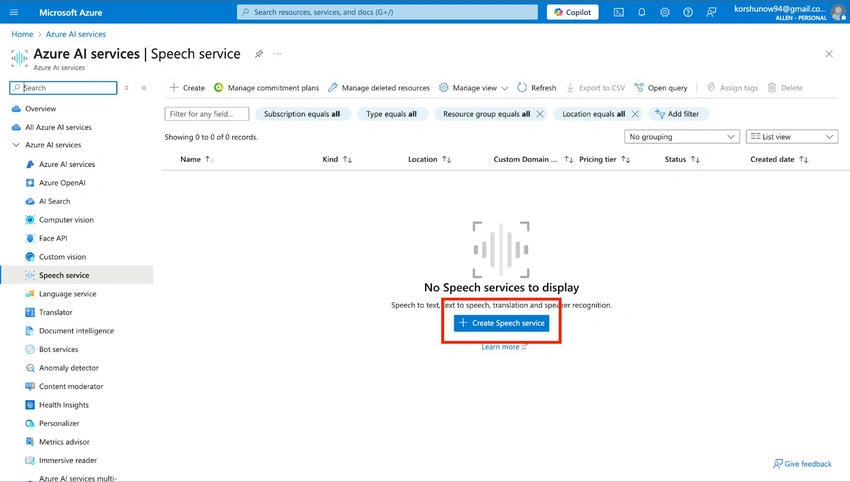
- Log in to the Azure Portal.
- Navigate to Create a Resource and search for Speech Service.
- Click Create, select a Subscription, Resource Group, and Region.
- Configure the pricing tier as per your needs and click Review + Create.
- Once deployed, navigate to the Keys and Endpoint section to retrieve your API key and endpoint URL.
Step 2. Install Required Python Libraries.
To process real-time transcription, install the Azure Speech SDK for Python.
pip install azure-cognitiveservices-speech
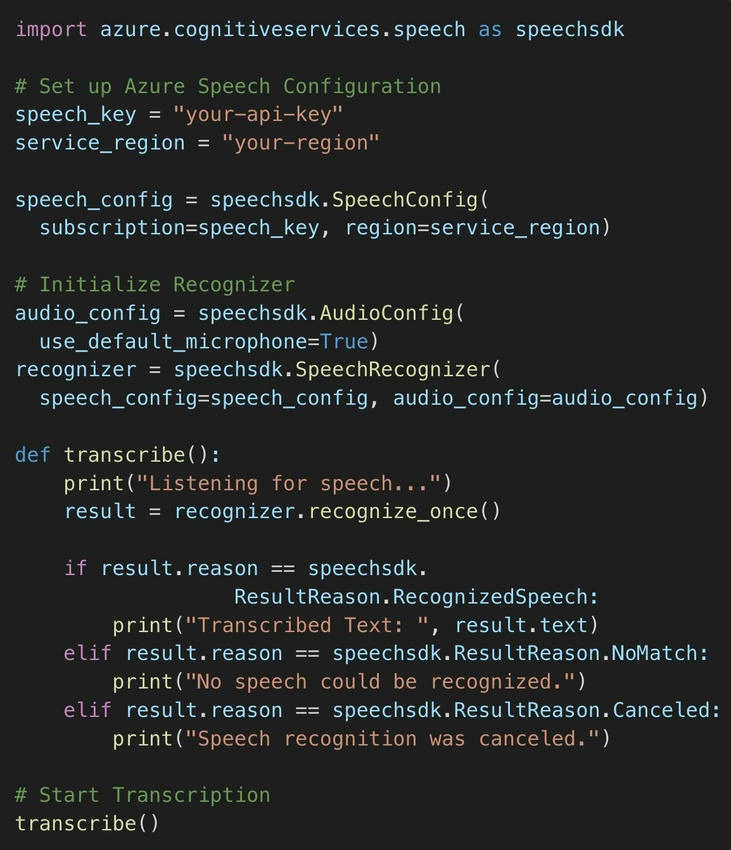
Step 3. Implement Real-Time Transcription.
Below is a Python script to transcribe speech in real time using Azure Speech SDK.
Optimizing Transcription Accuracy
To improve transcription accuracy and efficiency, follow these best practices.
- Use High-Quality Audio: Background noise can impact accuracy. Use noise-canceling microphones for better recognition.
- Enable Custom Speech Models: If working with industry-specific terminology, train Azure with custom datasets.
- Apply Post-Processing with NLP: Use Azure Text Analytics to enhance transcription results, such as summarization, sentiment analysis, or keyword extraction.
- Store and Index Transcripts: Integrate transcribed text with Azure Cognitive Search for efficient data retrieval.
Future of AI-Powered Speech Transcription
The future of AI transcription is promising, with advancements in,
- Real-time translation for multilingual conversations
- Enhanced speech synthesis for natural language interactions
- Greater accuracy in industry-specific transcription
- AI-assisted summarization and contextual understanding
Conclusion
Azure Speech Services revolutionizes real-time transcription by enabling seamless speech-to-text conversion with AI-driven accuracy. Whether for business documentation, healthcare, legal compliance, or customer support, it provides a robust and scalable solution to automate transcription workflows.
By following the setup guide and best practices outlined in this article, you can integrate and optimize AI-powered transcription in your applications effortlessly.
Ready to enhance your document transcription process? Start leveraging Azure Speech Services today!
Further Learning
Join the conversation! Your thoughts help the community grow.