

My last article explained SignalR and how to use it to create a simple web-based group chat. It included a good deal of explanation of how SignalR works and why it is a good candidate to create a real application. We will not get into details again and before you start with it, I recommend you read my previous article here. This discussion will be another practical implementation of what we had learned in the last article.
Let's create another sample application to understand the use of SignalR. This application will be a HTML page that displays some data from the database. At the back-end of this sample, we will have another application, say any form, Windows service or RSS feed that will insert the new data into the database. As soon as the new data is added to the database, that will be reflected on this HTML page.
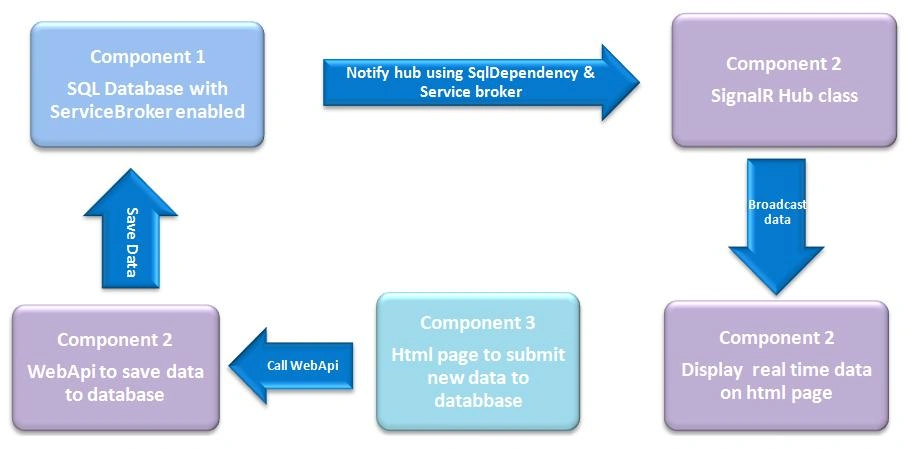
An important point before we start the discussion is that this example will not only use SqlDependency, so that our server hub is notified about changes in the database and broadcast the latest data to the users. To describe the logic briefly, our hub will subscribe to SqlServer for any change in its data in the database, be notified, fetch the latest data and broadcast it to the HTML page. So our application will consist of the following 3 separate components.
A sample table called Users in a SQL database, with its ServiceBroker enabled.
An application with a HTML page to display the list of users from the database. This application will also include:
- A webapi that receives data from a third application and save it into the database.
- A SignalR component to broadcast the latest data to the users.
So our overall application flow will be like the following:
Database setup: Create a new table named Users, in a sample database. To use the SqlDepedency, we need to enable the ServiceBroker for the database. This can be done using the following command:
ALTER DATABASE Database_Name SET ENABLE_BROKER
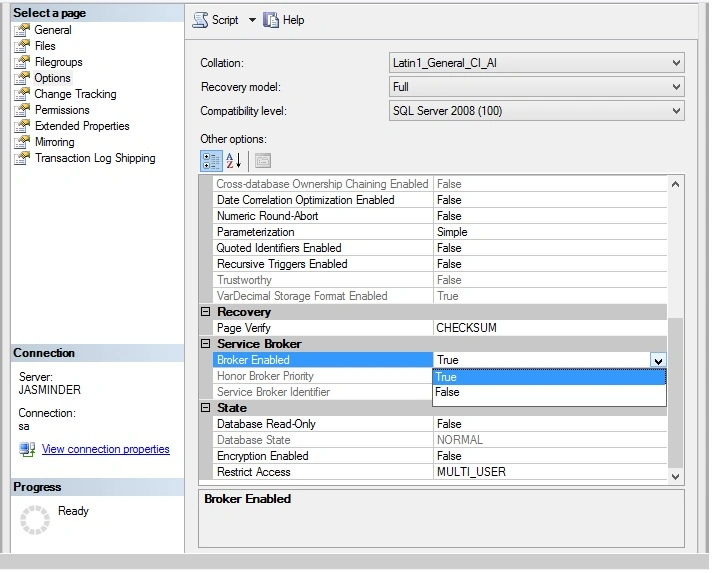
Or, from the UI by selecting the database, right-click on its properties, go to the Options, navigate to the Service Broker section and change the value to True for the Broker Enabled property.
Create the main application: This application will consist of the following components:
- Webapi to receive the data from the data feed application and save into the database.
- An HTML page to display the data from the database.
- SignalR component that will refresh the HTML page with the latest data, as soon as the new data is added to the database.
Let's create a Webapi that can receive the data from the user and store it in the database. For this, we add the references to the WebApi2 and OWIN packages, using the Nuget package manager. Once the references are added, we add a new class file of type Web API Controller class. Let's call it DataFeedController.cs. Add a POST method to receive the data from the user and store it in the database, using the Entity Framework. So our controller would look as in the following:
- public class DataFeedController: ApiController
- {
- public void PostUserData([FromBody] User userData)
- {
- SampleDBEntities _dbEntities = new SampleDBEntities();
- _dbEntities.Users.Add(userData);
- _dbEntities.SaveChanges();
- }
- }
Now to host the Webapi and SignalR, we add a file named Startup.cs and add the routing template for the Webapi and register both the webapi and SignalR to the OWIN pipeline. When we start the application, it will result in hosting of the Webapi at the back-end.
- public void Configuration(IAppBuilder appBuilder)
- {
- // Configure the SignalR hosting
- appBuilder.MapSignalR();
- HttpConfiguration config = new HttpConfiguration();
- config.Routes.MapHttpRoute(
- name: "DefaultApi",
- routeTemplate: "{controller}/{action}");
- // Configure the WebAPI hosting
- appBuilder.UseWebApi(config);
- }
Now to add the real-time functionality to the application we add a class named RealtimeDataHub.cs, derived from the Hub class and will be used as a middleware between the database and the HTML page (that is used to display the data). This class will have a method named GetUsers() that will get the data from the database and broadcast it to the connected users. Inside this method, the hub also subscribes to the SQL for getting notifications for a change in the database, using the OnDependency change event of the SqlDependency class. See the code below:
- public class RealtimeDataHub: Hub
- {
- public void GetUsers()
- {
- List < User > _lst = new List < User > ();
- using(var connection = new SqlConnection(ConfigurationManager.ConnectionStrings["ADOEntities"].ConnectionString)) {
- String query = "SELECT UserId, FirstName, LastName, Age FROM dbo.Users";
- connection.Open();
- using(SqlCommand command = new SqlCommand(query, connection))
- {
- command.Notification = null;
- DataTable dt = new DataTable();
- SqlDependency dependency = new SqlDependency(command);
- dependency.OnChange += dependency_OnChange;
- if (connection.State == ConnectionState.Closed) connection.Open();
- SqlDependency.Start(connection.ConnectionString);
- var reader = command.ExecuteReader();
- dt.Load(reader);
- if (dt.Rows.Count > 0)
- {
- for (int i = 0; i < dt.Rows.Count; i++)
- {
- _lst.Add(new User {
- UserId = Int32.Parse(dt.Rows[i]["UserId"].ToString()),
- FirstName = dt.Rows[i]["FirstName"].ToString(),
- LastName = dt.Rows[i]["LastName"].ToString(),
- Age = Convert.ToInt32(dt.Rows[i]["Age"])
- });
- }
- }
- }
- }
- IHubContext context = GlobalHost.ConnectionManager.GetHubContext < RealtimeDataHub > ();
- context.Clients.All.displayUsers(_lst);
- }
- void dependency_OnChange(object sender, SqlNotificationEventArgs e)
- {
- if (e.Type == SqlNotificationType.Change) {
- RealtimeDataHub _dataHub = new RealtimeDataHub();
- _dataHub.GetUsers();
- }
- }
- }
Create data feed application: Create a new empty project and add an HTML page to it. This HTML page will have 3 textboxes and a button to store the data in the database, by calling the WebApi created in Step 1 above. We will call it as a data feeder application. In a real scenario, we can have any Windows service that is fetching data using some API and storing it in the database. So our HTML mark-up will be as in the following:
- <!DOCTYPE html>
- <html xmlns="http://www.w3.org/1999/xhtml">
- <head>
- <title></title>
- </head>
- <body>
- <table>
- <tr>
- <td>First Name: </td>
- <td>
- <input type="text" id="txtFirstName" />
- </td>
- </tr>
- <tr>
- <td>Last Name: </td>
- <td>
- <input type="text" id="txtLastName" />
- </td>
- </tr>
- <tr>
- <td>Age: </td>
- <td>
- <input type="text" id="txtAge" />
- </td>
- </tr>
- <tr>
- <td></td>
- <td>
- <input type="button" id="btnSave" value="Save Data" /></td>
- </tr>
- </table>
- </body>
- </html>
Next, use the ajax call to send the data to the webapi controller that stores it in the database.
- <script type="text/javascript" src="Scripts/jquery-1.7.1.min.js"></script>
- <script type="text/javascript">
- $("#btnSave").click(function ()
- {
- var url = "http://localhost:24010/DataFeed/PostUserdata";
- var userData =
- {
- FirstName: $("#txtFirstName").val(),
- LastName: $("#txtLastName").val(),
- Age: $("#txtAge").val()
- };
- $.ajax({
- type: "POST",
- cache: false,
- url: url,
- data: JSON.stringify(userData),
- contentType: "application/json",
- async: true,
- success: function (response)
- {
- alert('Data Saved successfully...!!!');
- },
- error: function (err)
- {
- alert('Call failed');
- }
- });
- })
- </script>
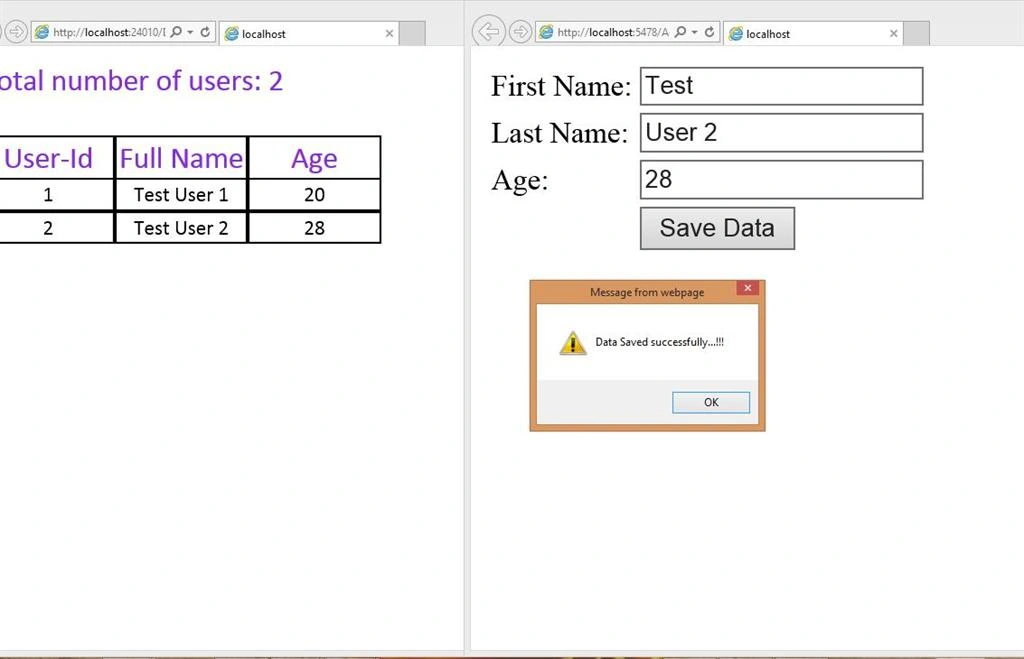
So our setup is complete now. To start the application, first run the HTML page of the main application that displays the data from the database. When this application is started, its corresponding web API is also hosted. The first time, there will be no data. So let's start the data feeder application also and add some data. Add the new data and save it. As soon as the new data is added, it is immediately reflected in the main applications home page. See below:
So now we need to use timer-based calls. Use the SignalR functionality and create real applications. I hope you enjoyed reading this and it will be helpful for you. Happy coding!
Sunil DeshalahrePosted May 31, 2024, 9:37 AM
Hi, Can you please explain where is data updating on the addition of new user?
inco bilgisayarPosted Feb 27, 2020, 4:24 AM
Hi Jasminder, hpw can we use Stored Procedure instead of inline query as (GetUsers()) have you any sample same subject but using Stored Procedure or any sample suggestion
ishan aroraPosted Jul 30, 2018, 4:00 AM
Hello jasminder , you have not shown the code for displaying the records on table.Please provide its code by end of the day.
Nazareth BerlangaPosted Jul 18, 2018, 2:05 PM
Is there a link that I can get the project code at? Thanks!
Ramdas MutkulePosted Sep 15, 2017, 4:42 AM
Hello Sir, we have angular 2 (using visual studio code) project and web api . Now how to use signalr concept in this architecture api and angular are different projects. I have followed above mentioned steps but here I am not able to call api method in angular or asp.net form using signalr. please guide me...
Jamie RosenburgPosted Jul 29, 2017, 3:11 PM
Hi Jasminder, great article but there appears to be something missing, the code for the HTML page that displays the list of users and is updated via SignalR... Perhaps I'm missing something and this was done in a previous article? Could you please advise? Thanks!
Avinash PhadkePosted Nov 16, 2016, 9:09 AM
Hi, Can we do this for multiple tables and view?
Avinash PhadkePosted Nov 16, 2016, 9:07 AM
Hi Jasminder, This is a really nice and helpful post. But I have 1 Query, Can we use Stored Procedure instead of inline query in GetUsers() method. Since do not use inline query in our application and only allow to call SP's as our companies coding standered.
nicklasPosted May 9, 2016, 4:55 AM
Where is the code to viewing the data you post ?
Biju AlapattPosted Apr 21, 2016, 3:13 AM
Sir, Can u share the source code, I couldn't find the download link.
Abel GebrayPosted Jan 29, 2016, 2:04 PM
Please i have been looking for this for long time so please sir if u can share the code via email please sir i need it really badly for my project kindly my email is: [email protected]
Santhakumar MunuswamyPosted Apr 25, 2015, 7:30 AM
Thanks for nice article
Santhakumar MunuswamyPosted Apr 25, 2015, 7:30 AM
Good Work
Tom MohanPosted Mar 23, 2015, 4:45 AM
goo one
Shuby AroraPosted Mar 22, 2015, 4:38 PM
Good one
ROHAN PANDEYPosted Mar 22, 2015, 11:23 AM
Nice one sir
Sourabh SomaniPosted Mar 22, 2015, 9:25 AM
Nice One Sir :)