

Introduction
In the series of Azure IoT basics (Internet of Things), we have covered all the basic details about the IoT and related terminology, including the Azure IoT Hub, device provisioning service, and related authentication. Now, in this article, we will learn how to control and manage the IoT device lifecycle with the help of device twin properties. If you want to read the previous articles, then please read them using the following links.
- Introduction To Azure IoT Hub
- Understanding The Azure IoT Hub Device Provisioning Service
- Device Enrollments Using Azure IoT Hub Device Provisioning Service
- Generating X.509 Certificates with Private and Public Keys for IoT Device Security
- Azure IoT Hub Device Allocation Policy
What is the Azure IoT Hub Device Twin?
Azure IoT Hub Device Twins are the properties for storing and retrieving metadata associated with an IoT device, commonly referred to as its "twin. This information can be used to configure and manage the device, monitor its status, and troubleshoot issues.
In this article, we will take a closer look at Azure IoT Hub Device Twin with an example of how it can be used in a real-world scenario. Every device has the following set of twin properties that describe the current state of the device, as well as a set of desired properties that specify the desired state of the device.
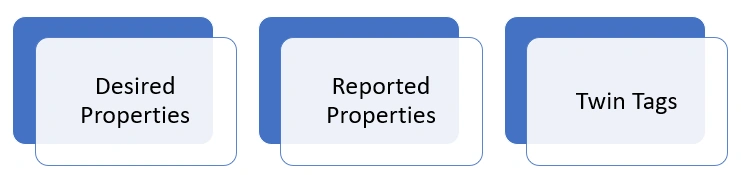
- Desired Properties
- Reported Properties
- Twin Tags
Let's learn about the properties and their uses. The real-time device twin section of the device metadata in the IoT Hub looks like the following image representation.
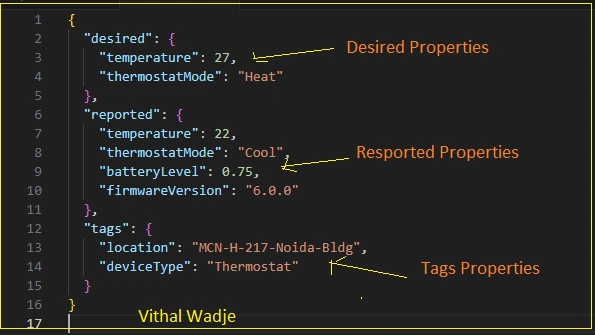
Let's learn about each property in detail.
Desired Properties
Desired properties in the Azure IoT Hub Device twins are like instructions for an IoT device. These are the settings and configurations that the application wants the device to follow. If the application needs to change these settings, it can send a message to the IoT hub. The device then reads these new instructions and adjusts its behavior accordingly. So, it's a way for the application to remotely control and tweak how the IoT device works.
Let's break it down into simpler terms to understand the desired properties.
What are they?
- Desired properties are like remote control settings for IoT devices.
- They are configurations and preferences that the application wants the device to follow.
How Does It Work?
- The application can change these settings at any time by sending a message to the Azure IoT Hub.
- The device then reads and applies these new settings to adjust its behavior.
What Can You Do?
- It's not just about basic settings; you can even do things like tell the device to restart or update its software.
Flexibility
- You can update these settings whenever you want, giving you real-time control over your devices.
How do Devices understand?
- Devices use something called the Azure IoT SDK to understand and act upon these updates.
JSON Structure for Desired Properties
Let's consider a scenario where an IoT device is attached to a moving truck transporting GoPure Sweets from the factory to the shop's outlet. The desired properties can be configured to monitor and manage various aspects of the truck's operation, ensuring the synchronization of various aspects during the journey. Here's an example JSON structure for such desired properties.
{
  "desired": {
    "temperatureThreshold": 5,
    "humidityThreshold": 80,
    "samplingInterval": 300,
    "truckSpeedLimit": 60,
    "destination": "B1-K08,Galaxy Blue Sapphire Plaza,Noida, UP"
  }
}
Explanation of preceding each desired property.
TemperatureThreshold
- Purpose: Sets the desired maximum temperature for transporting Sweets.
- Example Use Case: A "temperature threshold" of 5 degrees Celsius ensures that the truck's refrigeration system keeps the cargo within a specific temperature range to prevent spoilage.
HumidityThreshold
- Purpose: Specify the desired maximum humidity level inside the truck.
- Example Use Case: If vegetables are sensitive to humidity, a "humidity threshold" of 80 ensures that the cargo area maintains an appropriate level of moisture to preserve the quality of the Sweets.
SamplingInterval
- Purpose: Determines how often the IoT device should collect and send data.
- Example Use Case: A "sampling interval" of 300 seconds means the device reports temperature, humidity, and other relevant data every 5 minutes, providing regular updates on the conditions inside the truck.
TruckSpeedLimit
- Purpose: Set the maximum speed limit for the truck.
- Example Use Case: A "truck speed limit" of 60 km/h ensures that the truck adheres to a safe and controlled speed, promoting both road safety and cargo stability during transit.
Destination
- Purpose: Specify the desired destination for the truck.
- Example Use Case: Setting "destination" to "B1-K08, Galaxy Blue Sapphire Plaza, Noida, UP" informs the truck about its intended endpoint, allowing for route optimization and ensuring that it reaches the correct warehouse.
In this scenario, these desired properties provide a comprehensive configuration for monitoring and managing the transportation of Gopure sweets, covering temperature control, humidity levels, data reporting frequency, speed limits, and the destination of the truck.
{
  "desired": {
    "temperature": 27,
    "thermostatMode": "Heat"
  },
  "reported": {
    "temperature": 22,
    "thermostatMode": "Cool",
    "batteryLevel": 0.75,
    "firmwareVersion": "6.0.0"
  },
  "tags": {
    "location": "MCN-H-217-Noida-Bldg",
    "deviceType": "Thermostat"
  }
}
Key points about Desired Properties
- Desired properties are used to configure and control the behavior of the device remotely.
- Desired properties can be used to send new configuration settings or commands to the device.
- The device can read the desired properties and take actions based on the new settings.
- The application can update desired properties at any time, and the device will receive the updates and act accordingly.
- Desired properties can be used to implement a simple form of device management, such as reboot or reset commands.
- Desired properties can be used to update firmware, change device configuration, or update a device's behavior.
- Desired properties are updated by the application and can be accessed by the device via the Azure IoT SDK
Reported Properties
The reported properties in Azure IoT Hub Device Twins are the device's current state and configurations. These are the properties that the device is reporting back to the IoT hub, and they can be used to monitor the status and health of the device.
- Reported properties are used to report the device's current state and configurations.
- Reported properties can be used to report sensor data, device status, error messages, and other information.
- The IoT solution or the application can read reported properties to monitor the status and health of the device.
- The device can update reported properties at any time, and the IoT hub will receive the updates and act accordingly.
- Reported properties can be used to implement a simple form of device monitoring, such as checking if the device is online or offline.
- Reported properties can be used to report the device's location, temperature, battery level, and other telemetry data.
- Reported properties are updated by the device and can be accessed by the IoT solution or the application via the Azure IoT SDK.
Twin Tags
Azure IoT Hub Device Twins also support a feature called "Twin Tags," which allows you to add metadata to the Device Twin properties, including the desired and reported properties. These tags can be used to filter, query, and identify the devices in your solution.
- Twin tags are used to add metadata to the device's twin properties.
- Twin tags can be used to filter, query, and identify the devices in your solution.
- The IoT solution or the application can add tags to the Device Twin to filter and group the devices according to specific characteristics.
- Twin tags can be used to add information such as the device's location, manufacturer, and model.
- Twin tags can be used to filter devices based on their characteristics, such as device type, location, or firmware version.
- Twin tags can be used to segment devices into different groups, such as test devices, production devices, or devices in a specific region.
- Twin tags can be used to filter devices based on specific criteria, and then apply different policies or rules to each group of devices.
- Twin tags are stored in the Azure IoT hub and can be accessed by the IoT solution or the application via the Azure IoT SDK.
Key Points: IoT Hub Device Twin
- Azure IoT Hub Device Twins are JSON documents that store metadata and configurations for devices connected to an IoT hub.
- The size of the Device Twin JSON document is limited to 8KB.
- The property depth is limited to 32 levels, meaning that the Device Twin JSON document can only have 32 nested levels of properties.
- If the size of the device twin or property depth exceeds these limits, the update will fail, and an error will be returned.
- The device twin can be used to store and retrieve configuration information, such as desired properties and reported properties.
- The desired properties are updated by the application, and the reported properties are updated by the device.
- Desired and reported properties can also be used to implement a simple form of device management, such as reboot or reset commands.
- The device twin is stored in the Azure IoT hub, so it will be highly available and automatically backed up.
- The device twin is specific to the device, so it can store device-specific information like version, device model, and firmware.
- The device twin can also be used to store the device's location, which can be useful for tracking and monitoring.
Summary
I hope the preceding explanations helped you understand that Azure IoT Device Twins are a powerful feature that allows developers to synchronize the state of their IoT devices with the cloud. Each device twin contains a set of properties that describe the current state of the device, as well as a set of desired properties that specify the desired state of the device. The desired and reported properties can be updated at any time, making it easy to keep track of the state of your devices and take appropriate actions.
Join the conversation! Your thoughts help the community grow.