

In this blog, we will learn how to read when an incoming message is received in Twilio using Power Automate.
- Power Automate Flow creation.
- Configuration power automates flow URL in Twilio.
Power Automate Flow creation
Open https://make.powerapps.com/ and create a new automated flow in Power Automate using the "When an HTTP request is received" trigger.
To do this, search for "HTTP" and select the HTTP request trigger, as shown below.


Give the required flow name and click on Create.
Next, add Compose compound and add the below formal to read input from the above step.
decodeUriComponent(
    string(
        triggerBody()
    )
)

Next to read the received message, from number and to number we need each initial variable in flow.
From Number add below formal in value: first(split(split(outputs('Compose'), 'From=')[1], '&'))

To Number add below formal in value.
first(split(split(outputs('Compose'), 'To=')[1], '&'))
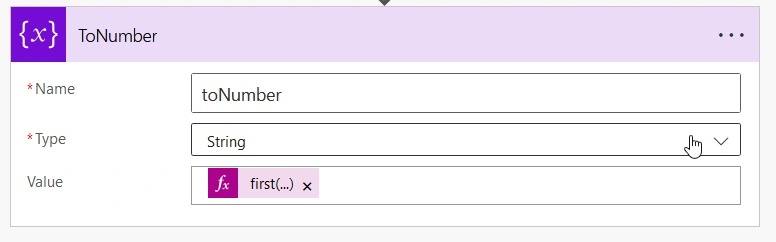
To read Message add below formal value.
first(split(split(outputs('Compose'), 'Body=')[1], '&'))

And save the flow, once flow is saved an HTTP POST URL will get generated as show in blow screen.

Configuration power automates flow URL in Twilio.
Logging to https://console.twilio.com/
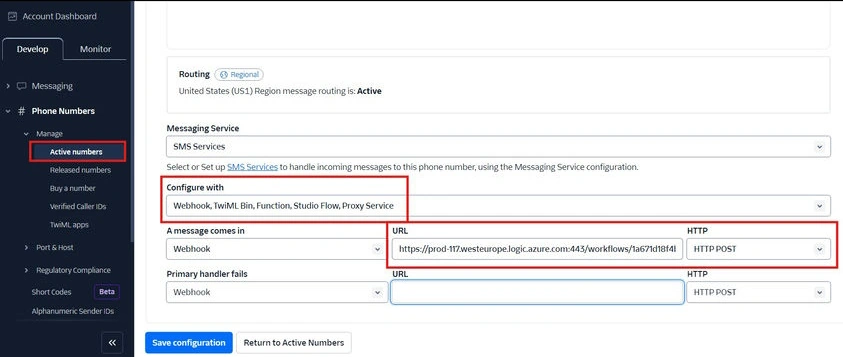
- Under Develop section expand Phone Numbers. Then in the left side navigation, click on Manage > Active Numbers.
- Click the active number, and it will take you to the configuration page.
- On the configuration page, scroll down to the Messaging Section. Under ‘A MESSAGE COMES IN’, set the first dropdown to Webhook, then into the text box, enter the Azure function app URL as the path, and lastly, set the second dropdown to HTTP POST.

Thank you!
Join the conversation! Your thoughts help the community grow.