

Introduction
In my previous article, we have learned the best practices while creating a new team. In this article, we will explore the Teams Channel. If you are new to Microsoft Teams, please visit my previous articles to get more understanding of Teams- Introduction, Teams Differently, Guest Users in Teams.
Understanding of channels in Microsoft Teams
Channels are the main part of Teams to separate the content sharing in Teams. The files shared in team conversations are automatically stored in the SharePoint Document Library and the permissions and file security options are automatically reflected in Teams.
Primarily, to share files in Teams, you need to have SharePoint Online enabled in your tenant. OneDrive for Business is also tied with SharePoint license to share private files in chats or conversations.
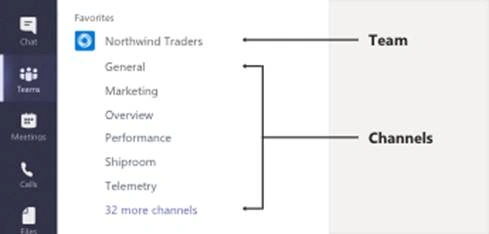
Figure 1: Team & Channels
In this article, let’s understand what things we need to consider most while creating channels in Microsoft Teams.
- “General” channel is available by default to the newly created team and shows in the first position for everyone. “General“ Channel should be restricted to a specific purpose, such as Announcements or News or general information sharing for the specific team
- Maximum limit restricted to 200 channels only (Including deleted channels).
- By default, Channels are sorted alpha-numerically.
- You can prefix channels with a number to enforce sorting - for e.g.
- 1- Important / Urgent
- 2- Customers
- 3- Vendors
- 4- Suppliers
- Create channels based on the purpose of the channel such as,
- A new Team is for “HelpDesk” application – create new channels considering each product from the helpdesk.
- A new Team is for the “Sales” department – create channels considering each customer engagements.
Pankajkumar PatelPosted Aug 13, 2019, 11:58 PM
Nice one ...