

Here, you can have your data recovered from an unattached content db. There might be scenarios, when you want to have data from a database, which you have removed from the Farm, so this is the best and simplest way to read the data.
How to recover?
Let’s open Central Admin of SharePoint on your machine. On your Windows desktop screen, click Start >> Administrative Tools >> SharePoint 2013 Central Administration.
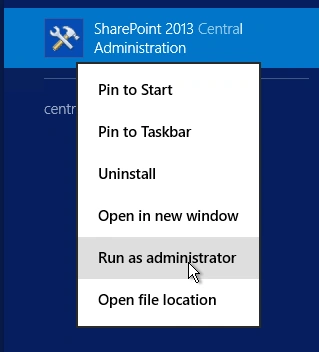
- Run it as an administrator to have the elevated privileges.
- You will see the screenshot given below.
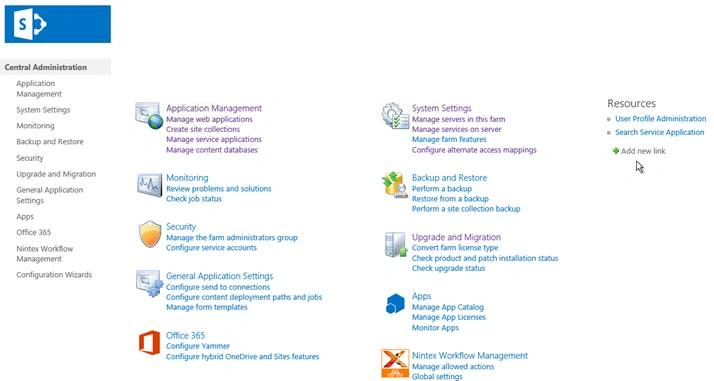
- Central Admin is configured under the categories given above.
- Click Backup and Restore.
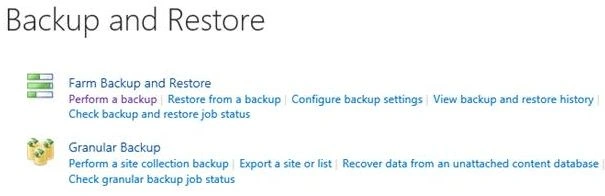
- Go to Granular Backup.

- Click Recover data from an unattached content database.
- You will see the screen below. Click it.
Configure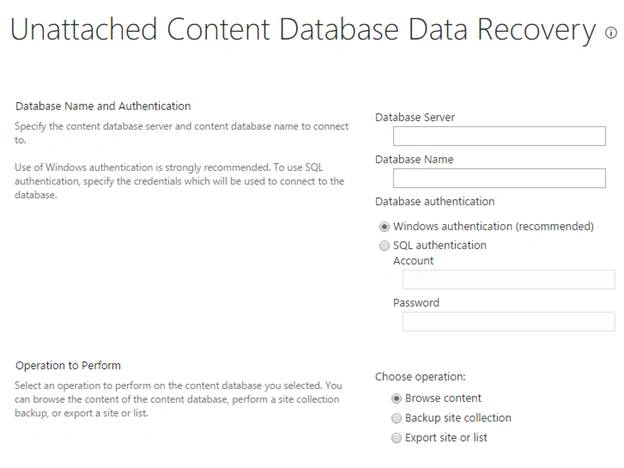
- Database Name and Authentication
Provide the database Server, name and choose the authentication; you want to have on the database like Windows or SQL with an account and a password. - Operation to Perform
Here, you can choose the operations you want to do as in Browse content. - Backup site collection.
- Export site or list.
Once the configuration is done, you can perform the operations on your data as browsing the content or backing up the site collection or exporting a site or a list.
The export will be saved in the file location provided by you; where you can configure the security and versions on the site or the list.
In this article, we saw how to recover the data from an unattached content database in SharePoint 2013 Central Admin. There are more articles to come on Central Administration. Until then, keep reading and keep learning.
Join the conversation! Your thoughts help the community grow.