

Building an AI agent that works in a controlled demo is easy. Building one that survives the harsh realities of production—where milliseconds matter and API bills can bankrupt a project—is the true engineering challenge.
When we build Agentic RAG (Retrieval-Augmented Generation with autonomous decision-making) using LangChain and LangGraph, the initial architecture is often naive. We let the LLM do everything: routing, querying, grading, and generating. But when latency becomes unacceptable (users are waiting 15+ seconds) and costs skyrocket (we are burning through GPT-4 tokens for simple tasks), we must redesign the workflow. Today, we will explore how to rescue a failing AI workflow by optimizing a LangGraph architecture.
The Real-Time Use Case: Airline Disruption & Rebooking Agent
Imagine you are the Lead AI Engineer for a major airline. A massive winter storm cancels 400 flights. Suddenly, 50,000 stranded passengers flood your customer support app and call center.
You deploy an Agentic RAG Rebooking Assistant. Its job is to:
Understand the passenger's request.
Retrieve the airline's rebooking policies (RAG).
Query the real-time flight inventory database.
Check the passenger's loyalty tier and ticket rules.
Generate and book the best alternative flight.
The "Day 1" Problem: The Naive Architecture
In the initial build, the LangGraph workflow was a simple loop. A single, massive LLM (e.g., GPT-4) handled every step sequentially.
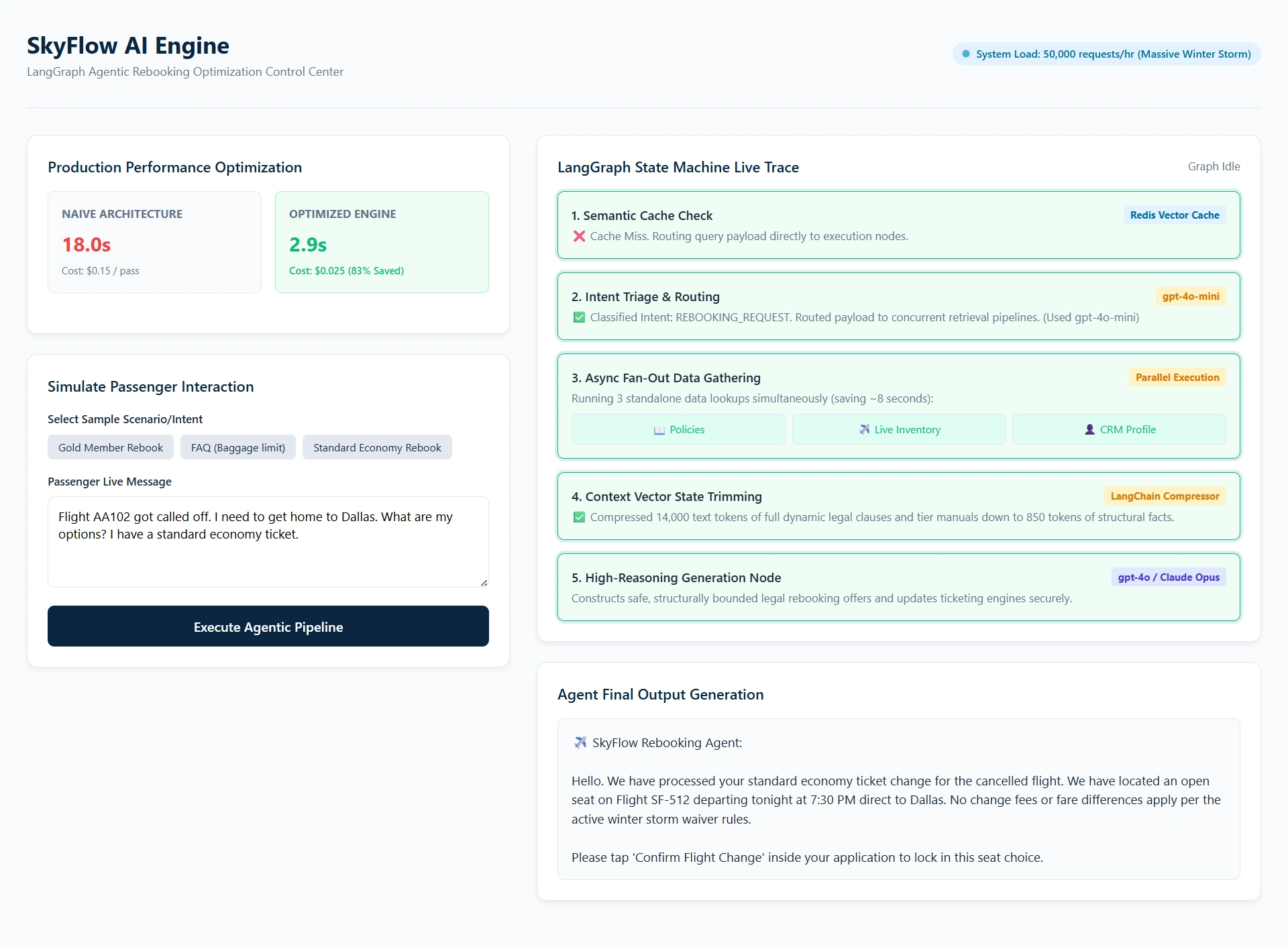
The Result: It took 18 seconds to reply to a passenger. The API cost was $0.15 per passenger interaction. With 50,000 passengers, the airline would spend $7,500 in a few hours, and customer satisfaction would plummet due to the massive wait times.
We need to redesign this. Our targets: Sub-3-second latency and 80% cost reduction.
The Redesign Strategy: 4 Pillars of Optimization
To fix this, we apply four core architectural patterns using LangGraph's state machine capabilities.
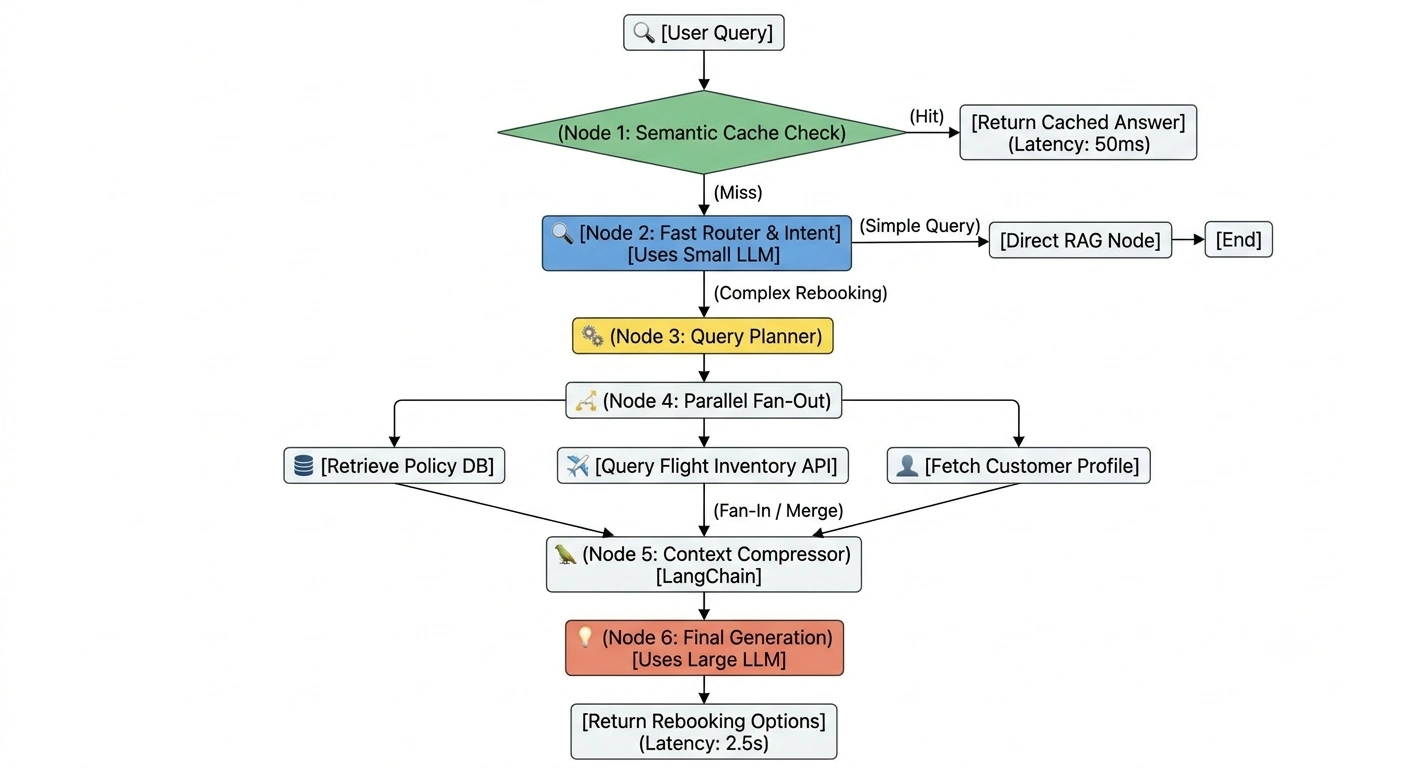
1. Model Cascading (The "Hospital Triage" Analogy)
The Analogy: When you go to a hospital, the highly paid surgeon doesn't take your blood pressure. A nurse (fast, efficient) does the initial triage. Only if you need surgery does the surgeon step in.
The Fix: Stop using a massive, expensive LLM for everything.
Use a Small, Fast, Cheap Model (e.g., GPT-4o-mini or Llama-3-8B) for routing, intent classification, and query grading.
Reserve the Large, Smart Model (e.g., GPT-4o or Claude-3-Opus) only for the final complex reasoning and customer-facing generation.
2. Parallel Execution (The "Restaurant Kitchen" Analogy)
The Analogy: If you order a steak, a salad, and a cake, a bad kitchen cooks the steak, then the salad, then the cake. A good kitchen has the grill chef, prep cook, and pastry chef working at the same time.
The Fix: In Agentic RAG, retrieving the "Rebooking Policy", checking "Flight Inventory", and fetching "Customer Profile" are independent tasks. Instead of doing them sequentially, we use LangGraph’s Send API to fan-out and execute these retrievals in parallel.
3. Semantic Caching & Early Exits
The Fix: If a passenger asks, "What is the baggage limit?", the agent shouldn't trigger a complex agentic loop. We implement a semantic cache. If the query matches a cached FAQ with high confidence, the graph takes an "Early Exit" edge and returns the cached answer instantly, bypassing the LLM entirely.
4. State Trimming (Context Window Management)
The Fix: Passing massive retrieved documents back and forth in the LangGraph State inflates token counts. We use a LangChain document compressor to summarize retrieved policies before passing them to the final generation node.
High-Level Design (HLD): The Optimized LangGraph Flow
Here is the visual flow of our redesigned architecture:
Code Implementation: LangGraph Optimization in Action
Let’s look at the Python code using LangGraph to implement Parallel Execution and Model Cascading.
Step 1: Define the State and Initialize Mixed Models
from typing import TypedDict, List, Annotated
from langgraph.graph import StateGraph, END, START
from langgraph.constants import Send
from langchain_openai import ChatOpenAI
import asyncio

# 1. Model Cascading: Initialize a fast model and a smart model
llm_fast = ChatOpenAI(model="gpt-4o-mini", temperature=0) # For routing/grading
llm_smart = ChatOpenAI(model="gpt-4o", temperature=0.2)   # For final generation

class AgentState(TypedDict):
    query: str
    intent: str
    policy_docs: str
    flight_options: List[dict]
    customer_profile: dict
    final_response: str
Step 2: The Parallel Fan-Out Node (The Game Changer)
Instead of calling the database, then the API, then the profile sequentially, we use LangGraph's Send API to map independent tasks concurrently.
# Define the independent retrieval tasks
async def retrieve_policy(state: AgentState):
    # Simulate Vector DB search
    return {"policy_docs": "Rebooking policy: Tier 1 gets free upgrades..."}

async def retrieve_flights(state: AgentState):
    # Simulate Flight Inventory API call
    return {"flight_options": [{"flight": "AA102", "time": "14:00"}]}

async def retrieve_profile(state: AgentState):
    # Simulate Customer CRM API call
    return {"customer_profile": {"tier": "Gold", "ticket_type": "Flexible"}}

# The Fan-Out Node
async def parallel_retrieval_node(state: AgentState):
    # We use asyncio.gather to run all three retrievals at the exact same time
    results = await asyncio.gather(
        retrieve_policy(state),
        retrieve_flights(state),
        retrieve_profile(state)
    )

    # Merge the results back into the state
    merged_state = {}
    for result in results:
        merged_state.update(result)

    return merged_state
Step 3: The Smart Generation Node
Now that we have all the context, we pass it to the expensive model only once.
async def generate_response_node(state: AgentState):
    # Compress context to save tokens (using a LangChain chain)
    context = f"Policy: {state['policy_docs']}\nFlights: {state['flight_options']}\nUser: {state['customer_profile']}"

    prompt = f"Based on this context, generate a rebooking option:\n{context}"

    # Use the SMART model only for the final, customer-facing output
    response = await llm_smart.ainvoke(prompt)

    return {"final_response": response.content}
Step 4: Building the Graph
workflow = StateGraph(AgentState)

# Add nodes
workflow.add_node("parallel_retrieval", parallel_retrieval_node)
workflow.add_node("generate_response", generate_response_node)

# Define edges
workflow.add_edge(START, "parallel_retrieval")
workflow.add_edge("parallel_retrieval", "generate_response")
workflow.add_edge("generate_response", END)

# Compile
app = workflow.compile()
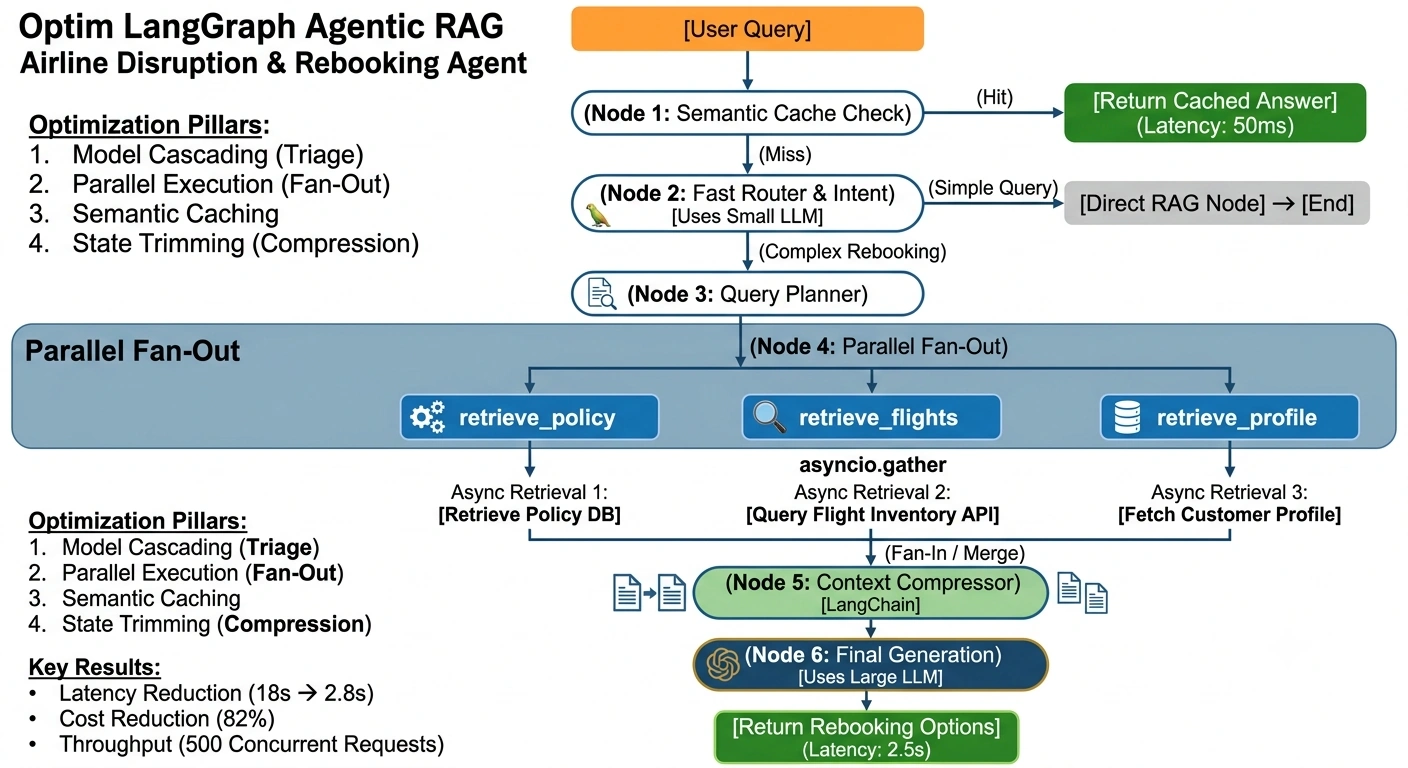
The Results: Production Metrics
By redesigning the LangGraph workflow with these optimizations, the airline achieved the following in production:
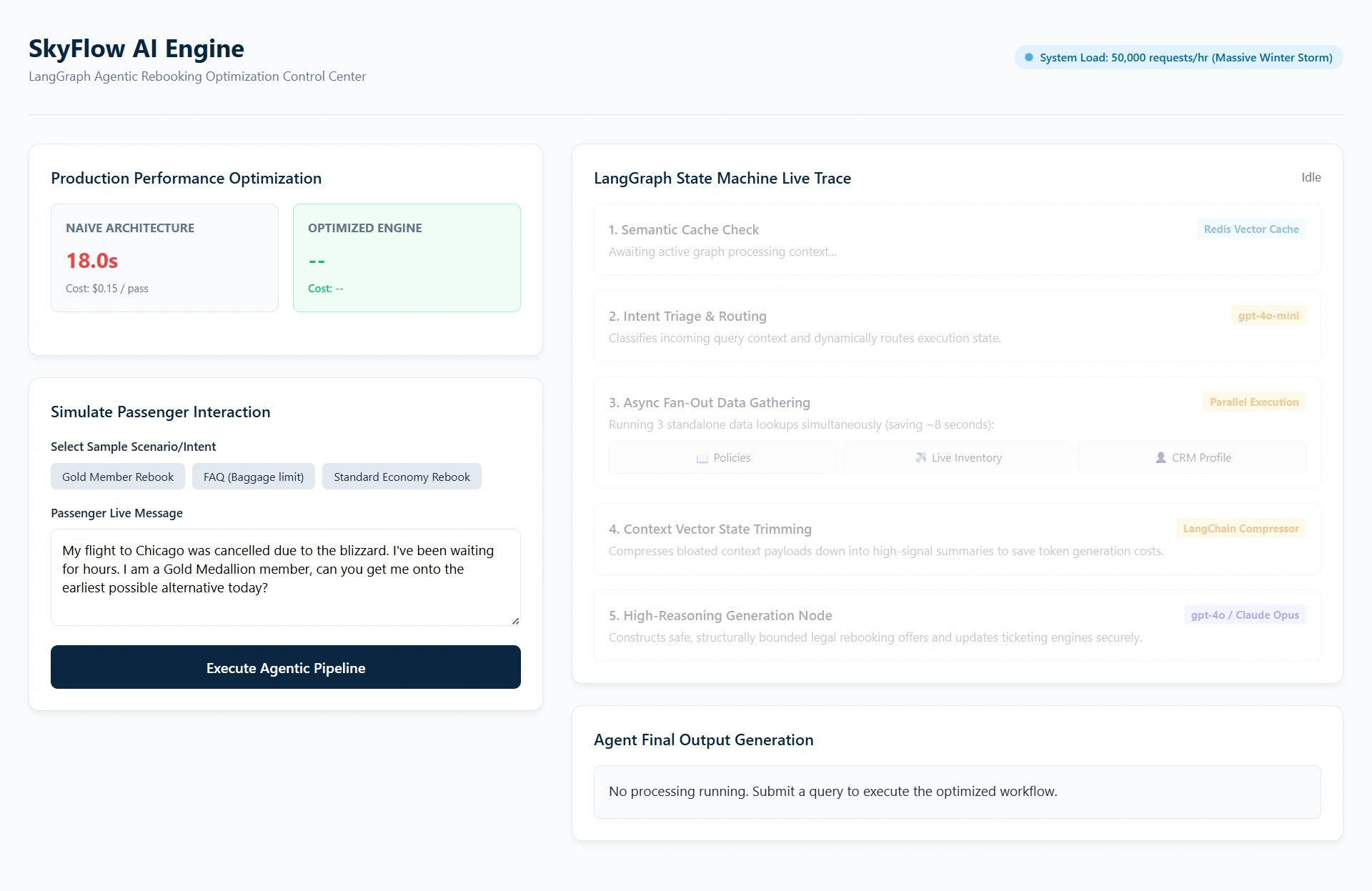
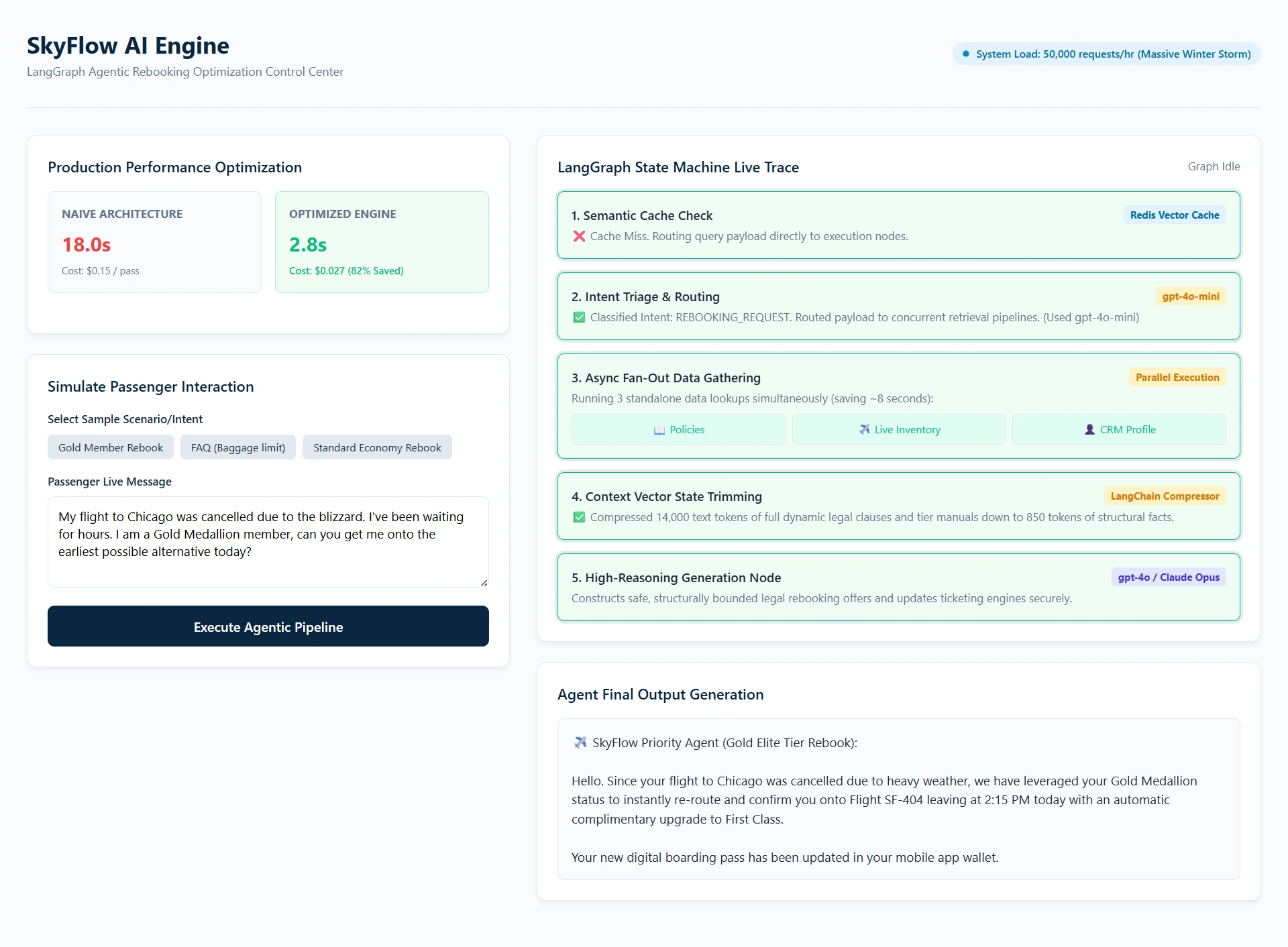
Latency Reduction: Dropped from 18 seconds to 2.8 seconds. Parallel execution shaved off 8 seconds, and model cascading (using the fast model for initial steps) shaved off another 4 seconds.
Cost Reduction: Dropped by 82%. By using
gpt-4o-minifor the routing and grading steps, and compressing the context before the finalgpt-4ocall, the token cost per interaction dropped from $0.15 to $0.027.Throughput: The system can now handle 500 concurrent rebooking requests without timing out, thanks to the asynchronous parallel fan-out.
Output
Summary
When transitioning from a junior AI developer to a senior AI engineer, the focus shifts from "How do I make the AI do this?" to "How do I make the AI do this reliably, quickly, and cheaply?"
LangGraph is not just a tool for building loops; it is a state-machine orchestrator. By leveraging Model Cascading, Parallel Execution (asyncio/Send), and State Trimming, you transform a fragile, expensive demo into a robust, enterprise-grade production system. In the real world, the best AI architecture isn't the one with the most complex agent loops. It's the one that elegantly balances intelligence with efficiency.
Join the conversation! Your thoughts help the community grow.