

Introduction
In general when we load a User control with the Page.LoadControl() method, the
User control is returned as an instance of the System.Web.UI.Control class. This
means that if the User control includes any custom properties, the properties
aren't available when we dynamically load the User control. If we dynamically
load a User control, then we need to cast the control to the correct type before
we can access any of the control's custom properties. To get a reference to a
User control's type, we must use the <%@ Reference %> directive.
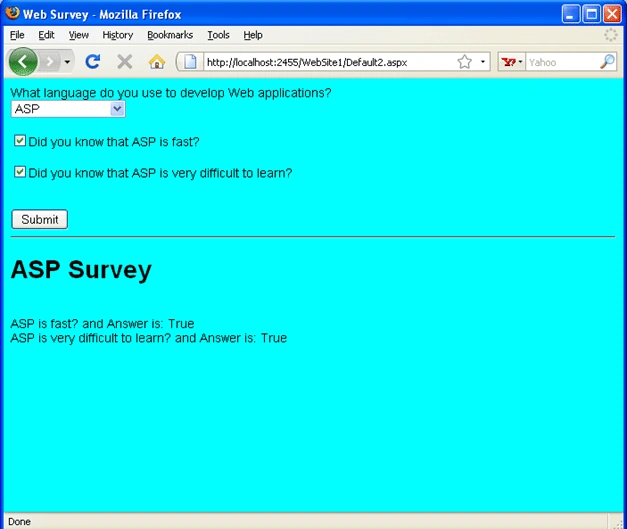
Taking an example, imagine that we need to create a form that displays different
questions depending on the answers that a user provides for previous questions.
In that case, we can dynamically load different User controls that contain the
different sets of questions. The page given below contains a survey form. The
first question asks us whether we are currently using VS 4.0 or VS 3.5 and
depending on our answer, the remainder of the form displays different questions.
Default2.aspx File Code
<%@
Page Language="VB"
%>
<%@
Reference Control="~/ASPSurvey.ascx"
%>
<%@
Reference Control="~/ASPNetSurvey.ascx"
%>
<!DOCTYPE
html PUBLIC
"-//W3C//DTD XHTML 1.1//EN"
"http://www.w3.org/TR/xhtml11/DTD/xhtml11.dtd">
<script
runat="server">
Private _survey As Control = Nothing
Private
Sub Page_Load()
Select Case
ddlLanguage.SelectedIndex
Case 1
_survey = Page.LoadControl("ASPSurvey.ascx")
Case 2
_survey = Page.LoadControl("ASPNetSurvey.ascx")
End Select
If
Not IsNothing(_survey)
Then
PlaceHolder1.Controls.Add(_survey)
End If
End Sub
Protected
Sub btnSubmit_Click(ByVal
sender As Object,
ByVal e As
EventArgs)
Select Case
ddlLanguage.SelectedIndex
Case 1
Dim aspResults
As
ASPSurvey = CType(_survey,
ASPSurvey)
ltlResults.Text =
"<h1>ASP Survey</h1>"
ltlResults.Text +=
"<br/>ASP is fast? " + aspResults.KnowFast.ToString()
ltlResults.Text += "<br
/>ASP is very difficult to learn? " + aspResults.KnowNewest.ToString()
Case 2
Dim aspNetResults
As
ASPNetSurvey = CType(_survey,
ASPNetSurvey)
ltlResults.Text =
"<h1>PHP Survey</h1>"
ltlResults.Text +=
"<br />PHP is fast? " + aspNetResults.KnowSlow.ToString()
ltlResults.Text += "<br
/>PHP is very difficult to learn? " +
aspNetResults.KnowOutdated.ToString()
End Select
End Sub
</script>
<html
xmlns="http://www.w3.org/1999/xhtml"
>
<head
id="Head1"
runat="server">
<style
type="text/css">
html
{
font:14px
Arial,Sans-Serif;
background-color:Aqua;
}
</style>
<title>Web
Survey</title>
</head>
<body>
<form
id="form1"
runat="server">
<div>
Join the conversation! Your thoughts help the community grow.