

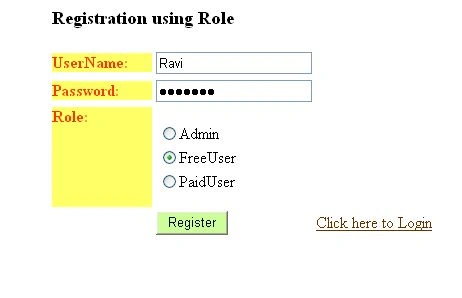
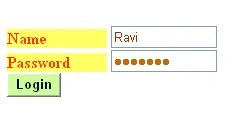
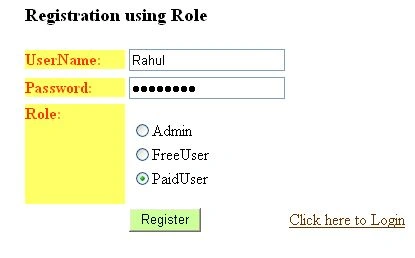
In this article, we will learn how to register a user having multiple roles. In the example here we have the three roles "Admin", "Free User" and "Paid User". After successful registration we can also login to the system. During login we can redirect to various webpages depending on their corresponding roles.
Table Creation
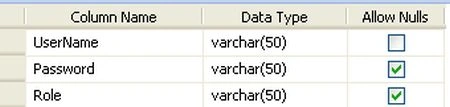
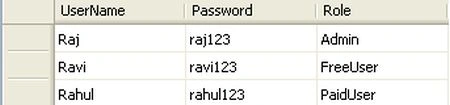
Table Data
Now let's move to the code.
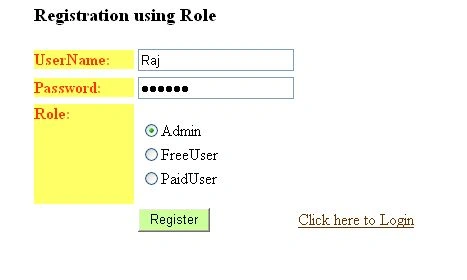
Register.aspx
- <%@ Page Language="C#" AutoEventWireup="true" CodeBehind="Register.aspx.cs" Inherits="Login_role.Register" %>
- <!DOCTYPE html PUBLIC "-//W3C//DTD XHTML 1.0 Transitional//EN" "http://www.w3.org/TR/xhtml1/DTD/xhtml1-transitional.dtd">
- <html xmlns="http://www.w3.org/1999/xhtml" >
- <head runat="server">
- <title>Register</title>
- </head>
- <body>
- <form id="form1" runat="server">
- <div>
- <table align="center">
- <tr>
- <td colspan="2">
- <h3>
- Registration using Role</h3>
- </td>
- </tr>
- <tr>
- <td>
- <asp:Label ID="Label1" runat="server" Text="UserName:" Font-Bold="True" Width="100px" BackColor="#FFFF66" ForeColor="#FF3300"></asp:Label>
- </td>
- <td>
- <asp:TextBox ID="txt_UserName" runat="server" Width="150px"></asp:TextBox>
- </td>
- <td><asp:RequiredFieldValidator ID="RequiredFieldValidator2" runat="server" ErrorMessage="Enter UserName" ControlToValidate="txt_UserName"></asp:RequiredFieldValidator> </td>
- </tr>
- <tr>
- <td>
- <asp:Label ID="Label2" runat="server" Text="Password:" Font-Bold="True" Width="100px" BackColor="#FFFF66" ForeColor="#FF3300"></asp:Label>
- </td>
- <td>
- <asp:TextBox ID="txt_Password" TextMode="Password" runat="server"
- Width="150px"></asp:TextBox>
- </td>
- <td><asp:RequiredFieldValidator ID="RequiredFieldValidator3" runat="server" ErrorMessage="Enter Password" ControlToValidate="txt_Password"></asp:RequiredFieldValidator> </td>
- </tr>
- <tr>
- <td>
- <asp:Label ID="Label3" runat="server" Text="Role:" Font-Bold="True" Width="100px" Height="100px" BackColor="#FFFF66" ForeColor="#FF3300"></asp:Label>
- </td>
- <td>
- <asp:RadioButtonList ID="rbtRole" runat="server" RepeatDirection="Vertical">
- <asp:ListItem>Admin</asp:ListItem>
- <asp:ListItem>FreeUser</asp:ListItem>
- <asp:ListItem>PaidUser</asp:ListItem>
- </asp:RadioButtonList>
- </td>
- <td><asp:RequiredFieldValidator ID="RequiredFieldValidator4" runat="server" ErrorMessage="Select role" ControlToValidate="rbtRole"></asp:RequiredFieldValidator> </td>
- </tr>
- <tr>
- <td></td>
- <td>
- <asp:Button ID="btn_register" runat="server" BackColor="#CCFF99" Text="Register"
- onclick="btn_register_Click" />
- </td>
- <td><asp:HyperLink ID="HyperLink1" runat="server" NavigateUrl="~/Login.aspx"
- ForeColor="#663300">Click here to Login</asp:HyperLink></td>
- </tr>
- <tr>
- <td align="center" colspan="2">
- <asp:Label ID="lblmsg" runat="server"></asp:Label>
- </td>
- </tr>
- </table>
- </div>
- </form>
- </body>
- </html>
Register.aspx.cs
- using System;
- using System.Collections;
- using System.Configuration;
- using System.Data;
- using System.Linq;
- using System.Web;
- using System.Web.Security;
- using System.Web.UI;
- using System.Web.UI.HtmlControls;
- using System.Web.UI.WebControls;
- using System.Web.UI.WebControls.WebParts;
- using System.Xml.Linq;
- using System.Data.SqlClient;
- namespace Login_role
- {
- public partial class Register : System.Web.UI.Page
- {
- string strConnString = ConfigurationManager.ConnectionStrings["ConnectionString"].ConnectionString;
- SqlCommand com;
- protected void btn_register_Click(object sender, EventArgs e)
- {
- SqlConnection con = new SqlConnection(strConnString);
- com = new SqlCommand();
- com.Connection = con;
- com.CommandType = CommandType.Text;
- com.CommandText = "Insert into Login values(@UserName,@Password,@Role)";
- com.Parameters.Clear();
- com.Parameters.AddWithValue("@UserName", txt_UserName.Text);
- com.Parameters.AddWithValue("@Password", txt_Password.Text);
- com.Parameters.AddWithValue("@Role", rbtRole.SelectedValue);
- if (con.State == ConnectionState.Closed)
- con.Open();
- com.ExecuteNonQuery();
- con.Close();
- lblmsg.Text = "Successfully Registered!!!";
- clear();
- }
- private void clear()
- {
- txt_UserName.Text = "";
- rbtRole.ClearSelection();
- }
- }
- }
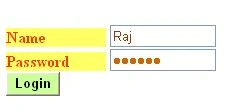
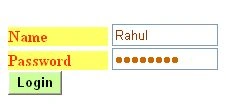
Login.aspx
- <%@ Page Language="C#" AutoEventWireup="true" CodeBehind="Login.aspx.cs" Inherits="Login_role.Login" %>
- <!DOCTYPE html PUBLIC "-//W3C//DTD XHTML 1.0 Transitional//EN" "http://www.w3.org/TR/xhtml1/DTD/xhtml1-transitional.dtd">
- <html xmlns="http://www.w3.org/1999/xhtml" >
- <head runat="server">
- <title>Login</title>
- <script type="text/javascript" language="javascript">
- function Validate()
- {
- var UName=document.getElementById('TextBox_user_name');
- var Password=document.getElementById('TextBox_password');
- if((UName.value=='') || (Password.value==''))
- {
- alert('UserName or Password should not be blank');
- return false;
- }
- else
- {
- return true;
- }
- }
- </script>
- </head>
- <body>
- <form id="form1" runat="server">
- <div>
- <asp:Label ID="lb1" runat="server" Font-Bold="True" ForeColor="#FF3300"></asp:Label><br />
- <asp:Label ID="Label1" runat="server" Text="Name" Font-Bold="True" Width="100px" BackColor="#FFFF66" ForeColor="#FF3300"></asp:Label>
- <asp:TextBox ID="TextBox_user_name" runat="server" ForeColor="#993300" Width="100px"></asp:TextBox><br />
- <asp:Label ID="Label2" runat="server" Text="Password" Font-Bold="True" Width="100px" BackColor="#FFFF66" ForeColor="#FF3300"></asp:Label>
- <asp:TextBox ID="TextBox_password" runat="server" ForeColor="#CC6600" TextMode="Password" Width="100px"></asp:TextBox><br />
- <asp:Button ID="btn_login" runat="server" Text="Login" Font-Bold="True"
- BackColor="#CCFF99" OnClientClick="Validate()" onclick="btn_login_Click"/><br />
- </div>
- </form>
- </body>
- </html>



Dennis J GordonPosted Jul 28, 2023, 3:48 AM
What are your views on Identity?
Dimpal PalPosted Mar 29, 2021, 3:50 PM
The Role Code isn't work
Dimpal PalPosted Mar 29, 2021, 3:49 PM
It's Showing Error NullReferenceException not found error can you help me?
sofique uddinPosted Feb 25, 2021, 3:40 AM
If possible kindly give me a PDF Link
sofique uddinPosted Feb 25, 2021, 3:34 AM
Thank You. Dear Brother
nad sPosted May 21, 2019, 8:59 PM
I tried this code but its not working properly.I mean the Role isn't working.can you please check the code.
Subin ThomasPosted Feb 5, 2019, 12:17 AM
Nice article
حسنين أبوسعدهPosted Dec 18, 2018, 5:08 AM
Thanks is great and simple
Sunny TamangPosted Nov 29, 2017, 3:00 AM
There is one question if u r logged in as free user and u manually changed the url for paid users, will it still be accessible by the free user?
Sai KiranPosted Dec 11, 2016, 1:49 PM
This article is good but I want Registration and Login By Role in ASP.NET with WCF Servicss Please post me
SubashPosted Jul 13, 2016, 1:23 PM
Nice one
Sthitaprajnya Debasis NayakPosted Jan 13, 2016, 1:35 PM
Helped Me A lot.
Chandu KumawatPosted Oct 12, 2015, 7:12 AM
nice 1
SharadPosted Jul 22, 2015, 12:32 AM
good one...
Yayat YatimanPosted Jan 22, 2015, 3:06 AM
nice ! how to logout code