

Introduction
Normally as a user we navigate to a website, register ourself and verify the account to enjoy the service provided by them. To develop such an application we need a special scenario. There are many ways to perform the activation.
Send the SMS containing random code to cell phone and ask that code for
verification
Send email having URL to verify
Send email having random code to verify
In this article, we will learn the (2) method. In the future, I'll post on all.
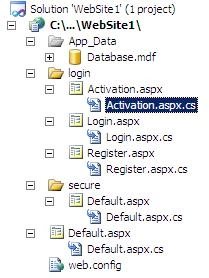
Look at the following file hierarchy and develop the same by following the steps given below.
Untitled1.jpg
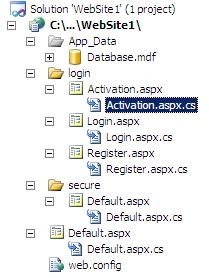
Follow the steps for development:
Step 1
Develop the database, look at the screenshot:
Untitled.jpg
Remember to mark the "id" field as auto-number and the default value for
verified column to "NO".
Step 2
Create the connection string in config file as follows:
<connectionStrings>
<add name="ConnectionString1" connectionString="Data Source=.\SQLEXPRESS;AttachDbFilename=|DataDirectory|\Database.mdf;Integrated
Security=True;User Instance=True"
providerName="System.Data.SqlClient" />
</connectionStrings>
Step 3
Configure the secure location path that will be accessed when the user is fully
authorized.
<location path="secure">
<system.web>
<authorization>
<deny users="?"/>
</authorization>
</system.web>
</location>
Step 4
Create the ~/login/Register.aspx form using C# code-behind and write the
following code.
Register.aspx Code
<form id="form1" runat="server">
<div>
<asp:Label ID="Label1" runat="server" Visible="False" ForeColor="Red"
Font-Bold="True"></asp:Label><br />
<br />
<table cellpadding="5px" cellspacing="5px">
<tr>
<td style="vertical-align:top;">
Full Name:
</td>
<td style="vertical-align:top;">
<asp:TextBox ID="fullname" runat="server" Width="200px" MaxLength="50"></asp:TextBox>
<asp:RequiredFieldValidator ID="RequiredFieldValidator1" runat="server"
ErrorMessage="Full Name can't be empty." ControlToValidate="fullname" ForeColor="Red">*</asp:RequiredFieldValidator>
</td>
</tr>
<tr>
<td style="vertical-align:top;">
Email ID:
</td>
<td style="vertical-align:top;">
<asp:TextBox ID="emailid" runat="server" Width="200px" MaxLength="80"></asp:TextBox>
<asp:RequiredFieldValidator ID="RequiredFieldValidator2" runat="server"
ErrorMessage="Email ID can't be empty." ControlToValidate="emailid" ForeColor="Red">*</asp:RequiredFieldValidator>
<asp:RegularExpressionValidator ID="RegularExpressionValidator1" runat="server"
ErrorMessage="Invalid Email ID." ControlToValidate="emailid" ForeColor="Red"
ValidationExpression="\w+([-+.']\w+)*@\w+([-.]\w+)*\.\w+([-.]\w+)*">*</asp:RegularExpressionValidator>
</td>
</tr>
<tr>
<td style="vertical-align:top;">
Username:
</td>
<td style="vertical-align:top;">
<asp:TextBox ID="username" runat="server" Width="200px" MaxLength="20"></asp:TextBox>
<asp:RequiredFieldValidator ID="RequiredFieldValidator3" runat="server"
ErrorMessage="Username can't be empty." ControlToValidate="username" ForeColor="Red">*</asp:RequiredFieldValidator>
</td>
</tr>
<tr>
<td style="vertical-align:top;">
Password:
</td>
<td style="vertical-align:top;">
<asp:TextBox ID="password" runat="server" TextMode="Password" Width="200px"
MaxLength="20"></asp:TextBox>
<asp:RequiredFieldValidator ID="RequiredFieldValidator4" runat="server"
ErrorMessage="Password can't be empty." ControlToValidate="password"
ForeColor="Red">*</asp:RequiredFieldValidator>
</td>
</tr>
<tr>
<td style="vertical-align:top;">
Re-Type Password:
</td>
<td style="vertical-align:top;">
<asp:TextBox ID="repassword" runat="server" TextMode="Password" Width="200px"
MaxLength="20"></asp:TextBox>
<asp:RequiredFieldValidator ID="RequiredFieldValidator6" runat="server"
ErrorMessage="Password can't be empty." ControlToValidate="password"
ForeColor="Red">*</asp:RequiredFieldValidator>
</td>
</tr>
</table>
<asp:Button ID="submit" runat="server" Text="Submit" onclick="submit_Click" />
<table>
<tr>
<td>
<asp:ValidationSummary ID="ValidationSummary1" runat="server" ForeColor="Red"/>
<br /><br />
<asp:HyperLink ID="HyperLink1" runat="server" NavigateUrl="~/login/login.aspx">I
have already an account !</asp:HyperLink>
<br /><br />
</td>
</tr>
</table>
</div>
</form>
Register.aspx.cs Code
protected void Page_Load(object sender, EventArgs e)
{
}
protected void submit_Click(object sender, EventArgs e)
{
SqlDataSource sds = new SqlDataSource();
sds.ConnectionString = ConfigurationManager.ConnectionStrings["ConnectionString1"].ToString();
sds.SelectParameters.Add("username", TypeCode.String, this.username.Text);
sds.SelectCommand = "SELECT * FROM [users] WHERE [username] = @username";
DataView dv = (DataView)sds.Select(DataSourceSelectArguments.Empty);
try
{
if (dv.Count == 0)
{
SqlDataSource emailcheck = new SqlDataSource();
emailcheck.ConnectionString = ConfigurationManager.ConnectionStrings["ConnectionString1"].ToString();
emailcheck.SelectParameters.Add("emailid", TypeCode.String, this.emailid.Text);
emailcheck.SelectCommand = "SELECT * FROM [users] WHERE [emailid] = @emailid";
DataView emailcheckdv = (DataView)emailcheck.Select(DataSourceSelectArguments.Empty);
try
{
if (emailcheckdv.Count == 0)
{
if (password.Text == repassword.Text)
{
execution(fullname.Text, emailid.Text, username.Text, password.Text);
}
else
{
Label1.Visible = true;
Label1.Text = "Form not completed or password not matched.";
}
}
else
{
Label1.Visible = true;
Label1.Text = "Email ID already Registered.";
}
}
catch (System.Data.SqlClient.SqlException ex_msg)
{
string msg = "Error occured while login.";
msg += ex_msg.Message;
Label1.Visible = true;
Label1.Text = msg;
}
}
else
{
username.Text = null;
password.Text = null;
Label1.Visible = true;
Label1.Text = "User already exist, please use different username.";
}
}
catch (System.Data.SqlClient.SqlException ex_msg)
{
string msg = "Error occured while login.";
msg += ex_msg.Message;
Label1.Visible = true;
Label1.Text = msg;
}
finally
{
//Here will be fially elements
}
}
public string GetConnectionString()
{
return System.Configuration.ConfigurationManager.ConnectionStrings["ConnectionString1"].ConnectionString;
}
public void execution(string fullname, string emailid, string username, string
password)
{
SqlConnection myConnection = new SqlConnection(GetConnectionString());
SqlCommand storeimage = new SqlCommand("INSERT INTO users (fullname,emailid,username,password)
VALUES (@fullname,@emailid,@username,@password)", myConnection);
storeimage.Parameters.Add("@fullname", SqlDbType.VarChar, 50).Value = fullname;
storeimage.Parameters.Add("@emailid", SqlDbType.VarChar, 50).Value = emailid;
storeimage.Parameters.Add("@username", SqlDbType.VarChar, 50).Value = username;
storeimage.Parameters.Add("@password", SqlDbType.VarChar, 50).Value = password;
try
{
myConnection.Open();
storeimage.ExecuteNonQuery();
sendmail(fullname, emailid, username, password);
Label1.Visible = true;
Label1.Text = "User Created.";
}
catch
{
//catch block goes here
}
}
public void sendmail(string fullname, string emailid, string username, string
password)
{
string siteurl = "http://www.yourdomain.com/login/Activation.aspx";
string smsg = "New Registration on our website, find your details below:<br>";
smsg += "<br><b>Name: </b>" + fullname;
smsg += "<br><b>Username: </b>" + username;
smsg += "<br><b>Password: </b>" + password;
smsg += "<br><b>Your account is not activated still, please activate it by
clicking here: </b>";
smsg += "<br><b>Title of Post: </b><br>" + "<a href=" + siteurl + "?username=" +
username + "></a>";
smsg += "<br><br><br><br>";
smsg += "<b>Administrator";
MailMessage message = new MailMessage();
try
{
message.To.Add(new MailAddress(emailid));
message.From = new MailAddress("youremailaddress");
message.Subject = "yoursubject";
message.Body = smsg;
message.IsBodyHtml = true;
SmtpClient client = new SmtpClient();
client.Port = 25; // Gmail works on this port 587
client.Host = "smtp.gmail.com";
System.Net.NetworkCredential nc = new
System.Net.NetworkCredential("youremailaddress", "password");
client.EnableSsl = true;
client.UseDefaultCredentials = false;
client.Credentials = nc;
client.Send(message);
}
catch
{
//catch block goes here
}
}
Step 5
Now, create the ~/login/Login.aspx form using C# code-behind and write the
following code.
Login.aspx
<form id="form1" runat="server">
<div>
<table cellspacing="5px">
<tr>
<td>
<table>
<tr>
<td>
Username:
</td>
<td>
<asp:TextBox ID="username" runat="server" Width="150px"></asp:TextBox>
<asp:RequiredFieldValidator ID="RequiredFieldValidator3" runat="server"
ErrorMessage="Username can't be empty." ControlToValidate="username" ForeColor="Red">*</asp:RequiredFieldValidator>
</td>
</tr>
<tr>
<td>
Password:
</td>
<td>
<asp:TextBox ID="password" runat="server" TextMode="Password"
Width="150px"></asp:TextBox>
<asp:RequiredFieldValidator ID="RequiredFieldValidator4" runat="server"
ErrorMessage="Password can't be empty." ControlToValidate="password"
ForeColor="Red">*</asp:RequiredFieldValidator>
</td>
</tr>
<tr>
<td>
</td>
<td>
<asp:Button ID="login" runat="server" Text="login" onclick="login_Click" />
</td>
</tr>
</table>
</td>
</tr>
</table>
<br /><br />
<table>
<tr>
<td>
<asp:Label ID="lblinfo" runat="server" Text=""></asp:Label><br />
<asp:ValidationSummary ID="ValidationSummary1" runat="server" ForeColor="Red"/>
</td>
</tr>
</table>
</div>
</form>
Login.aspx.cs Code
protected void Page_Load(object sender, EventArgs e)
{
}
protected void login_Click(object sender, EventArgs e)
{
SqlDataSource sds = new SqlDataSource();
sds.ConnectionString =
ConfigurationManager.ConnectionStrings["ConnectionString1"].ToString();
sds.SelectParameters.Add("username", TypeCode.String, this.username.Text);
sds.SelectParameters.Add("password", TypeCode.String, this.password.Text);
sds.SelectCommand = "SELECT * FROM [users] WHERE [username] = @username AND
[password] = @password";
DataView dv = (DataView)sds.Select(DataSourceSelectArguments.Empty);
try
{
if (dv.Count == 0)
{
this.lblinfo.ForeColor = System.Drawing.Color.Red;
this.lblinfo.Text = "Invalid username or password.";
return;
}
else
{
//stop the user here if not verified otherwise let him go
FormsAuthentication.RedirectFromLoginPage(username.Text, true);
Session["username"] = username.Text;
//Response.Redirect("~/admin/publisharticle.aspx");
}
}
catch (System.Data.SqlClient.SqlException ex_msg)
{
string msg = "Error occured while login.";
msg += ex_msg.Message;
throw new Exception(msg);
}
finally
{
//Here will be fially elements
}
}
In above code, look at line [//stop
the user here if not verified otherwise let him go]. Here you can put your
decision that you are wishing to let the access to un-verified user or not.
Place the code as you wish.
Step 6
Now, create the ~/login/Activation.aspx form using C# code-behind and write the
following code.
Activation.aspx Code
<form id="form1" runat="server">
<div>
<asp:Label ID="Label1" runat="server" Text="Label"></asp:Label>
</div>
</form>
Activation.aspx.cs Code
protected void Page_Load(object sender, EventArgs e)
{
string usernamequerystring = Request.QueryString["username"].ToString();
SqlConnection myConnection = new SqlConnection(GetConnectionString());
SqlCommand storeimage = new SqlCommand("UPDATE users SET verified='YES' WHERE
username=@usernamequerystring)", myConnection);
storeimage.Parameters.Add("@usernamequerystring", SqlDbType.VarChar, 50).Value =
usernamequerystring;
try
{
myConnection.Open();
storeimage.ExecuteNonQuery();
Label1.Visible = true;
Label1.Text = "Account Activated.";
}
catch
{
//catch block goes here
}
}
public string GetConnectionString()
{
return
System.Configuration.ConfigurationManager.ConnectionStrings["ConnectionString1"].ConnectionString;
}
That's all for the coding. The secure folder can have any page. No special code
here.
Conclusion
In this article I have only outlined the basic procedures for such an
application.
HAVE A GREAT CODING !!
Sahasra WorksPosted Jun 22, 2015, 3:26 AM
Sir, i used the above code in my application. actually i have written my host in string url as ~/login/mypage.aspx. link is not existing in the got mail to click pls can you help me,@ [email protected]
krishna gupthaPosted Aug 4, 2014, 7:00 AM
Thanku boss
Hayat BedruPosted Jun 14, 2013, 8:48 AM
@ [email protected], can you forward it the project it for me if u have it in hand ([email protected])
rakib HasanPosted Jun 12, 2013, 1:59 AM
Excellent article, just what I'm looking for. Please send me source code and database layout for this project to my email: [email protected] Thank you very much!
doni antoPosted Apr 1, 2013, 11:39 PM
Please send source code and screenshot to mail : [email protected] Thanks
Ron MedellinPosted Feb 5, 2013, 9:33 AM
Awesome article, just what I'm looking for. Please send me source code and database layout for this project to my email: [email protected] Thank you very much!
hung doanPosted Jan 9, 2013, 2:12 AM
Please, send this source code to my email: [email protected]. Thanks so much
Shahid IqbalPosted Dec 28, 2012, 1:20 PM
Sir plz mail me this project with screen shot .my Email id is [email protected]
Shahid IqbalPosted Dec 28, 2012, 1:19 PM
Develop the database, look at the screenshot: Untitled.jpg image is not available
parth parmarPosted Dec 14, 2012, 4:16 PM
excellent work... can you please mail me this project..my email id is [email protected]. thanks..
mangesh bankarPosted Oct 11, 2012, 2:44 PM
nice article can u send me this project in 3Tier application? lots of Thanks!!!
Sharad GuptaPosted Oct 3, 2012, 11:50 AM
precise article....thanks
preethi raviPosted Jun 8, 2012, 5:38 AM
great work can u send the project to my mail id plz........
farooq haiderPosted Apr 30, 2012, 3:59 AM
grt work.but i want a first option.can you made it
Moaa MemoPosted Mar 15, 2012, 1:27 PM
it is work good without connection string in web.config but if put connection string in web.config this error occur :Sections must only appear once per config file. See the help topic <location> for exceptions.
Moaa MemoPosted Mar 13, 2012, 2:05 PM
this exception occur operation time out
tarkano ahmadPosted Jan 25, 2012, 5:10 AM
am using sorted procedure and i need to check if email is active in data base or now >>> if no send msg to activation >>
Lalitdutt ParsaiPosted Nov 21, 2011, 8:27 AM
Thanks sir i m search my solution arround 1 month n finally solve by this code thank u sir
mahendra herimathPosted Oct 12, 2011, 10:51 AM
Please can you give the Database for this/... Thanks
nitin PawarPosted Aug 27, 2011, 1:17 PM
pls tell me where i get this point u tell in this project and where to changet it Remember to mark the "id" field as auto-number and the default value for verified column to "NO" when i run project no user object created error coming
Anil KumarPosted Jun 17, 2011, 9:09 AM
for this project how many Table we should create in database,if i am using VS 2005..and we ll create store proc or can we use without store proc???? i am trying to connect with database but i am not getting any response!! plz help me ....if there are any changes i have to do anywhere then please tell me..