

Regular expressions
There are typically two polarizing reactions to the above statement. The first may result in a charge of attempted murder against your mouse and the other may have nested closer to your screen saying "Yes? Tell me more!” This article is primarily going to focus on the first group of people that may currently be struggling to find their mouse from across the room.
Regular expressions can be incredibly powerful tools when dealing with large amounts of text and attempting to grab very specific data within it using different patterns or expressions. However, they are not the friendliest things in the world to look at or write:
// Example of an incredibly ugly regular expression
// to match dates in a variety of formats
((0?[13578]|10|12)(-|/)((0[0-9])|([12])([0-9]?)|(3[01]?))(-|/)((d{4})|(d{2}))|(0?[2469]|11)(-|/)((0[0-9])|([12])([0-9]?)|(3[0]?))(-|/)((d{4}|d{2})))
This post is going to cover a new library called RegExpBuilder that was released by Andrew Jones, which aims to transform these very nasty looking regular expressions into human friendly statements that can easily be built and understood.
The Problem
You need to write a very basic regular expression to perform some pattern matching and you don’t have any idea how to write a regular expression (or you do and they always turn out wrong).
Using RegExpBuilder
RegExpBuilder can target a variety of environments such as Dart, Java, JavaScript and Python. For this post, we will focus on the use of JavaScript since it will be very easy to demonstrate through the use of examples that would be at least somewhat interactive.
Getting started with RegExpBuilder is as simple as including the appropriate file or reference into your application (based on your environment) like so:
- <!-- Example of directly referencing the RegExpBuilder.js file from GitHub -->
- <script type='text/javascript' src='https://raw.github.com/thebinarysearchtree/RegExpBuilder/master/RegExpBuilder.js' />
Dealing with Currency
A common regular expression might be to validate if a value contains is currency or not. In this example, we will consider currency to be US dollars which will consist of an explicit dollar sign '$' followed by a series of numbers, then a dot '.' and exactly two decimal places such as:
$123.45 # Perfect example of a US currency value
Using a Regular Expression, you would get something that looks like this:
^$\d+.\d{2}$
Let's break this down for those of you unfamiliar with regular expressions:
^ # Start of Expression
$ # An explicit '$' symbol (escaped with a slash)
\d+ # One or more digits (digits denoted by the d and one or more indicated by the '+')
. # An explicit '.' symbol (this must be escaped as '.' matches a variety of characters in Regular Expressions)
\d{2} # Exactly 2 digits (notice the digit symbol from earlier followed by the braces used to denote quantity)
$ # End of the expression
And the same thing would look like this when built through RegExpBuilder:
// Constant collection of digits (this will be used
// throughout these examples)
var digits = ["0", "1", "2", "3", "4", "5", "6", "7", "8", "9"];
var regex = new RegExpBuilder()
.startOfLine() // ^
.then("$"); // $
.some().from(digits) // \d+
.then(".") // .
.exactly(2).from(digits) // \d{2}
.endOfLine() // $
.getRegExp(); // (builds the regex)
You should immediately notice the difference in readability. The beauty of RegExpBuilder is that it actually reads extremely well, which translates into it being easily written. Now let's use a very simple Javascript alert to see what the RegExpBuilder generates for us through a simple alert(regex) call:

Basically, they operate in the exact same manner as traditional Regular Expressions, but they simply maintain a higher level of readability when being generated.
Dealing with Basic Phone Numbers
Phone numbers are another common use-case when discussing regular expression-based validation. Although they can be terribly complicated, we will define a very basic one for demonstration purposes:
555-555-5555 # A very common US Phone number example
And the expression for which might look like this:
^\d{3}-\d{3}-\d{4}
And could be explained via the following breakdown:
^ # Start of Expression
\d{3} # Exactly three digits (area code)
- # An explicit '-'
\d{3} # Exactly three more digits (first component of phone number)
- # Another hyphen
\d{4} # Exactly four digits
$ # End of the expression
Not too tough right? Let’s try it with RegExpBuilder.
var dashes = new RegExpBuilder()
.exactly(3).from(digits).then("-") // \d{3}-
.exactly(3).from(digits).then("-") // \d{3}-
.exactly(4).from(digits) // \d{4}
.getRegExp();
Which would render the following if we used another alert(regex); call :
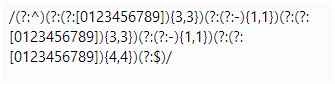
That isn't very interesting though is it? How about a slight change to allow for optional area codes like these:
555-5555 # Valid
555-555-5555 # Valid
Which would have an expression that looks like:
^(\d{3}-)?\d{3}-\d{4}$
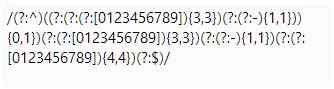
The only changes that are being made from the previous example is that we are grouping our first section using parentheses and indicating that this group can only appear 0 or 1 times (i.e. optional):
(\d{3}-)?
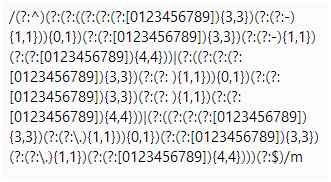
You'll find that the RegExpBuilder allows you to create other RegExpBuilder objects that can be passed in as groups to allow you to easily separate all of the components when dealing with complex expressions through the like() function:
Sonu ChaudharyPosted Feb 25, 2016, 7:14 AM
nice article
Santhakumar MunuswamyPosted Nov 11, 2015, 8:46 AM
Good one
Gowtham KPosted Nov 7, 2015, 10:17 AM
Thanks for sharing
Muhammad Aqib ShehzadPosted Nov 6, 2015, 4:46 AM
fantastic one
Sibeesh VenuPosted Nov 6, 2015, 12:15 AM
Nice Share
Humayun Kabir MamunPosted Nov 5, 2015, 11:32 PM
Nice...
Harshad PansuriyaPosted Nov 5, 2015, 11:30 PM
Nice one