

A regular expression, often abbreviated as regex, is a sequence of characters that forms a search pattern. It is a powerful tool used for pattern matching and manipulating strings of text. Regular expressions are widely used in various programming languages, text editors, and command-line tools. With regular expressions, you can define patterns that describe specific sets of strings. These patterns can be used to search, validate, or transform text data.
A regular expression in C# is represented by the C# Regex class. This article teaches using the Regex class to work with regular expressions in C#. If you are looking for some C# Regex code examples, here is are the top C# Regex Examples (2023).
C# Regex class syntax
The following basic syntax is used for regular expressions,
Quantifiers
The most important quantifiers are *?+.
-
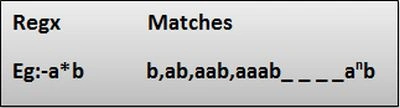
* - Matches the preceding character zero or more times.
Example
-
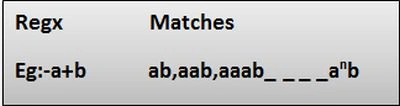
+ - Matches the preceding character 1 or more times.
Example
-
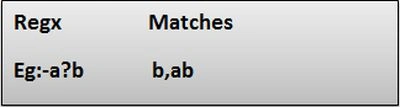
? - Matches the preceding char zero or one time.
Example
Special characters
Many special characters are available for regex building. Here are some of the more usual ones.
-
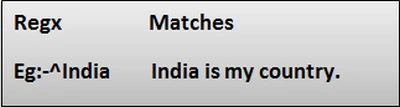
^ - It is used to match the beginning of a string.
Example
-
$ - It is used to match the end of a string.
Example

-
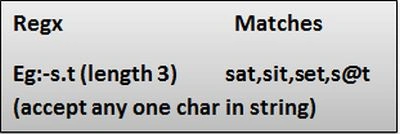
(Dot) - Matches any character only once.
Example
-
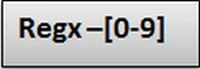
\d - It is used to match a digit character.
Example
-
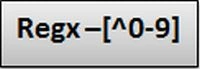
\D - It is used to match any non-digit character.
Example
-
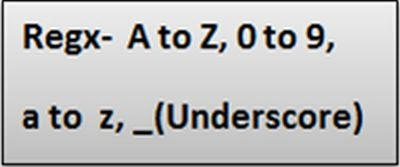
\w - It matches an alphanumeric character plus "_".
Example
-
\W - It is used to match any non-word character.
Example

-
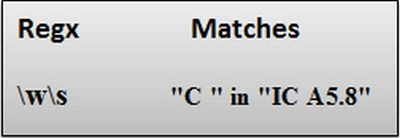
\s - Matches white space characters.
Example
-
\S - Matches a non-whitespace character.
Example

-
\n - Matches a newline character.
Character classes
You can group characters by putting them between square brackets. This way, any character in the class will match one character in the input.
-
[ ] - It is used to match a range of characters.
Example

Grouping and alternatives
It's often necessary to group things with parentheses ( and ).
-
() - It is used to group expressions.
Example
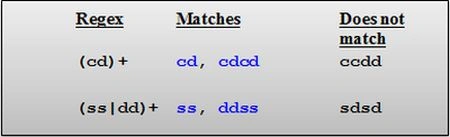
In the preceding image, the | operator is the Or operator that takes any of the alternatives.
-
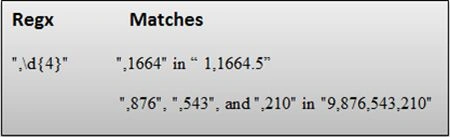
{} - It matches the preceding character a specified number of times.
i) {n} - Matches the previous element exactly n times.
Example
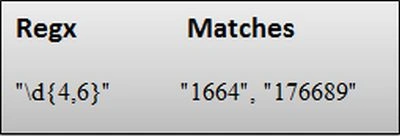
ii) {n,m} - Matches the previous element at least n times, but no more than m times.
Example
Example- Regex for Mobile Number Validation
The following procedure will explain how to create our regular expression for Mobile Number validation in a C# console application.
Step-by-step creation of a Regular Expression
Step 1
Open Visual Studio 2013.
Step 2
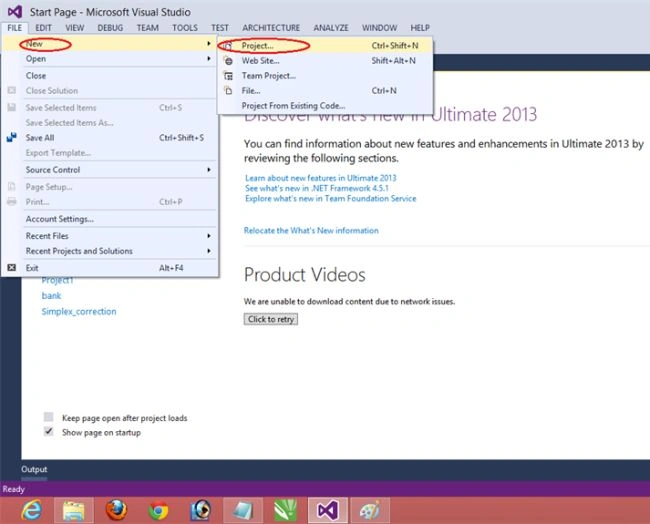
Then click on "File" > "New" > "Project..." ( or press "Ctrl +Shift + N").
Step 3
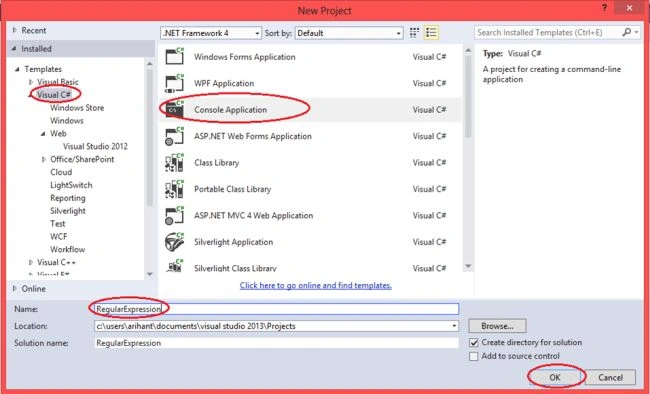
Then select Console Application, provide the application's name, "RegularExpression1," and click OK.
Step 4
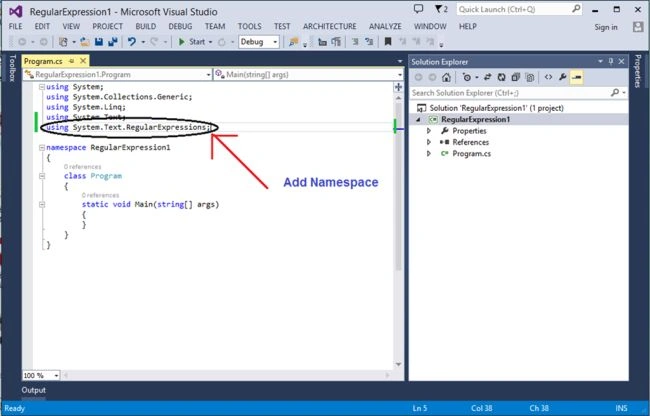
After adding the project "RegularExpression1", you will see the following code in the "Program.cs" file, and for the creation of the regex, add the namespace.
using System.Text.RegularExpressions;
Step 5
Now write the following code in the program.cs file to create the regex.
using System;
using System.Collections.Generic;
using System.Linq;
using System.Text;
using System.Text.RegularExpressions;

namespace RegularExpression1
{
    class Program
    {
        static void Main(string[] args)
        {
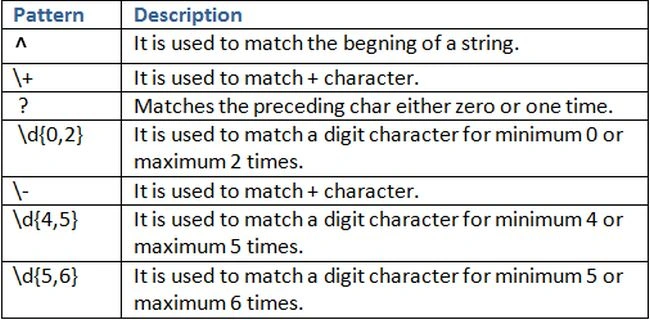
            Regex r = new Regex(@"^\+?\d{0,2}\-?\d{4,5}\-?\d{5,6}");
            //class Regex Repesents an immutable regular expression.

            string[] str = { "+91-9678967101", "9678967101", "+91-9678-967101", "+91-96789-67101", "+919678967101"};
            //Input strings for Match valid mobile number.

            foreach(string s in str)
            {
                Console.WriteLine("{0} {1} a valid mobile number.", s,
                    r.IsMatch(s) ? "is":"is not");
            //The IsMatch method is used to validate a string or
           //to ensure that a string conforms to a particular pattern.
            }
        }
    }
}
Step 6
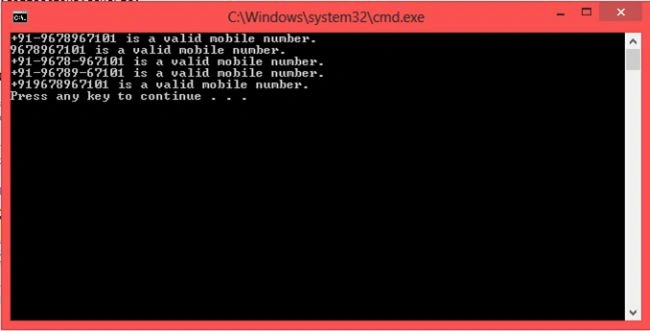
After writing the code, build the program, then run it and get the following output,
Explanation of Regular Expression Pattern
It is one way to create a Mobile Number validation RegularExpression.

Conclusion
It is all about how to create the RegularExpression in C#. Learn more here C# Regex Examples (2023).
Sumit SharmaPosted Apr 12, 2020, 1:46 AM
Nice try. but a couple of comments. 1. You no need to use ^ flag here. Without this, even this expression will work as expected. In the definition of ^ flag, you can rephrase "Matches the beginning of the string, or the beginning of a line if the multiline flag (m) is enabled. This matches a position, not a character." 2. To Improve this expression you can use "Alternation Metacharacter |". 3. You can add "0" case as well, So the user will be able to write the mobile number with prefix 0 which's a valid scenario as well. 4. In the definition of \- you mistyped '+' instead '-'. Keep it up.
Monishan RPosted Apr 5, 2020, 10:36 PM
Nice simple one to understand. Thank you
arun rajPosted Sep 18, 2018, 7:22 AM
It's Good explained one. Here small correction fifth section (\-) wrongly mentioned for description please update it.
Raja ZubairPosted Mar 3, 2018, 12:00 PM
Hello i am from pakistan .its really helpful.you explained very well.thanks
mohamed rayesPosted Oct 8, 2016, 8:42 AM
Its help me how to use and understand ReEx thanks
Kashif SohailPosted Mar 13, 2016, 1:02 PM
its help me to understand RE in C#, i learnt it before in Automata but never implemented it
Sr KarthigaPosted Mar 8, 2016, 11:21 AM
good one
Sr KarthigaPosted Mar 8, 2016, 11:20 AM
nice explanation
Shaili DashoraPosted Nov 11, 2014, 11:30 AM
Thanks to all....
Max AlbishPosted Nov 6, 2014, 4:54 PM
thanks a lot very useful !
Anupam SinghPosted Nov 2, 2014, 9:48 AM
a good work done with simple examples and steps.keep it up
Gaurav Kumar AroraPosted Nov 2, 2014, 1:22 AM
Good stuff. Keepo it up
Sourabh SomaniPosted Nov 1, 2014, 12:35 PM
Shaili Dashora :) gr8 keep it up