

This article shows how to remove duplicate records from a SQL Server table.
For the example of this article I have the following SQL Server table in my database.
Image 1.
The following is the script of my table:
- CREATE TABLE [dbo].[Employee](
- [Emp_ID] [int] IDENTITY(1,1) NOT NULL,
- [Name] [varchar](50) NULL,
- [Email] [varchar](500) NULL,
- [Designation] [varchar](50) NULL,
- [City] [varchar](50) NULL,
- [State] [varchar](50) NULL,
- [Country] [varchar](50) NULL
- ) ON [PRIMARY]
- GO
The following are some records in my table: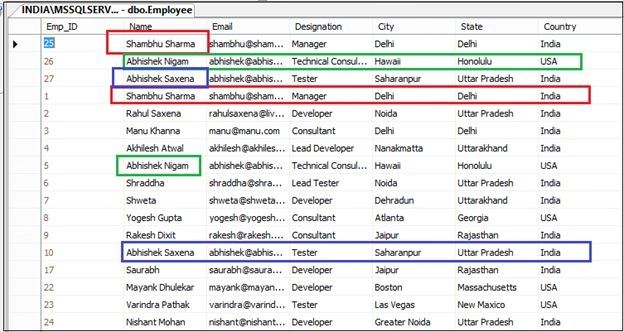
Image 2.
Here you can see I have some duplicate records in this table.
Now the challenge is, how to remove these duplicate records using a SQL statement.
So use the following statements:
- WITH CTE AS(
- SELECT ROW_NUMBER() OVER(PARTITION BY NAME ORDER BY NAME) AS ROWNO,
- NAME,Emp_ID, Designation, Email FROM Employee
- )
- SELECT * FROM CTE WHERE ROWNO > 1
The preceding statement returns all the duplicate records with a number of occurrences:
Image 3.
Now use the following statements to remove duplicate records.
- WITH CTE AS(
- SELECT ROW_NUMBER() OVER(PARTITION BY NAME ORDER BY NAME) AS ROWNO,
- NAME,Emp_ID, Designation, Email FROM Employee
- )
- DELETE FROM CTE WHERE ROWNO > 1
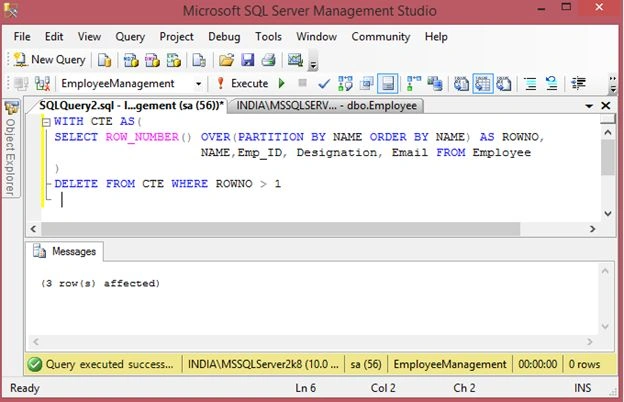
Image 4.
Now select records from your table.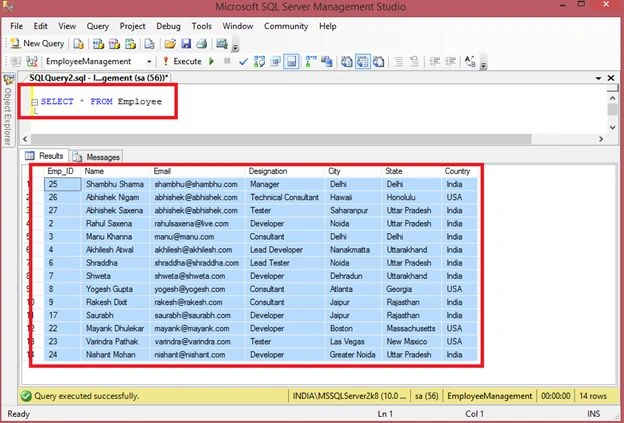
Image 5.
Benoit ArchambaultPosted Feb 28, 2015, 4:43 PM
It would be great if you explained how the SQL request actually works.
Rizwan FancyPosted Feb 27, 2015, 12:53 PM
select count(*) as counts , name from citytable group by name having count(*) > 1
Nadim PatwegarPosted Feb 26, 2015, 12:23 PM
nice but one dout.suppose shambhu sharma having Emp_Id 25 and 1 and both Emp_Id used in other table and we use this query it will result in data loss
Pankaj Kumar ChoudharyPosted Feb 26, 2015, 11:23 AM
Sir I also use a another method for delete duplicate data from tableWhich is " delete Row1 from Employee_Table Row1, Employee_Table Row2 where Row1.Name = Row2.Name and Row1.Email = Row2.Email and Row1.Designation = Row2.Designation and Row1.City = Row2.City and Row1.[State] = Row2.[State] and Row1.Country = Row2.Country and Row1.Emp_ID > Row2.Emp_ID " It is method for your table Now my question is that Which method is best of the behalf of Complexity(Time Consuming) Because i can't calculate complexity of your Method. Please Refer me best method which should i use for future Query.. Sorry for english
Rahul Kumar SaxenaPosted Feb 26, 2015, 11:22 AM
Thanks a lot Pankaj Kumar Choudhary...
Rahul Kumar SaxenaPosted Feb 26, 2015, 11:21 AM
Thanks Khargesh Rajput...
Pankaj Kumar ChoudharyPosted Feb 26, 2015, 11:13 AM
Very Nice Article Really very helpfull for Me.
Khargesh RajputPosted Feb 26, 2015, 10:17 AM
Nice
Rahul Kumar SaxenaPosted Feb 26, 2015, 8:54 AM
Thanks Manish Kumar Choudhary...
Rahul Kumar SaxenaPosted Feb 26, 2015, 8:54 AM
Thanks Nitin Tyagi...
Rahul Kumar SaxenaPosted Feb 26, 2015, 8:54 AM
Thanks Harpreet Singh...
Manish Kumar ChoudharyPosted Feb 26, 2015, 8:30 AM
Nice one.
NitinPosted Feb 26, 2015, 8:04 AM
Nice article. Very useful information.
Harpreet SinghPosted Feb 26, 2015, 7:55 AM
Will give it a try...Thanks for sharing