

It's always nice when you can just either install something or flip a switch and experience dramatic improvements within your application performance. This article covers one of those switches that you might be interested in flipping, the App Suspend feature, which is available in .NET 4.5.1 on Windows Server 2012 R2.
The newest iteration of the .NET Framework (4.5.1) has introduced all kinds of nifty features, one of which is the App Suspend feature, which can not only make your ASP.NET sites and web applications much more responsive, but it also enables you to host more sites on a single server without compromising performance.
This post will explain a bit of how the App Suspend feature works, how to implement it within your application and the kind of benefits that you should be able to expect from using it.
What is App Suspend? How does it work?
As mentioned, App Suspend was introduced within .NET 4.5.1 and is actually built on another fairly new .NET feature called the IIS Idle Worker Process Page-Out, which might sound like a mouthful, but is incredibly useful.
The IIS Idle Worker Process Page-Out option was introduced in IIS 8.5 and it allows IIS to suspend applications that may become idle rather than terminating them. This suspension will enable these applications to be very quickly restarted when requested as opposed to if they were terminated, which would require the server to spin up and essentially experience a cold start.
So when an application becomes idle, if the IIS Idle Worker Process Page-Out function is enabled, the application will remain active and will be paged out to disk rather than terminated and when it is requested in the future, the process will be re-activated and immediately available for use.
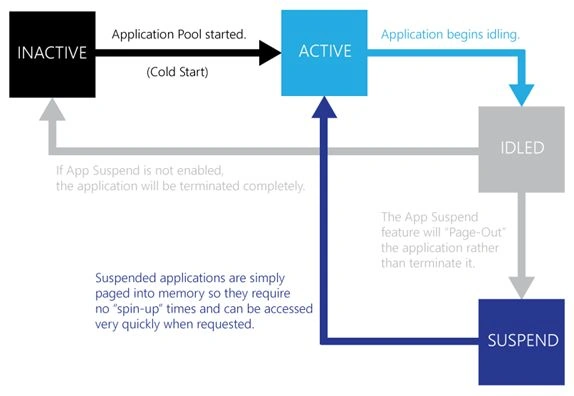
You can see a very basic breakdown of how the App Suspend feature differs from the traditional idle time out operations.
The introduction of this feature will allow the presence of three different states of sites or applications within your server to be running:
- Inactive Sites: Sites that are completely inactive. They are not loaded into memory currently and will need to be spun-up when requested. This is the default state that a site will be in prior to being accessed.
- Active Sites: Sites that are currently running, being accessed and that have not idled out. They are actively using system resources such as memory and CPU cycles.
- Suspended Sites: Sites that may have been previously running and have been paged-out into memory and suspended through App Suspend and are awaiting to be re-animated. Suspended sites receive far less CPU cycles and system memory, which can be allocated to other active sites that need it.



Bhavik PatelPosted Dec 26, 2015, 11:11 PM
useful info
Anish AnsariPosted Nov 16, 2015, 12:39 AM
Nice
Harshad PansuriyaPosted Nov 13, 2015, 11:00 PM
NIce one
Banketeshvar NarayanPosted Nov 13, 2015, 4:48 PM
Nice Article... Thanks Rion
Santhakumar MunuswamyPosted Nov 13, 2015, 10:14 AM
Good one
Dhanik SahniPosted Nov 13, 2015, 1:41 AM
very good article. Thanks Rion.
Anish AnsariPosted Nov 12, 2015, 8:38 AM
Nice one
Sibeesh VenuPosted Nov 12, 2015, 4:03 AM
Nice Share
Manas MohapatraPosted Nov 12, 2015, 1:45 AM
Informative one
Humayun Kabir MamunPosted Nov 12, 2015, 12:49 AM
Nice...