

The Repeater control is one of the Data Controls available in the ASP.Net Data Section of the Toolbox for displaying records in the front end. Now you may be wondering, since we have GridView, DataGrid and ListView controls in ASP.Net, why do we need a repeater control? Well let's consider a scenario where you are asked to create software to print tickets of any movie or a bill in a shopping mall. When you look at a ticket you can see that the header and footer section of all tickets that are printed (movie or any shopping mall bills) are nearly the same except with some change of values. And the middle of all tickets or bills vary depending on the seat being booked or the number of items being purchased in the shopping mall. For such type of scenarios we can use a Repeater control where we have to display a number of items repeated but with the same header and footer.
A Repeater control is a control that will not by default render itself like that of a GridView control (we normally call it an unformatted control that basically does not have any predefined layout), we explicitly have to define the layout of how the data has to be displayed to use a repeater control. That means we can customize the look and feel of how the data has to be displayed on the front end. It generally uses various templates for specifying the look of the control. The various types of templates are the same as for a GridView, DataGrid or ListView control in ASP.Net. Templates (such as HeaderTemplate, ItemTemplate, SeparatorTemplate, AlternatingItemTemplate, FooterTemplate) make up the repeater control.
How the Repeater Control works
The Repeater control, when bound to a datasource, will loop through all the records of the datasource and then generate the itemtemplate for that respective datasource record resulting in a new row being rendered. You can also perform some calculations when performing this looping by making use of the ItemBound Event of the Repeater Control.
How to Define the Layout Of a Repeater Control
The following describes how to define the layout of a Repeater Control:
- Well for defining layout, as we discussed earlier, we must use a Template that is provided by this control.
- We can define the layout as we choose by use of the HeaderTemplate for the header row of the control, then moving toward for displaying data we must use an itemtemplate or alternatingitemtemplate and
- In case we want any separation between two records we can always use a SeparaterTemplate.
- Finally we have to close the container tag in the footerTemplate that was opened in the headertemplate.
Out of the preceding template, HeaderTemplate and FooterTemplate are the template that will only be rendered once. And for every row every ItemTemplate, AlternatingItemTemplate and SeparatorTemplate will be rendered repeatedly.
Let us look at the following design source code for this:
- <%@ Page Language="C#" AutoEventWireup="true" CodeFile="Default.aspx.cs" Inherits="_Default" %>
- <!DOCTYPE html PUBLIC "-//W3C//DTD XHTML 1.0 Transitional//EN" "http://www.w3.org/TR/xhtml1/DTD/xhtml1-transitional.dtd">
- <html xmlns="http://www.w3.org/1999/xhtml">
- <head runat="server">
- <title></title>
- <style type="text/css">
- #even td
- {
- background-color: #9EEEF2;
- }
- tr, th
- {
- border: solid 1px lime;
- }
- #odd td
- {
- background-color: #066D7A;
- }
- </style>
- </head>
- <body>
- <form id="form1" runat="server">
- <div>
- <asp:Repeater ID="Repeater1" runat="server" OnItemDataBound="Repeater1_ItemDataBound">
- <HeaderTemplate>
- <table style="background-color: White; font-family: Verdana; font-size: small;">
- <tr style="background-color: #0D2D37; color: White;">
- <th>
- ID
- </th>
- <th>
- Name
- </th>
- <th>
- Address
- </th>
- <th>
- Department
- </th>
- <th>
- Salary
- </th>
- </tr>
- </HeaderTemplate>
- <ItemTemplate>
- <tr id="even">
- <td>
- <asp:Label ID="lblID" runat="server" Text='<%#Bind("ID") %>'></asp:Label>
- </td>
- <td>
- <asp:Label ID="Label1" runat="server" Text='<%#Bind("Name") %>'></asp:Label>
- </td>
- <td>
- <asp:Label ID="Label2" runat="server" Text='<%#Bind("Address") %>'></asp:Label>
- </td>
- <td>
- <asp:Label ID="Label3" runat="server" Text='<%#Bind("Department") %>'></asp:Label>
- </td>
- <td>
- <asp:Label ID="Label4" runat="server" Text='<%#Bind("Salary") %>'></asp:Label>
- </td>
- </tr>
- </ItemTemplate>
- <AlternatingItemTemplate>
- <tr id="odd">
- <td>
- <asp:Label ID="lblID" runat="server" Text='<%#Bind("ID") %>'></asp:Label>
- </td>
- <td>
- <asp:Label ID="Label1" runat="server" Text='<%#Bind("Name") %>'></asp:Label>
- </td>
- <td>
- <asp:Label ID="Label2" runat="server" Text='<%#Bind("Address") %>'></asp:Label>
- </td>
- <td>
- <asp:Label ID="Label3" runat="server" Text='<%#Bind("Department") %>'></asp:Label>
- </td>
- <td>
- <asp:Label ID="Label4" runat="server" Text='<%#Bind("Salary") %>'></asp:Label>
- </td>
- </tr>
- </AlternatingItemTemplate>
- <FooterTemplate>
- </table>
- </FooterTemplate>
- </asp:Repeater>
- </div>
- </form>
- </body>
- </html>
The above code will render our data as in the following: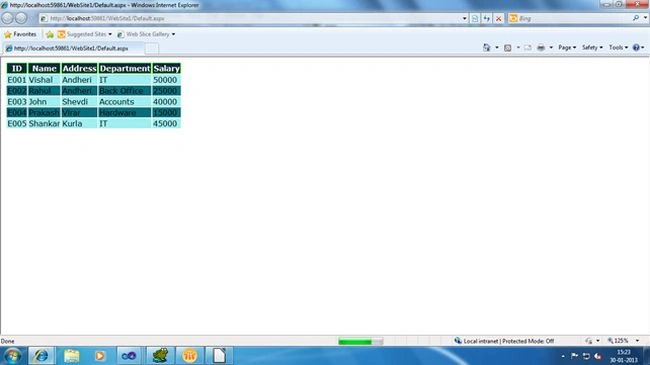
In our example we perform some JavaScript functionality that basically tells us in an alert box about the data. For any of you not getting my point, this can best be understood by looking at the following diagram: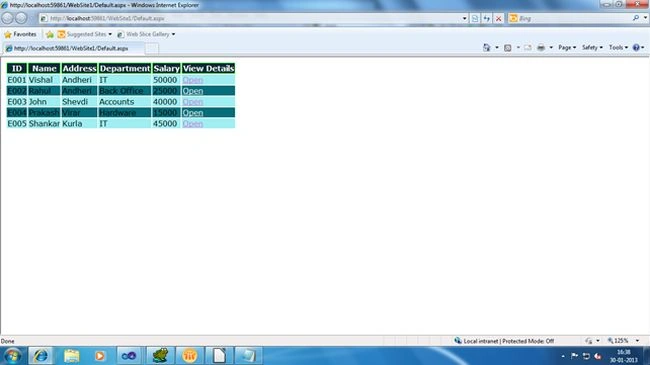
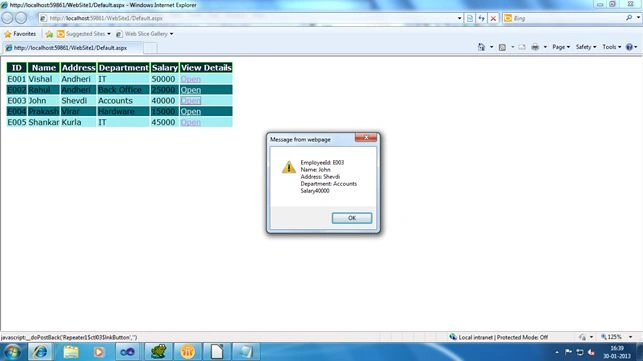
Here is the source code for it:
- using System;
- using System.Collections.Generic;
- using System.Linq;
- using System.Web;
- using System.Web.UI;
- using System.Web.UI.WebControls;
- using System.Data;
- using System.Web.UI.HtmlControls;
- public partial class _Default : System.Web.UI.Page
- {
- protected void Page_Load(object sender, EventArgs e)
- {
- if (!IsPostBack)
- {
- Repeater1.DataSource = LoadFile();
- Repeater1.DataBind();
- }
- }
- private DataTable LoadFile()
- {
- string filepath = Server.MapPath("~/EmpX.xml");
- DataSet ds = new DataSet();
- ds.ReadXml(filepath);
- DataColumn dc = new DataColumn("ViewDetails", typeof(string));
- dc.DefaultValue = "Open";
- ds.Tables[0].Columns.Add(dc);
- if (ds.Tables[0].Rows.Count > 0)
- {
- DataTable dt = ds.Tables[0];
- return dt;
- }
- else
- return null;
- }
- protected void Repeater1_ItemDataBound(object sender, RepeaterItemEventArgs e)
- {
- if (e.Item.ItemType == ListItemType.Item)
- {
- LinkButton btn = (LinkButton)e.Item.FindControl("lnkButton");
- btn.ForeColor = System.Drawing.Color.Orchid;
- btn.OnClientClick = "javascript:return displayAlert('" + (e.Item.ItemIndex + 1) + "');";
- }
- else if (e.Item.ItemType == ListItemType.AlternatingItem)
- {
- LinkButton btn = (LinkButton)e.Item.FindControl("lnkButton");
- btn.ForeColor = System.Drawing.Color.White;
- btn.OnClientClick = "javascript:return displayAlert('" + (e.Item.ItemIndex + 1) + "');";
- }
- }
- }
Here we are just displaying the records as it is through JavaScript, but you can perform many more things such as deleting the appropriate record when the linkbutton is clicked, or redirecting the user to the specific page and many more things.
Hope you may find this article interesting and it may help you in your project.
Santhakumar MunuswamyPosted Dec 30, 2015, 3:15 PM
ok Thank you
Santhakumar MunuswamyPosted Dec 29, 2015, 10:48 AM
Thanks for nice article. I have small suggestion if you added advantage / disadvantage of repeater control mean it will understand the beginner in which data control is used in the best performance as well.
Sibeesh VenuPosted Dec 29, 2015, 6:48 AM
Nice Share
Ankur MistryPosted Dec 29, 2015, 4:34 AM
Nice share.