

Introduction
Windows 10 comes up with new features such as UI, Cortana, Microsoft Edge, and personalized UI icons. All these features are very well compatible with our PC, but still, some features are not so satisfied with our need, many people are having some issues regarding windows 10 start menu. Windows 10 Start Menu is similar to that of Windows 8 but comes up with Cortana and nice UI.
While working with windows 10 from the last 1 month I experienced the start menu is not giving me the same accuracy as windows 8 start menu gave. When I want to search for something from windows, I go to the Start Menu and search there, but it takes a lot of time to search and it does not give me the exact result of my search. However, I found many other ways to improve and customize the start menu.
Customize your Start Menu
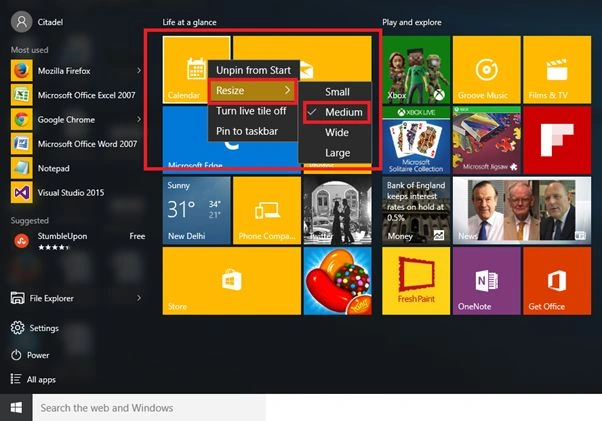
- Resize your Tile to Small or Medium.
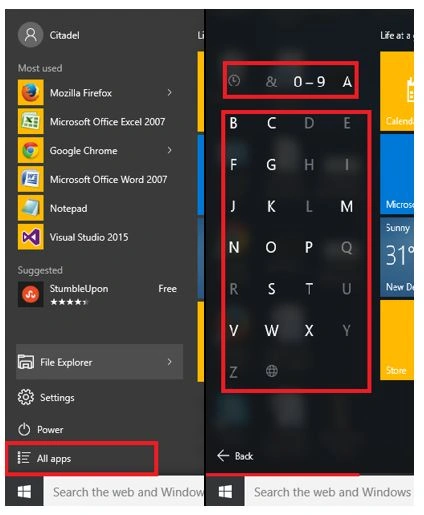
- Change your All apps listings from numeric to alphabetic [0-9 to A-B].
- Personalize Settings of Windows Start Menu.Go to PC Settings - Personalize, then click Start.

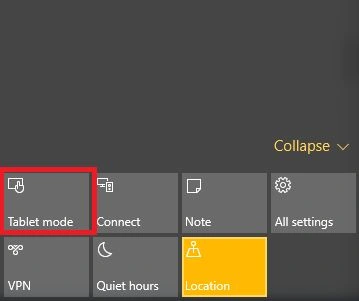
- Use Tablet ModeGo to Notification bar - Action Centre, then Tablet Mode. In tablet mode, you will see your start menu works fast in comparison with normal mode. It will hide your taskbar icons so you don't have to make the following settings: "Auto Hide Taskbar”.
 Tablet Mode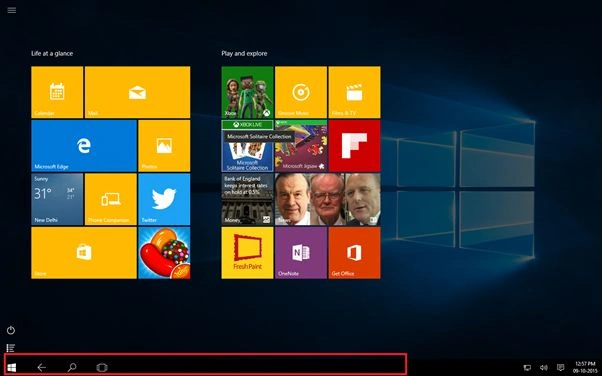
- Classic Shell [Third Party tool].If you want to change your Windows 10 start menu, this tool works perfectly in windows 10. Classic Shell is having a similar start menu as we saw in Windows 7. So to get back windows 7 awesome start menu, you can download it from the following link.
Download Classic Shell
Install it and run it on your PC, it is so reliable that you can use both the start menus at the same time. Try it and share your experience with everyone.
 Hope you liked it. Thank you for reading. Have a good day.
Classic Shell
Summary
In this article, we learned about replace the Windows 10 Start Menu With Classic Shell Start Menu.
Arul RPosted Oct 28, 2015, 5:30 AM
Good one !!!
Santhakumar MunuswamyPosted Oct 18, 2015, 4:44 AM
Good one
Priyaranjan K SPosted Oct 14, 2015, 11:32 AM
Classic is the best :)
RakeshPosted Oct 10, 2015, 2:19 AM
Good information share
Abhishek JaiswalPosted Oct 9, 2015, 10:38 AM
Nice read! :)
Mukesh KumarPosted Oct 9, 2015, 10:07 AM
Nice one sir
Vinodh NarayananPosted Oct 9, 2015, 7:27 AM
nice share
Anony mousPosted Oct 9, 2015, 7:14 AM
Classic Shell is a better option in my opinion. Fast, customizable and full-featured.
Harshad PansuriyaPosted Oct 9, 2015, 6:53 AM
Nice one