

Procedure to reset user password
Use the following listed procedure to reset the user password in a Microsoft Online portal.
Step 1: Open the “Microsoft Online Portal” (Admin Center) in your browser,
URL: microsoftonline
Provide the username and password to login the portal, then you will be navigated to the online portal (Admin Center) as shown below.
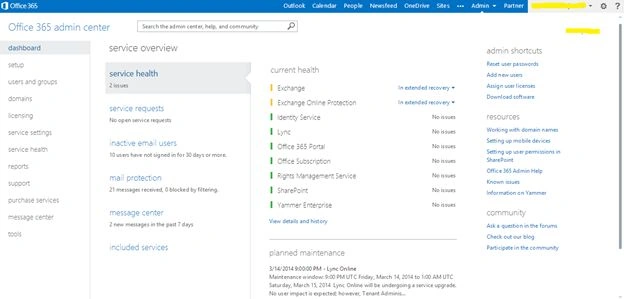
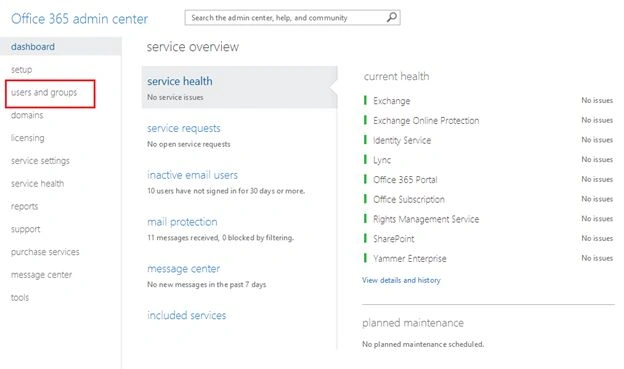
Step 2: On the admin center page select the “Users and Groups” option as shown below:
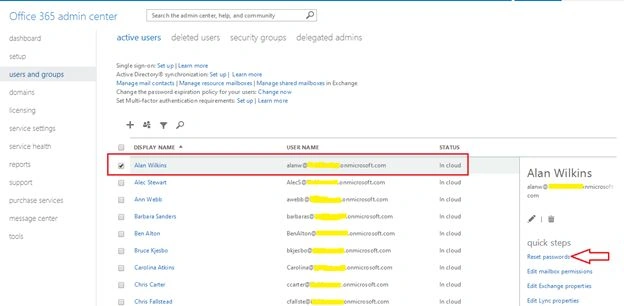
Step 3: Then select a user from the list as shown below and click on the reset password to change the password.
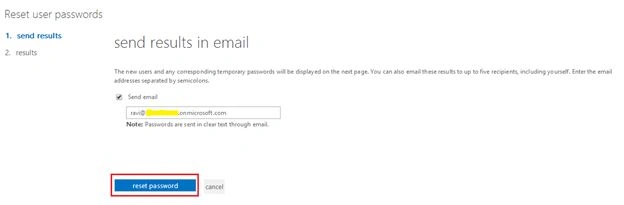
Step 4: When you click on the Reset Passwords, you will be navigated to send the results in an email page, there you can select whether you need to receive a password in mail or not. Then click on the reset password button for confirmation.
Step 5: After you click the reset password, you will be navigated to the Result page, there the new password will be updated for the selected user. Then click finish as shown below.
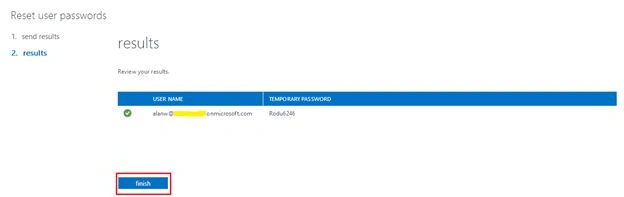
Finally the password will be updated successfully for the selected user.
Summary
In this article we explored how to reset a password for a selected user in Microsoft Online.
Kaviya BalasubramanianPosted Mar 18, 2014, 6:36 AM
Thanks Lakshmanan.. will change the section.
Lakshmanan Sethu SankaranarayanPosted Mar 18, 2014, 6:34 AM
Nice Article. Kindly change the section to SharePoint 2013 :)