


Problem Statement
With the upcoming deprecation of platform-enabled disaster recovery for Azure App Service web apps on March 31, 2025, it is crucial to implement a robust Disaster Recovery (DR) strategy to maintain application availability and minimize downtime for Azure-hosted applications.
Introduction
By leveraging Azure Front Door with a multi-region deployment, traffic routing strategies, health probes, and automatic failover, organizations can minimize downtime and enhance resilience against outages. This article provides the disaster recovery plan for the App services hosted in Azure that can be implemented after the deprecation of platform-enabled disaster recovery for Azure App Services.
There are different ways of handling this however in this article, we will focus on Azure Front Door.
Solution: Disaster Recovery with Azure Front Door
Solution diagram
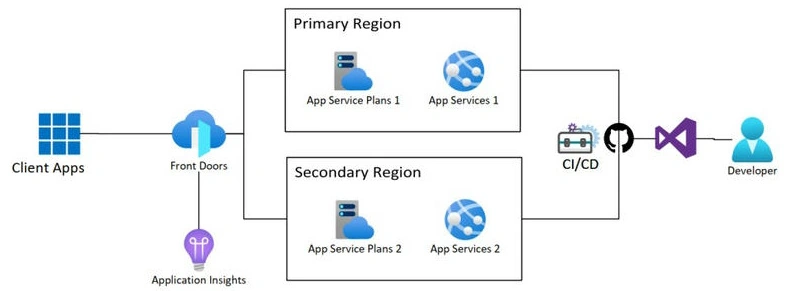
We can use Azure Front Door, which is a global load-balancing service that provides high availability and resilience across multiple regions. Primary & Secondary Regions: We can deploy the Web app in two separate Azure regions. The primary region serves live traffic, while the secondary region remains on standby or serves in an active-active setup. Azure Front Door acts as a global entry point, directing user traffic to the healthiest endpoint based on performance, availability, and geographic proximity. Automatic Failover: If the primary region experiences an outage, Azure Front Door automatically reroutes requests to the secondary region, ensuring uninterrupted access to the application.
The configuration for this is shown later in this solution document. Custom Health Probes: AFD periodically checks the health of applications and triggers failovers when necessary. Additional improvement: We should publish the solution (latest production version) for both app services in both regions. We can automate the deployment easily using CI/CD with GitHub repositories. Note: Primary and secondary should be in different regions. Azure Front Door routes traffic between Primary & Secondary Regions
Steps to Implementing DR with Azure Front Door
Step 1. Deploy the Application in Two Regions.
- Deploy the application in Region A (e.g., East US).
- Deploy a secondary instance in Region B (e.g., West US).
- Ensure that both App Services have the same configurations.
Step 2. Configure Azure Front Door.
- Go to the Azure Portal → Create a resource → Search for Azure Front Door → Click Create.
- Choose Subscription and Resource Group.
- Under Front Door Manager, click + Add a Front Door.
- Configure Frontend Hostname (e.g., api.rijsat.com).
Step 3. Add Backend Pools.
- Under Backend Pools, click + Add a Backend Pool.
- Name it Backend Pool and add the App Services:
- Primary: api-rijsat-web1.azurewebsites.net
- Secondary: api-rijsat-web2.azurewebsites.net
- Set Priority-Based Routing (Primary as 1, Secondary as 2) for failover.
Step 4. Set Routing Rules.
- Click Routing Rules → + Add a Rule.
- Configure
- Route Name: API-RIJSAT-Routing
- Frontend: api.rijsat-web.com
- Backend Pool: BackendPool
- Forwarding Protocol: HTTPS
- Save the configuration.
Step 5. Enable Health Probes.
Front Door will automatically detect failures and route traffic to the healthy instance.
Step 6. Test Failover.
Stop the Primary App Service and verify that traffic is routed to the Secondary App Service.
Conclusion
As the platform-enabled disaster recovery for Azure App Service web apps approaches deprecation on March 31, 2025, implementing a robust disaster recovery strategy is essential to ensure application availability and business continuity. Azure Front Door serves as a powerful solution for achieving high availability, global load balancing, and seamless failover between regions. A well-designed disaster recovery strategy not only mitigates risks but also ensures a seamless user experience, even in the face of unexpected failures. As cloud environments continue to evolve, staying proactive in DR planning will help businesses maintain reliability and performance in their Azure-hosted applications. Overall, this article has provided insight and solutions for Azure disaster recovery with the proper implementation of step by step guide for the Azure front door.
Shem OtienoPosted Feb 27, 2025, 9:02 AM
Azure Front Door is a powerful tool for ensuring resilient disaster recovery for Azure Web Apps. Here are some key points to consider: 1. Global Load Balancing Azure Front Door provides global load balancing, which helps distribute traffic across multiple regions. This ensures that if one region goes down, traffic can be redirected to another region, maintaining high availability. 2. Multi-Region Deployment Deploying your web app in multiple Azure regions is crucial for disaster recovery. Azure Front Door can route traffic to the nearest available region, ensuring minimal downtime and improved performance. 3. Health Probes Azure Front Door uses health probes to monitor the availability of your web app endpoints. If an endpoint becomes unavailable, Front Door automatically routes traffic to the next available endpoint. 4. Custom Domain and SSL You can configure custom domains and SSL certificates with Azure Front Door, ensuring secure and seamless access to your web app even during a disaster. 5. Caching and Acceleration Azure Front Door offers caching and acceleration features, which can improve the performance of your web app by caching content at edge locations. This reduces latency and ensures a better user experience. 6. Security Features Azure Front Door includes built-in security features such as Web Application Firewall (WAF) and DDoS protection. These features help protect your web app from malicious attacks and ensure its availability during a disaster. By leveraging Azure Front Door, you can create a resilient disaster recovery strategy for your Azure Web Apps, ensuring high availability, performance, and security.